What is Penseum?
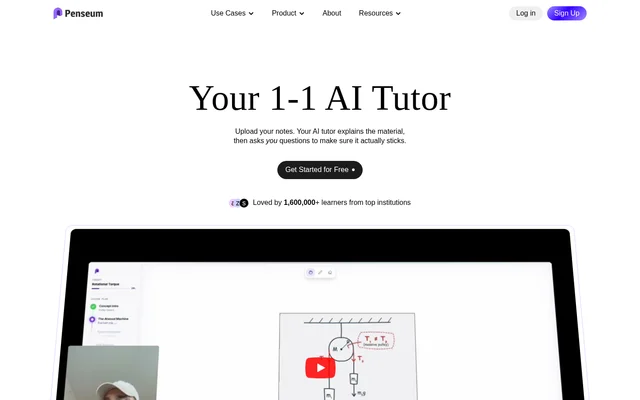
Penseum is a web-based AI tutor for students who want help understanding a problem or reviewing course material. Penseum can respond to work shown on screen with a spoken explanation and draw the steps on a shared canvas. Students can also upload notes or slides to create materials for independent review, such as flashcards, quizzes, and study guides.
What Penseum can do
Penseum combines live tutoring with study tools generated from course materials. During a walkthrough, the canvas shows the diagrams, equations, or annotations that go with the spoken explanation. When a student attempts a solution, Penseum can respond to the work shown rather than just the wording of the original question.
- Penseum explains problems aloud in real time.
- Penseum draws diagrams and works through equations on the canvas.
- Penseum marks where a student's solution went wrong.
- Penseum tracks what a student has mastered and what still needs work.
- Penseum generates study guides, quizzes, and flashcards from uploaded materials.
How Penseum works
Penseum starts with an account and a personal workspace. Students can type a question, upload a problem set, or write directly on the canvas. After a spoken walkthrough, students can try the problem on their own and show their steps. Penseum can then mark a mistake on screen, explain what to fix, and let the student try again.
Penseum accepts study materials such as PDFs, lecture notes, and slides. When materials are uploaded in a supported language, Penseum can generate study resources in that same language. The web tool is mobile-friendly, and students can access it from a device with an internet connection.
Who Penseum is for
Penseum is for students studying subjects such as math, chemistry, biology, medicine, economics, and social sciences. The tutoring canvas is useful when students need to show their reasoning, as with an equation or a chemistry problem. Summaries, flashcards, and practice questions suit tasks such as reviewing lecture concepts or preparing for an exam.
- Work through equations and practice applying theorems in math.
- Review chemistry formulas and reactions with step-by-step solutions.
- Study biology or medical concepts with generated flashcards.
- Prepare for economics exams with unit summaries and practice exams.
Penseum pricing and plans
Penseum is free to use and also offers a premium subscription. The website provides a free sign-up option for students who want to create a workspace. The page does not list a price for the premium subscription or explain which features or usage limits differ between free and premium access.
Penseum strengths and limitations
Penseum gives students a way to see exactly where a solution went wrong while hearing an explanation of what to change. That feedback complements the separate tools for making study resources from course materials. For generated resources, Penseum recommends checking that the output meets the student's needs before using it to study.
- Penseum recommends reviewing generated study materials.
- Penseum requires an internet connection for web access.
- Penseum does not list premium pricing or plan details on the page.
Penseum FAQ
What is Penseum?
Penseum is a web-based AI tutor and study tool for students. Penseum explains problems aloud in real time, draws solutions on a canvas, and marks mistakes in work shown on screen. It also generates study guides, flashcards, and quizzes from uploaded course materials.
Is Penseum free?
Penseum is free to use and also offers a premium subscription. Students can sign up for a free account on the website. The page does not list the premium subscription price or specify what the subscription includes.
Can Penseum check my math work?
Penseum can check math work written on its canvas. Students can show their solution step by step, and Penseum can mark where an error occurred and explain what to fix. Penseum can also work through equations and draw diagrams during a spoken walkthrough.
What files can I upload to Penseum?
Penseum accepts study materials including PDFs, lecture notes, slides, and problem sets. Penseum can use uploaded material to generate study guides, flashcards, and quizzes. Students can also type a question or write directly on the canvas instead of uploading a file.
Does Penseum support languages other than English?
Penseum supports over 20 languages, including Dutch, French, Hindi, Italian, German, Portuguese, Russian, Turkish, and Mandarin. Students can upload materials in a supported language, and Penseum can generate learning resources in that same language.
From the community
No reviews yet
Be the first to review this tool. What you write helps the next person choose.