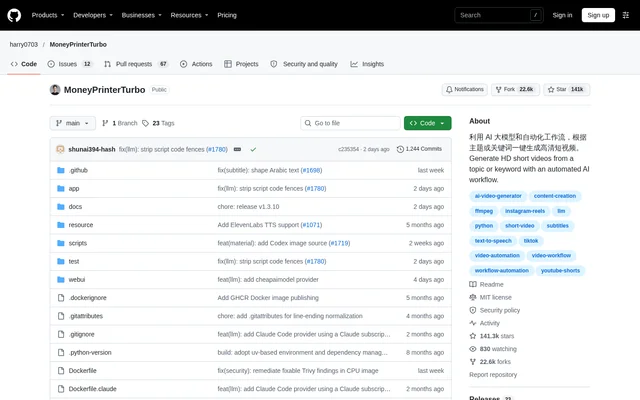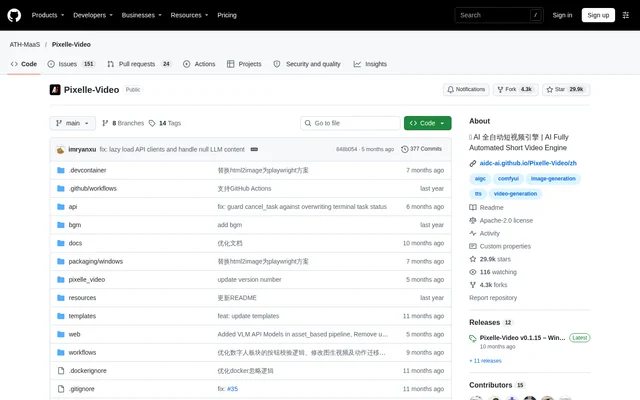
What is Pixelle-Video?
Pixelle-Video is an open-source AI short video engine that converts a topic into a finished video with narration, generated visuals and optional background music. Pixelle-Video is intended for people who want to create videos without editing experience, while also supporting users who need control over scripts, models, speech engines and presentation styles.
Pixelle-Video combines script generation, visual planning, frame processing and video composition in a modular workflow. The repository includes examples covering travel, history, science, personal growth and fiction narration. Those examples demonstrate both portrait and landscape output, alongside extensions for digital presenters, image-to-video generation and motion transfer.
What Pixelle-Video can do
Pixelle-Video automates the main production stages while exposing settings for the underlying media and language models. Users can generate content from a topic or supply a finished script instead. Visual templates determine the layout, while separate workflows handle image generation, video clips and speech synthesis.
- Pixelle-Video writes narration scripts from a supplied topic.
- Pixelle-Video generates illustrations or dynamic video content.
- Pixelle-Video synthesizes narration through Edge-TTS, Index-TTS and other speech workflows.
- Pixelle-Video adds built-in or custom background music.
- Pixelle-Video supports reference audio for compatible voice-cloning workflows.
- Pixelle-Video accepts uploaded photos and videos for AI-assisted script creation.
- Pixelle-Video provides digital presenter, image-to-video and motion-transfer modules.
How Pixelle-Video works
Pixelle-Video runs through a web interface with content input, speech and visual settings, and video generation controls. Initial setup includes choosing a language model and configuring the services needed by the selected workflows. Media can come from local ComfyUI, RunningHub or direct provider APIs, including OpenAI, DashScope, Volcengine ARK and Kling.
Pixelle-Video lets users preview speech, background music, image styles and templates before generating the final output. After generation starts, the interface displays progress through scriptwriting, illustration, speech synthesis and composition. Completed videos appear in a preview, and generated video files are saved in the output folder.
Who Pixelle-Video is for
Pixelle-Video serves creators who want automated short video production, people with existing narration scripts and users interested in customizing ComfyUI workflows. The supplied examples cover informational, cultural and storytelling subjects. Users familiar with HTML can create templates, while users familiar with ComfyUI can add their own media and speech workflows.
- Creators can turn topic keywords into narrated short videos.
- Scriptwriters can convert completed narration text into video.
- Educational creators can produce science, knowledge and history explainers.
- Users can build narrated content from their own photos and video clips.
Pixelle-Video pricing and access
Pixelle-Video is released under the Apache 2.0 license and documents a free operating configuration using locally hosted Ollama and ComfyUI. External language models, RunningHub and other cloud media services can introduce costs. The repository distinguishes the free local approach from cloud configurations rather than offering subscription plans for the software itself.
Pixelle-Video is available as source code or as a Windows package containing the required dependencies. Windows users can extract the package and launch start.bat. Source installation is described for macOS, Linux and users needing customization; that route requires uv and ffmpeg before launching the Streamlit web interface.
Pixelle-Video strengths and limitations
Pixelle-Video combines end-to-end video generation with configurable components rather than requiring a single model provider. Local and cloud workflows, direct APIs, reusable templates and fixed-script input give users several ways to build videos. The Windows package reduces dependency installation work, but model configuration and workflow-specific requirements remain part of setup.
- Pixelle-Video requires initial configuration of the selected models and services.
- Pixelle-Video source installation requires uv and ffmpeg.
- Pixelle-Video cloud configurations can incur external service charges.
- Pixelle-Video voice cloning depends on a compatible speech workflow.
- Pixelle-Video requires English text for image style prompt prefixes.
Pixelle-Video FAQ
What is Pixelle-Video?
Pixelle-Video is an open-source AI short video engine that turns a topic into a video by generating narration scripts, images or video clips, synthesized speech and background music. Pixelle-Video also accepts existing scripts and supports customizable models, workflows and visual templates.
Is Pixelle-Video free?
Pixelle-Video is free open-source software released under the Apache 2.0 license. Pixelle-Video documents free local operation using Ollama and locally deployed ComfyUI, while configurations using external model APIs or RunningHub can incur service costs.
How do you install Pixelle-Video?
Pixelle-Video offers a Windows package with dependencies included, launched by extracting the download and running start.bat. Pixelle-Video can also run from source using uv and ffmpeg, with a Streamlit web interface. Initial setup requires configuring the models and services selected for generation.
Which models and services does Pixelle-Video support?
Pixelle-Video supports language models including GPT, Qwen, DeepSeek and Ollama, along with ComfyUI and RunningHub workflows. Pixelle-Video also supports direct image and video services including OpenAI, DashScope, Seedream, Seedance and Kling, plus speech workflows such as Edge-TTS and Index-TTS.
Can Pixelle-Video use an existing script or custom media?
Pixelle-Video accepts fixed narration text so users can skip AI scriptwriting. Pixelle-Video also supports uploaded photos and videos with AI-assisted script generation, custom background music, and reference audio for voice cloning when the selected speech workflow supports that capability.
Do you need video editing experience to use Pixelle-Video?
Pixelle-Video is designed to generate videos without video editing experience by automating scriptwriting, visuals, narration and composition. Pixelle-Video still requires initial model and service configuration, while deeper customization of workflows or templates uses ComfyUI or HTML knowledge.
From the community
No reviews yet
Be the first to review this tool. What you write helps the next person choose.