What is Pixite?
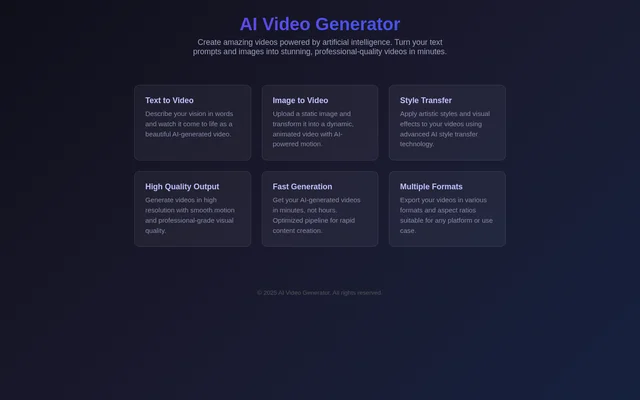
Pixite is an AI video generation tool that creates moving visuals from text descriptions and static images. Pixite supports people who want to express a video concept in words or animate an image they already have. The capabilities described on the page also include artistic style transfer, visual effects, and video export.
Pixite brings these capabilities together around video creation: generating footage from a starting input, applying a visual style, and exporting the result. The page emphasizes high-resolution video, smooth motion, and generation in minutes. These are stated capabilities rather than detailed specifications for particular resolutions, export formats, or generation settings.
What Pixite can do
Pixite supports different starting points for AI video creation, along with options for styling and exporting the resulting footage. Written descriptions provide the input for text-to-video generation, while static images provide the input for AI-powered animation. The page also describes output quality and generation speed as part of the video creation offering.
- Pixite generates AI videos from written descriptions.
- Pixite turns uploaded static images into animated videos.
- Pixite applies artistic styles to videos through AI style transfer.
- Pixite adds visual effects to videos.
- Pixite generates high-resolution videos with smooth motion.
- Pixite produces AI-generated videos in minutes.
- Pixite exports videos in multiple formats and aspect ratios.
How Pixite works
Pixite uses a written description or an uploaded static image as a starting point for video generation. For text-to-video creation, the user describes the intended vision in words. For image-to-video creation, the user uploads an image, and Pixite uses AI-powered motion to transform that static visual into an animated video.
Pixite also provides style transfer for applying artistic styles and visual effects to videos. Export options cover various formats and aspect ratios, allowing the resulting video to suit different presentation requirements. The page describes an optimized generation pipeline intended to deliver videos in minutes rather than hours.
Who Pixite is for
Pixite is for people creating video content from ideas expressed in text or from existing static images. Pixite also serves users who want artistic treatments and visual effects for videos. The export options address video creation for different platforms and use cases through a choice of formats and aspect ratios.
- Pixite can turn a written visual concept into video footage.
- Pixite can add animated motion to a static image.
- Pixite can apply an artistic visual treatment to a video.
- Pixite can export video for different format and aspect-ratio requirements.
Pixite strengths and output capabilities
Pixite combines text-based generation, image animation, and artistic style transfer within its stated video capabilities. Pixite also describes high-resolution output with smooth motion, generation in minutes, and exports in multiple formats and aspect ratios. These capabilities support creating moving content from different inputs and adapting the output to different uses.
Pixite FAQ
What is Pixite?
Pixite is an AI video generation tool that creates videos from written descriptions and static images. Pixite also supports artistic style transfer, visual effects, high-resolution output, and exports in multiple formats and aspect ratios.
Can Pixite turn an image into a video?
Pixite can transform an uploaded static image into an animated video using AI-powered motion. Pixite also offers text-to-video generation, providing a separate way to create videos from a written description.
Does Pixite support video style transfer?
Pixite supports AI style transfer for applying artistic styles and visual effects to videos. Pixite lists this capability alongside text-to-video generation and image-to-video animation as part of its video creation features.
What video export options does Pixite offer?
Pixite exports videos in various formats and aspect ratios for different platforms and use cases. Pixite describes these export options without naming individual file formats, aspect ratios, or destination platforms.
How fast does Pixite generate videos?
Pixite states that AI-generated videos are produced in minutes rather than hours through an optimized pipeline for rapid content creation. Pixite does not give a specific generation time for individual videos.
From the community
No reviews yet
Be the first to review this tool. What you write helps the next person choose.