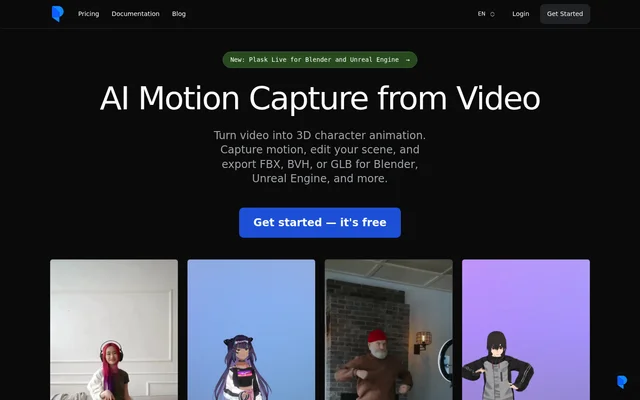
What is Plask Motion?
Plask Motion is a browser-based AI motion capture application that turns video footage into 3D character animation. Plask Motion supports a workflow that moves from uploaded video to extracted body motion, animated characters, scene editing, and rendered or exported results. The tool is relevant to creators producing character performances, dance animations, and motion assets for other animation software.
Plask Motion accepts footage from smartphones and online clips rather than requiring users to begin with an existing animation asset. Plask Motion also supports imported character models, allowing extracted movement to be applied to a chosen character. Finished assets can continue into Blender, Unreal Engine, Maya, or another compatible animation tool.
What Plask Motion can do
Plask Motion combines motion extraction with character and scene controls. Plask Motion includes options for tracking multiple people, starting an animation in a T-pose, and capturing finger movement with the supported extraction version. Scene tools cover lighting, cameras, and post-processing, while export options support both rendered video and assets intended for further animation work.
- Plask Motion extracts body motion from uploaded video.
- Plask Motion tracks multiple people or selects a subject with V2.
- Plask Motion captures finger movements with V1.
- Plask Motion adds physics and automatic blinking to VRM and PMX models.
- Plask Motion provides motion blur, depth-of-field, vignettes, and tone mapping.
- Plask Motion exports FBX, BVH, and GLB assets or video renders.
How Plask Motion works
Plask Motion starts with video upload and motion extraction. Users can preview the extracted animation, import a character, and apply the motion before arranging the scene. Model import is available through the Outliner Import button, the Asset panel, or drag and drop into the Viewport. Supported model formats are GLB, FBX, VRM, and PMX.
Plask Motion allows users to adjust lighting and camera settings before rendering or exporting. For developers, the Plask API supports video motion capture and realtime pose streams through an API key, a credit budget, and processing-progress tracking. Separate Plask Live workflows provide movement recording in Blender and motion reception through Live Link in Unreal Engine.
Who Plask Motion is for
Plask Motion serves creators who need to transfer recorded human movement to animated characters. Plask Motion supports workflows involving imported avatars, MikuMikuDance models, and animation assets destined for other tools. Developers can also use the API to add motion capture to applications, while scene controls support creators who want to produce rendered videos.
- Plask Motion helps character animators apply recorded movement to imported models.
- Plask Motion supports dance animation workflows with VRM and PMX characters.
- Plask Motion creates exportable motion assets for games and other animation software.
- Plask Motion supports developers adding motion capture to applications.
Plask Motion pricing and plans
Plask Motion offers a free Freemium Plan alongside paid Standard and Pro subscriptions. The Standard Plan includes a limited number of credits and faster processing, while the Pro Plan includes more credits and additional benefits. Both paid plans support monthly or annual billing. The supplied page directs users to plan details without stating subscription prices.
Plask Motion uses credits for motion extraction: single-person extraction consumes 1 credit per frame, while multi-person extraction consumes 3 credits per frame. Plask Motion also describes academic pricing through an educational email address. Subscription changes and cancellation are handled through the profile's Subscription and Billing settings.
Plask Motion strengths and limitations
Plask Motion brings video motion capture, character animation, scene controls, and export into the same workflow. Plask Motion supports several model and export formats, including options for Blender, Unreal Engine, and Maya. These capabilities come with import requirements and extraction-version restrictions that matter when preparing character files or choosing tracking options.
- Plask Motion limits uploaded models to 50 MB.
- Plask Motion requires mesh and skinned skeleton data with a T-pose resting pose.
- Plask Motion currently supports VRM version 0.0.
- Plask Motion restricts hand animation to V1.
- Plask Motion does not import animations from model files.
Plask Motion FAQ
What is Plask Motion?
Plask Motion is a browser-based AI motion capture tool that converts video into 3D character animation. Plask Motion lets users extract motion, apply movement to imported characters, edit scenes, and export video renders or FBX, BVH, and GLB assets.
Is Plask Motion free?
Plask Motion offers a free Freemium Plan and paid Standard and Pro subscriptions. The Standard Plan includes limited credits and faster processing, while Pro includes more credits and additional benefits. Both paid subscriptions can be billed monthly or annually.
Which model formats does Plask Motion support?
Plask Motion supports GLB, FBX version 7100 or later, VRM version 0.0, and PMX model imports. Plask Motion requires models to include a mesh and skinned skeleton, use a T-pose resting pose, and remain within the 50 MB upload limit.
Can Plask Motion capture fingers and multiple people?
Plask Motion supports finger tracking through Hand Animation with V1 and supports multi-person motion extraction. Plask Motion also allows subject selection with V2 when a video contains multiple people. Multi-person extraction consumes more credits per frame than single-person extraction.
Does Plask Motion have an API or support Blender and Unreal Engine?
Plask Motion offers an API for video motion capture and realtime pose streams, and exports assets for Blender and Unreal Engine. Separate Plask Live workflows support recording a Blender action or saving a take in Unreal Engine; camera setup requires macOS 14 or later, internet access, and API credits.
Who owns animations created with Plask Motion?
Plask Motion states that copyrights and intellectual property rights for animations created by subscribers belong to those users. Plask Motion directs users to the Terms and Conditions of Use for further information about their rights.
From the community
No reviews yet
Be the first to review this tool. What you write helps the next person choose.