What is PPC Ad Editor?
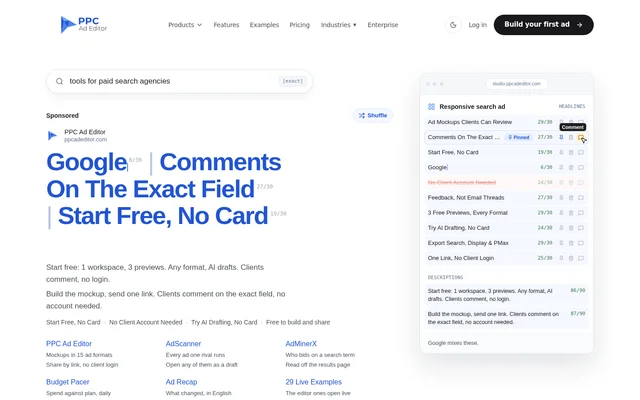
PPC Ad Editor is a web-based ad mockup generator for PPC professionals and agencies that need clients to review campaign creative before upload. PPC Ad Editor brings previews, field-specific feedback and approval into a shared review workflow. Clients open a link rather than creating an account, while the editor supports ad formats across Google Ads, Meta, LinkedIn and YouTube.
PPC Ad Editor also sits within a suite covering competitor research, budget pacing and account-change reporting. AdScanner and AdMinerX provide research inputs, Budget Pacer compares spending with a plan, and Ad Recap explains account changes. These tools can be selected separately or combined, rather than requiring every customer to buy the complete suite.
What PPC Ad Editor can do
PPC Ad Editor supports 15 ad formats and draws previews to reflect their placements. PPC Ad Editor combines AI drafting with a review process in which comments attach to individual fields. Export options depend on the format: responsive search, responsive display and Performance Max export as ads, while the remaining formats export as creative.
- PPC Ad Editor creates responsive search, responsive display and Performance Max mockups.
- PPC Ad Editor previews Meta, LinkedIn, YouTube and Demand Gen creative.
- PPC Ad Editor provides AI drafting on the free plan.
- PPC Ad Editor shares previews through links that require no client login.
- PPC Ad Editor applies a client's field-specific edit in one click.
- PPC Ad Editor records who approved an ad and when on Studio Pro.
How PPC Ad Editor works
PPC Ad Editor follows a build, share, review and export workflow. A user creates a mockup and sends a review link. The client opens the preview on a phone or another device and comments on the exact field that needs changing. Studio Pro records the sign-off, after which the user exports the approved material for upload.
PPC Ad Editor requires no installation and also offers a connector in Claude's directory for creating ad mockups within chat. Research can feed the drafting process: AdScanner opens a rival's ad as a draft, while AdMinerX sends search results to the editor as a campaign per term and an ad group per ad.
Who PPC Ad Editor is for
PPC Ad Editor serves PPC professionals, agencies and teams that prepare advertising for client review. PPC Ad Editor is relevant when clients need to see placement-specific previews, request precise copy changes or approve creative without signing into another account. The associated research and monitoring tools extend that workflow to competitive analysis, spending checks and client reporting.
- PPC Ad Editor helps agencies present ad drafts for client review.
- PPC Ad Editor lets reviewers request changes to specific headlines.
- PPC Ad Editor supports approved creative handoff through exports.
- PPC Ad Editor connects competitor research with draft creation.
PPC Ad Editor pricing and plans
PPC Ad Editor offers a free starting plan with 1 workspace and 3 previews, without requiring a payment card. Free access covers building in every format, share links, comments and AI drafting. Studio Pro costs $149 per month and adds recorded approvals and exports. The pricing page lists 3 client workspaces and 2 seats for Studio Pro.
PPC Ad Editor uses monthly billing in USD without an annual lock-in. Studio Pro is charged immediately and has a 24-hour refund. Budget Pacer and Ad Recap each offer a 14-day trial, while AdScanner and AdMinerX start on Lite access. Suite discounts depend on the product families selected, with research plans counted as one family.
PPC Ad Editor strengths and limitations
PPC Ad Editor combines placement-specific previews with feedback that stays attached to the relevant field. Account-free client review and free AI drafting make the initial drafting and sharing workflow accessible without payment details. Paid approvals add a record of who signed off and when, but export and publishing boundaries remain important when planning the handoff.
- PPC Ad Editor reserves recorded sign-off and exports for Studio Pro.
- PPC Ad Editor does not push ads directly to Google Ads.
- PPC Ad Editor requires users to upload the Google Ads Editor CSV themselves.
- PPC Ad Editor exports Meta, LinkedIn, YouTube and Demand Gen as creative rather than ads.
PPC Ad Editor FAQ
What is PPC Ad Editor?
PPC Ad Editor is a web-based ad mockup generator for PPC professionals and agencies. PPC Ad Editor supports 15 formats, AI drafting, shareable client previews and field-specific comments, with recorded approvals and exports available through Studio Pro.
Is PPC Ad Editor free?
PPC Ad Editor offers free building, sharing, comments and AI drafting, starting with 1 workspace and 3 previews without a card. Studio Pro costs $149 per month and adds recorded sign-off and exports, with a 24-hour refund.
Do clients need an account to review PPC Ad Editor mockups?
PPC Ad Editor does not require clients to create an account to review mockups. Clients open a share link on any device and comment on the exact field. Approval is available through the review link, with recorded sign-off included on Studio Pro.
Does PPC Ad Editor publish directly to Google Ads?
PPC Ad Editor does not push ads directly to Google Ads. Responsive search, responsive display and Performance Max leave as a Google Ads Editor CSV that the user uploads manually. Meta, LinkedIn, YouTube and Demand Gen export as creative for upload.
Does PPC Ad Editor work with Claude?
PPC Ad Editor offers a connector listed in Claude's directory for creating ad mockups directly in chat. PPC Ad Editor also provides a web editor and share links, allowing clients to review previews and leave field-specific comments without an account.
From the community
No reviews yet
Be the first to review this tool. What you write helps the next person choose.