What is PPLeGPT?
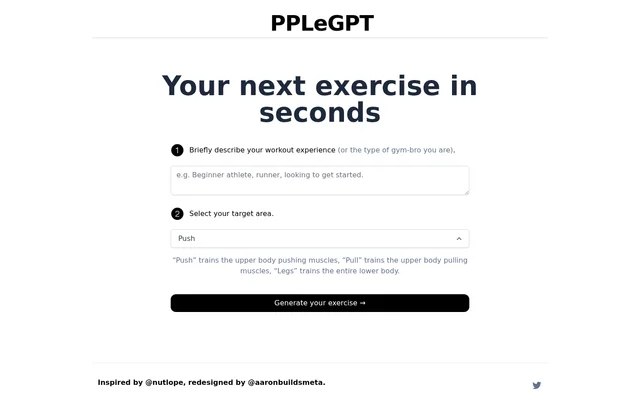
PPLeGPT is an exercise generator for gym-goers deciding what exercise to do next. The product page asks for a short description of the user's workout experience and a choice of training target. Instead of asking users to name a movement, PPLeGPT lets them start with the part of the body they want to train. The page frames the tool around the next exercise rather than the design of a full workout.
What PPLeGPT can do
PPLeGPT offers Push, Pull, and Legs as training targets. Push and Pull both refer to the upper body, but the distinction is whether the muscles are used for pushing or pulling. Legs is the option for the entire lower body. These labels define the target before the user requests an exercise.
- PPLeGPT accepts a brief description of workout experience.
- PPLeGPT offers Push for upper-body pushing muscles.
- PPLeGPT offers Pull for upper-body pulling muscles.
- PPLeGPT offers Legs for the entire lower body.
- PPLeGPT generates a next exercise for the selected target.
How PPLeGPT works
PPLeGPT presents the workout description and target selection before the exercise generation button. The description can cover workout experience or the kind of gym-goer the user considers themselves to be. That description provides context about the user, while the target selection identifies the area to train. Once both inputs are in place, the user selects the generation button to request the exercise.
Who PPLeGPT is for
PPLeGPT is for people looking for an exercise idea when they already know the area they want to train. A gym-goer planning an upper-body session can distinguish between pushing and pulling rather than use a general upper-body target. A gym-goer looking for a lower-body exercise can select Legs, which the page describes as covering the entire lower body rather than a named muscle group.
- Choose a movement for upper-body pushing muscles.
- Choose a movement for upper-body pulling muscles.
- Find an exercise for a lower-body session.
PPLeGPT pricing and access
PPLeGPT presents the exercise generator on its product page, where visitors can see the description prompt, the training target options, and the generation button. The page does not list a price or explain whether different plans are available. The presence of a generation button shows where to request an exercise, but does not establish whether using the generator costs anything.
Strengths and limitations of PPLeGPT
PPLeGPT keeps the exercise request focused by asking for a brief description and explaining each training target where it is selected. That setup helps users who know whether they want to train upper-body pushing muscles, upper-body pulling muscles, or the lower body. The same focus limits the scope of the request: the page offers broad training targets and describes the result as a next exercise.
- Target choices are limited to Push, Pull, and Legs.
- The result is presented as a next exercise, not a complete workout.
PPLeGPT FAQ
What is PPLeGPT?
PPLeGPT is an exercise generator that asks gym-goers for a brief description of their workout experience and a training target. The available targets are Push, Pull, and Legs, and the page offers to generate a next exercise.
How do you generate an exercise with PPLeGPT?
PPLeGPT asks users to describe their workout experience or the type of gym-goer they are, then select a training target. The user selects Push, Pull, or Legs and uses the exercise generation button to request a suggestion.
What is the difference between Push and Pull in PPLeGPT?
PPLeGPT uses Push for exercises that train upper-body pushing muscles and Pull for exercises that train upper-body pulling muscles. Both options are for upper-body training, but they target muscles according to whether they are used for pushing or pulling.
Can PPLeGPT suggest a leg exercise?
PPLeGPT can suggest an exercise for the lower body through its Legs option. The page describes Legs as covering the entire lower body, in contrast to Push and Pull, which target upper-body pushing and pulling muscles respectively.
Who is PPLeGPT for?
PPLeGPT is for gym-goers who want a suggestion for their next exercise and know which broad area they want to train. The page invites users to briefly describe their workout experience before choosing an upper-body push, upper-body pull, or lower-body target.
From the community
No reviews yet
Be the first to review this tool. What you write helps the next person choose.