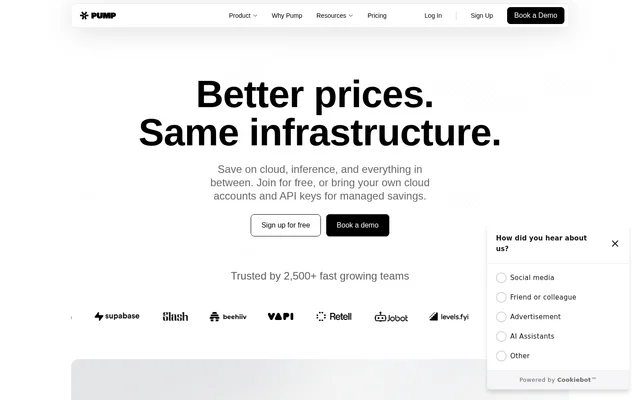
What is Pump?
Pump is a cloud and AI inference cost management tool for teams that want to track spending and apply savings without changing their underlying infrastructure. Pump combines cloud commitment purchasing, model request routing, cost reporting, and budget monitoring. Pump supports a free provider-funded option alongside custom arrangements for customers who bring existing cloud accounts or model API keys.
What Pump can do
Pump combines purchasing and routing mechanisms with tools for understanding where money goes. Pump buys reserved capacity across customers and passes along the rate, while inference routing selects models against a configured quality threshold. Pump also connects spending data to team ownership, budget warnings, and resource-level investigations.
- Pump pools reserved-capacity commitments across its customer base.
- Pump routes requests to the cheapest model that meets a selected quality bar.
- Pump uses fallback models when a provider is unavailable.
- Pump suggests owners for untagged spending.
- Pump sends Slack warnings before budget limits.
- Pump checks spending every hour and traces anomalies to resources and people.
- Pump supports custom cost queries and scheduled reports.
How Pump works
Pump starts with a read-only connection to cloud accounts, including AWS, Google Cloud, Azure, and Oracle Cloud. Pump presents the cloud bill and a savings plan for review before customers proceed. The website describes onboarding without migration and says savings can be applied without code changes.
Pump supports an alternative arrangement for customers bringing their own cloud accounts or model API keys. Pump retains the customer's existing setup and controls while adding managed optimization and support. For inference routing, customers set a quality bar, and Pump selects qualifying models at pooled token rates with provider fallbacks.
Who Pump is for
Pump serves teams responsible for cloud infrastructure and AI inference spending. Engineering and infrastructure teams can use Pump to review commitments, identify idle resources, and examine rightsizing recommendations. Teams handling budgets and cost reporting can use Pump to connect shared spending with owners and monitor cloud and AI costs together.
- Pump helps infrastructure teams review commitment coverage and utilization.
- Pump helps teams assign cloud and inference costs to owners.
- Pump helps AI teams manage model routing costs against quality requirements.
- Pump helps budget owners investigate spikes and receive spending warnings.
Pump pricing and plans
Pump offers a free option funded through group buying and partnerships with cloud and AI model providers. Pump states that the free offering has no platform fees and does not charge a percentage of savings. Listed capabilities include cost recommendations, infrastructure optimization, budgets, forecasts, anomaly detection, custom reports, and email support.
Pump also lists custom pricing for bring-your-own-cloud and enterprise arrangements. Pump describes these options as retaining existing access and controls while adding hands-on onboarding, advanced security features, and dedicated support. Customers obtain pricing through sales rather than a published fixed enterprise subscription price.
Pump strengths and limitations
Pump brings cloud and inference spending into the same budgeting and allocation workflow. Pump also combines savings recommendations with commitment purchasing and request routing, rather than offering visibility alone. Read-only onboarding and a no-migration setup reduce the infrastructure changes described for getting started, while custom arrangements accommodate existing accounts and controls.
- Pump requires a custom quote for bring-your-own-cloud and enterprise arrangements.
- Pump lists email support for the free offering.
- Pump lists dedicated support and hands-on onboarding under the custom offering.
Getting started with Pump
Pump provides a free sign-up path and a demo-booking option. Pump describes the initial workflow as connecting a cloud account with read-only access, reviewing the bill and savings plan, and then joining to start saving. Customers seeking managed savings on existing cloud accounts or model API keys can use the demo and sales paths to discuss custom arrangements.
Pump FAQ
What is Pump?
Pump is a cloud and AI inference cost management tool that combines pooled commitments, model routing, spending reports, budgets, and anomaly detection. Pump helps teams manage infrastructure and model costs while retaining their underlying infrastructure.
Is Pump free?
Pump offers a free option funded by group buying and partnerships with cloud and AI model providers, with no platform fees or percentage-of-savings charge. Pump also offers custom enterprise pricing for customers bringing their own cloud accounts or model API keys.
Which cloud providers does Pump support?
Pump lists AWS, Google Cloud, Azure, and Oracle Cloud in its cloud connection workflow. Pump describes initial account access as read-only and presents a cloud bill and savings plan for review during onboarding.
How does Pump route AI model requests?
Pump routes each request to the cheapest model that passes a configured quality bar. Pump uses pooled token rates and supports fallback models when a provider is unavailable, combining cost-based selection with a customer-defined quality requirement.
Does Pump have an API or integrations?
Pump lists API access and a Terraform provider on its pricing page. Pump also supports assigning tasks in Linear or Slack, sending budget warnings through Slack, and delivering alerts through Slack or email.
Does Pump require an infrastructure migration?
Pump describes onboarding as requiring no migration and says savings can be applied without code changes. Pump starts with read-only cloud account access and also offers a bring-your-own option that preserves existing accounts, setup, and controls.
From the community
No reviews yet
Be the first to review this tool. What you write helps the next person choose.