What is Questflow?
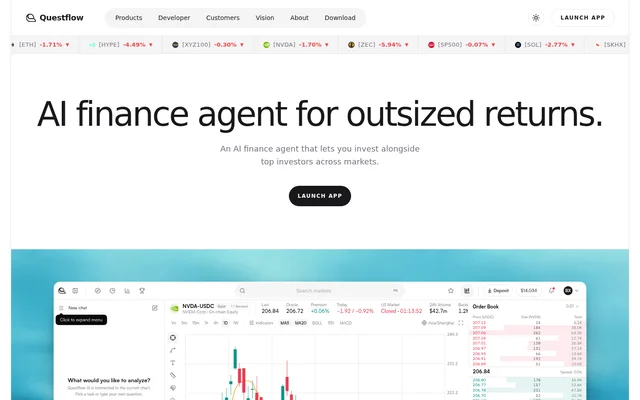
Questflow is an AI finance agent that connects market intelligence, investment strategies, and trading accounts. Questflow serves users ranging from retail traders to trading firms, with plans organized around analysis, agent customization, automation, and business requirements. The service describes a persistent intelligence environment where signals, decisions, risk rules, and trades contribute to the agent's context.
Questflow also turns investor strategies into agents that users can follow and invest with. Users can compare performance, risk, deposits, and capacity before deciding which agent their capital follows. This strategy-selection approach sits alongside tools for configuring an agent around a user's own investment methods and connected assets.
What Questflow can do
Questflow organizes agent capabilities around models, skills, plugins, and accounts. Models handle reasoning, skills define investment methods, plugins connect information sources, and accounts supply portfolio context and authorized execution. Feature access varies by subscription, with the free plan focused on reading markets and manual trading rather than the higher tiers' customization and persistent automation.
- Questflow supports model selection with options including GPT, Claude, and Gemini.
- Questflow supports official skills and uploaded investment strategies.
- Questflow connects news, market data, research, and on-chain signals through plugins.
- Questflow reads balances and analyzes positions from authorized accounts.
- Questflow executes natural-language or automated trades through connected accounts.
- Questflow provides AI market analysis and a Daily Brief.
How Questflow works
Questflow lets users select a reasoning model, install official skills or upload their own, and connect plugins for financial information. Users can link wallets, exchanges, and brokerages so the agent can consider positions, exposure, and available capital. After authorization, the agent can move from analysis to portfolio management and trade execution within the permissions the user sets.
Questflow keeps wallet assets under user custody rather than holding them in a separate vault. Users approve trading markets, size, and permissions, and can pause an agent with a kill switch. Max adds a persistent cloud computer for customized signal monitoring and order execution that continues when the user's computer is off.
Who Questflow is for
Questflow addresses different trading workflows through its plan structure. Free targets retail traders reading markets with AI, Pro targets professional traders building a finance agent, and Max targets fund managers seeking automation. Enterprise serves trading firms, while Business supports requirements such as custom data sources, strategies, markets, deployment, and security.
- Questflow helps retail traders review market data, news, and whale signals.
- Questflow lets professional traders configure agents with custom skills and plugins.
- Questflow supports fund managers with persistent monitoring and fund-launch capabilities.
- Questflow supports trading firms running agents across multiple accounts.
Questflow pricing and plans
Questflow offers Free at $0 forever, including open models, live market intelligence, AI analysis, and manual trading with an AI copilot. Pro has a $4.99 first-month card offer, followed by $19.99/month. Pro adds flagship models, deep research, official signals with live push, and custom skill and plugin uploads.
Questflow Max costs $99.99/mo and adds 5× usage, a persistent cloud computer, and the ability to launch a fund. Enterprise costs $1,200/month plus tax, billed monthly, and adds higher usage limits, multiple trading accounts, and enterprise support. Business has custom pricing for tailored models, data, agents, markets, deployment, security, and dedicated support.
Questflow strengths and limitations
Questflow combines research inputs, configurable investment logic, portfolio context, and account execution in a single agent workflow. Self-custody, user-approved trading scope, and a kill switch provide controls over agent activity. The plan structure also separates basic market analysis from custom agents and persistent execution, so access to these capabilities depends on the chosen subscription.
- Questflow limits the free plan to open models and manual trading with an AI copilot.
- Questflow places persistent cloud execution on Max and higher plans.
- Questflow places multiple trading accounts on Enterprise and Business.
Questflow FAQ
What is Questflow?
Questflow is an AI finance agent for market research, portfolio analysis, and authorized trading. Questflow combines selectable models, investment skills, data plugins, and connected accounts, and lets users compare and follow agents based on investor strategies.
Is Questflow free?
Questflow offers a free-forever plan at $0 for retail traders. The free plan includes open models, live market data, news, whale signals, on-chain data, AI market analysis, a Daily Brief, and manual trading with an AI copilot.
How much does Questflow cost?
Questflow offers Pro at $4.99 for the first month under a card offer, then $19.99/month. Max costs $99.99/mo, and Enterprise costs $1,200/month plus tax. Questflow also has a free plan and a Business plan priced according to custom requirements.
Which AI models does Questflow support?
Questflow lists DeepSeek, MiniMax, and Gemini among the free plan's open models. Pro and Max unlock flagship models including Claude, GPT, and Kimi, with switching available anytime. Enterprise adds higher usage limits, while Business supports custom model access and capacity.
Does Questflow hold your assets?
Questflow states that wallet assets remain under user custody. Questflow supplies the context, intelligence, and permission layer for trading within approved limits. Users approve markets, trade size, and permissions, and can pause an agent with a kill switch.
Can Questflow trade when your computer is off?
Questflow provides a persistent cloud computer on Max that continues working when the user's computer is off. Users can customize signal monitoring and order execution in that cloud runtime. Max includes the Pro features and adds 5× usage.
From the community
No reviews yet
Be the first to review this tool. What you write helps the next person choose.