What is ReceiptsAI?
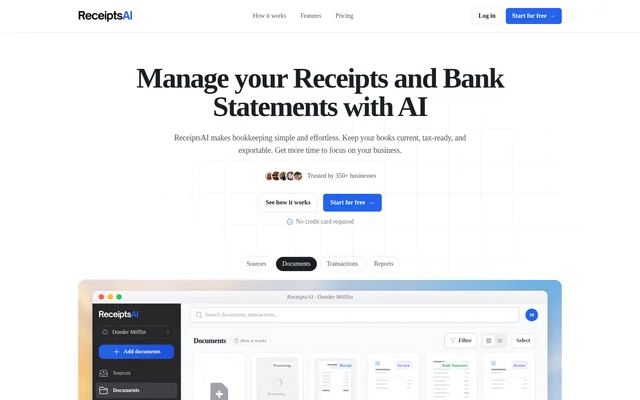
ReceiptsAI is an AI-powered bookkeeping assistant for freelancers, small businesses and the accountants who support them. ReceiptsAI turns receipts, invoices and bank statements into categorized financial records that users can review, report on and export. The service brings document capture, expense organization and bookkeeping exports into a shared workflow rather than leaving receipts scattered across different locations.
ReceiptsAI is offered as a web application, with support listed for Windows, MacOS, Chrome OS, Linux, iOS and Android. Separate workspaces help keep different sets of books apart, while connected mailboxes and team receipt submission support ongoing document collection. Access begins with free processing credits, followed by paid plans for greater document volumes and additional capabilities.
What ReceiptsAI can do
ReceiptsAI combines document extraction with expense organization and reporting. ReceiptsAI identifies document types and captures financial fields, including merchant names, dates, amounts, taxes and currencies. Users can apply custom categories and rules to shape how extracted transactions are organized, then review spending through reports or export structured records for further bookkeeping work.
- ReceiptsAI scans receipts, invoices and bank statements using AI extraction.
- ReceiptsAI accepts bulk uploads and captures documents forwarded by email.
- ReceiptsAI categorizes expenses using standard categories, custom categories and rules.
- ReceiptsAI matches bank transactions with receipts.
- ReceiptsAI generates expense reports, monthly summaries and spending charts.
- ReceiptsAI exports records to Excel, CSV and PDF.
- ReceiptsAI supports multiple currencies and historical exchange rates.
- ReceiptsAI redacts specified sensitive words or numbers before AI processing.
How ReceiptsAI works
ReceiptsAI starts with document intake: users upload PDF, JPG or PNG files from a device, or forward receipts to [email protected]. ReceiptsAI also supports WhatsApp capture and connected mailboxes. Gmail or Outlook forwarding rules can route receipts into a workspace, with each connected mailbox assigned to a workspace address to keep separate books from mixing.
ReceiptsAI then identifies documents, extracts their financial details and categorizes the resulting transactions. Users can review spending, generate reports and export records after processing. Employees can submit receipts as senders without logging into the application, while invited users can view and edit records. The available mailbox, sender and user allowances depend on the selected plan.
Who ReceiptsAI is for
ReceiptsAI serves freelancers who collect receipts while working, business owners separating different sets of books, and accountants or bookkeepers managing client documents. ReceiptsAI supports multiple workspaces with their own rules and reports, so documents can be organized around businesses, projects or clients. Shared access and employee receipt submission extend that workflow to bookkeeping teams and businesses with staff.
- Freelancers can capture receipts between jobs and export records for an accountant.
- Business owners can separate business and personal bookkeeping.
- Teams can collect employee receipts in a shared workspace.
- Accountants can manage client workspaces with separate rules and reports.
ReceiptsAI strengths and limitations
ReceiptsAI combines several bookkeeping tasks in one workflow: document capture, extraction, categorization, matching, reporting and export. Separate workspaces support distinct businesses or clients, while privacy controls can redact sensitive information before AI processing. ReceiptsAI states that personal emails are ignored and not stored, and users can disconnect email access to stop future scanning and processing.
- ReceiptsAI provides one-time free credits rather than a recurring free processing allowance.
- ReceiptsAI meters processing by page, so longer documents consume more credits.
- ReceiptsAI reserves receipt matching and historical currency conversion for higher paid plans.
- ReceiptsAI limits workspaces, connected mailboxes, users and senders according to the selected plan.
ReceiptsAI FAQ
What is ReceiptsAI?
ReceiptsAI is an AI-powered bookkeeping assistant that extracts, categorizes and exports information from receipts, invoices and bank statements. ReceiptsAI supports freelancers, business owners, accountants and bookkeepers with document capture, expense reports, receipt matching and separate workspaces.
Is ReceiptsAI free?
ReceiptsAI offers 30 one-time free credits without requiring a credit card. Each processed page uses one credit. Free access includes document extraction, basic categorization and email support, while paid plans provide monthly credits and additional bookkeeping features.
How do you upload receipts to ReceiptsAI?
ReceiptsAI accepts PDF, JPG and PNG uploads from a device, as well as receipts forwarded to [email protected]. ReceiptsAI also supports WhatsApp capture, bulk uploads and connected mailboxes, with Gmail or Outlook forwarding rules routing documents into assigned workspaces.
Can ReceiptsAI match receipts to bank statements?
ReceiptsAI can automatically match bank transactions with their receipts and categorize bank statement transactions. Receipt matching is included in the small-business paid plan and carried into the growing-team plan, rather than being listed among the free features.
What export formats does ReceiptsAI support?
ReceiptsAI supports Excel, CSV and PDF exports for bookkeeping records. ReceiptsAI also generates expense reports, monthly summaries and spending charts, allowing users to review categorized spending and turn extracted receipt or PDF data into structured spreadsheet records.
How does ReceiptsAI handle sensitive information?
ReceiptsAI lets users define sensitive words or numbers for redaction before AI processing. ReceiptsAI states that personal emails are ignored and not stored, data is not sold, and deleted data is not retained. Users can disconnect email access to stop future scanning.
From the community
No reviews yet
Be the first to review this tool. What you write helps the next person choose.