What is RenameClick?
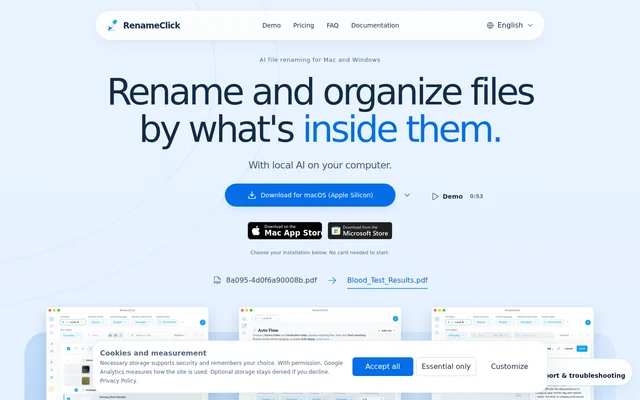
RenameClick is an AI file renaming and organization application for Mac and Windows. RenameClick reads supported documents and images and can transcribe spoken audio locally to suggest descriptive filenames. RenameClick is designed for tasks such as organizing PDFs, scans, screenshots, photos, and recordings without relying on their original filenames.
RenameClick combines naming, folder selection, and content search in a desktop workflow. Suggested filenames appear beside the original files, and users can inspect proposed category folders before applying changes. Naming and folder organization have separate settings, so changing a filename does not require moving the file.
What RenameClick can do
RenameClick supports content-based organization across image, document, and audio formats, including PDF, DOCX, XLSX, JPG, PNG, HEIC, MP3, and WAV. RenameClick can use content categories, metadata paths, or existing folders for organization. Custom Instructions can specify filename fields, their order, language, and handling of missing values.
- RenameClick renames files while keeping them in their current folders.
- RenameClick moves files into selected folder structures without changing their names.
- RenameClick applies a new filename and destination folder together.
- RenameClick searches indexed documents and images by descriptions of their contents.
- RenameClick watches incoming files through Auto Flow while the app runs.
- RenameClick uses local speech transcription to suggest names for recordings.
How RenameClick works
RenameClick starts with files or a folder and generates suggestions using the selected AI provider. RenameClick offers a bundled local model, connections to Ollama or LM Studio by server URL, supported cloud providers, and OpenAI-compatible APIs. The local model works offline after its initial download, while cloud analysis sends content to the selected provider.
RenameClick lets users review filenames and folders before applying changes. For content search, users index a folder, describe the document or image they need, and rename or move files from the results. For audio naming, users install Audio Transcription in AI & Models and select RenameClick Local AI when filename generation should stay on the device.
Who RenameClick is for
RenameClick serves Mac and Windows users who need to organize local files by their contents rather than their existing names. RenameClick supports document, image, and spoken-recording workflows, including files stored in synced folders when their contents are available locally. RenameClick does not browse cloud storage websites.
- RenameClick helps organize scans, PDFs, photos, and screenshots with descriptive filenames.
- RenameClick names voice notes, meetings, and lectures from spoken content.
- RenameClick sorts incoming downloads, camera uploads, and scans through Auto Flow rules.
- RenameClick finds documents and images when their filenames are unknown.
RenameClick pricing and plans
RenameClick offers a free plan with unlimited analysis and 100 successful renames or moves per month, with no credit card required. AI Search uses no apply credits. A successful combined rename and move uses the same credit as a single changed file. Pro Monthly costs $8 plus VAT per month, and Pro Lifetime costs $36 plus VAT as a one-time payment.
RenameClick paid plans include unlimited renames and moves and all features available in the chosen installation channel. Pro Lifetime includes lifetime updates. Plans are selected inside the app. Direct macOS and Windows licenses cover up to 3 active devices, while Mac App Store purchases are separate. External AI provider fees are not included.
RenameClick strengths and limitations
RenameClick provides a local-processing option that keeps files on the computer and avoids API costs for the built-in model. RenameClick also separates analysis from applied changes, allowing users to examine suggestions without consuming apply credits. Provider choice supports local servers and cloud services, although availability and processing requirements vary by installation channel and hardware.
- RenameClick excludes cloud providers from the Mac App Store build.
- RenameClick samples long recordings and does not identify songs.
- RenameClick requires model downloads, storage, and working memory for local AI.
- RenameClick needs the app running for Auto Flow watching, and history is not retained across restart.
- RenameClick requires connections for initial downloads, license activation and recovery, and Apple purchase restoration.
RenameClick FAQ
What is RenameClick?
RenameClick is an AI file renamer and organizer for Mac and Windows. RenameClick reads supported images and documents, transcribes spoken audio locally, and suggests filenames based on content. RenameClick also offers folder organization, content-based search, and automatic handling of incoming files.
Is RenameClick free?
RenameClick offers a free plan with unlimited analysis and 100 successful renames or moves per month, with no credit card required. AI Search does not use apply credits. Pro Monthly costs $8 plus VAT per month, while Pro Lifetime costs $36 plus VAT once for unlimited renames and moves.
Does RenameClick work offline?
RenameClick can process files offline with the local provider after the required model downloads. RenameClick still needs connections for initial downloads, license activation and recovery, and Apple purchase restoration. Cloud providers require internet access for analysis, and servers on another computer receive the content sent to them.
Which AI providers does RenameClick support?
RenameClick supports its built-in local model, Ollama, LM Studio, OpenAI, Google AI, Alibaba Cloud, and OpenAI-compatible APIs added by URL. RenameClick uses the user's API key for external services, with provider charges billed separately. Cloud providers and compatible APIs are excluded from the Mac App Store build.
Can RenameClick rename audio files from speech?
RenameClick uses local transcription to name MP3, WAV, FLAC, M4A, and AAC recordings from spoken content. RenameClick requires Audio Transcription to be installed in AI & Models; local filename generation also requires RenameClick Local AI. Long recordings are sampled, and the feature does not identify songs.
Can RenameClick automatically organize a folder?
RenameClick can watch folders with Auto Flow while the app runs and optionally apply changes automatically. RenameClick allows users to start with Auto Apply off to inspect suggestions before enabling automatic changes for a row. Watch must be turned off for Undo, and history is not retained across restart.
From the community
No reviews yet
Be the first to review this tool. What you write helps the next person choose.