What is ReStage?
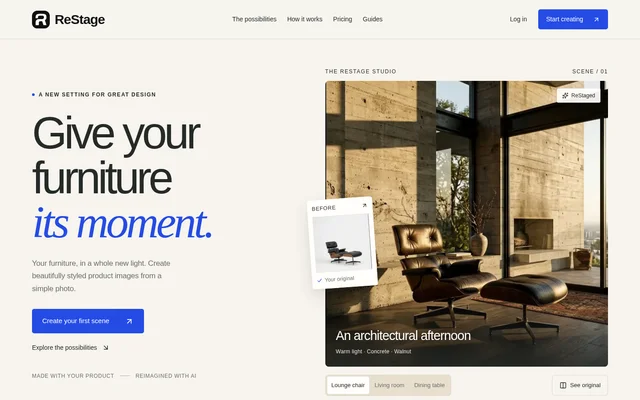
ReStage is an AI image creation tool for turning furniture product photos into styled scenes. ReStage is intended for furniture brands, independent designers, and creative teams that need images for catalogs, campaigns, and other creative projects. The source furniture image remains the reference for the generated scene.
ReStage presents furniture in different settings rather than requiring users to start with a complete lifestyle photograph. The website illustrates lounge chairs, living rooms, and dining tables in reimagined scenes. Users can explore different moods and backgrounds while working from photos of furniture they have already made.
What ReStage can do
ReStage combines furniture photo uploads with scene selection and image generation. Users can work with a template from the library or supply a background of their own, then review and refine the results. The listed Free and Pro plans also include saved images and scene history.
- ReStage generates styled product images from furniture photos.
- ReStage provides a template library for choosing scene directions.
- ReStage accepts custom background uploads alongside furniture images.
- ReStage supports image generation, review, and refinement.
- ReStage includes saved images and scene history.
How ReStage works
ReStage starts with an uploaded furniture photo, such as a sofa, chair, or table. The website recommends a clear image, a simple background, and a well-lit product as a starting point. Users then choose a template or upload the setting they want to use.
ReStage generates a scene that users can review and refine before taking selected images into a creative project. Because AI can change small details, the workflow includes checking materials, proportions, and finishes. That review is particularly relevant before using a generated image in a catalog or advertisement.
Who ReStage is for
ReStage explicitly addresses furniture brands, independent designers, and creative teams. The examples focus on presenting furniture in new settings and changing the mood of product imagery. Catalog production and campaign imagery are stated uses, while the workflow also supports taking favorite generated images into other creative projects.
- Furniture brands can create styled scenes for product catalogs.
- Independent designers can present furniture in different settings.
- Creative teams can explore different moods for furniture campaigns.
ReStage strengths and limitations
ReStage supports both library templates and user-supplied backgrounds, giving furniture teams different ways to choose a scene. Free daily credits provide access without a paid subscription, and saved images and scene history are included across the listed plans. Product accuracy and available generation usage remain important considerations.
- ReStage can alter small product details, so materials, proportions, and finishes need review.
- ReStage Free generation is constrained by the daily credit allowance.
- ReStage Pro generation and refinement remain subject to three-hour and monthly usage limits.
ReStage FAQ
What is ReStage?
ReStage is an AI furniture photography tool that creates styled product images from furniture photos. ReStage serves furniture brands, independent designers, and creative teams working on catalogs, campaigns, advertising, and other creative projects.
Is ReStage free?
ReStage offers a Free plan with 3 daily credits, with each generated image using 1 credit. The allowance refreshes at 00:00 UTC. ReStage also offers paid Pro subscriptions with generation and refinement allowances subject to three-hour and monthly limits.
Can I use my own background in ReStage?
ReStage supports custom backgrounds through a tool that accepts both a furniture image and the setting the user wants to use. ReStage also provides a template library for users who prefer to select an existing scene direction.
Will ReStage keep my furniture exactly the same?
ReStage uses the uploaded product photo as a reference, but AI can change small furniture details. ReStage advises reviewing materials, proportions, and finishes before using a generated image in a catalog or advertising.
What photo do I need to get started with ReStage?
ReStage starts with a clear photo of furniture, such as a sofa, chair, or table. ReStage recommends a simple background and a well-lit product, followed by choosing a template or uploading a custom background.
From the community
No reviews yet
Be the first to review this tool. What you write helps the next person choose.