What is Roshi?
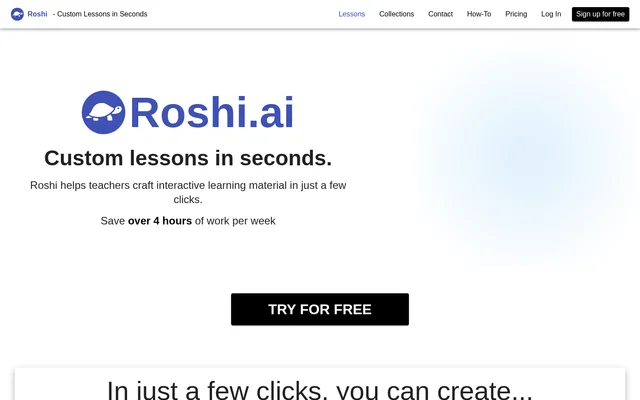
Roshi is an AI tool for teachers who want to create customized, interactive learning materials from written prompts. Roshi generates resources such as voiced dialogues, visuals, and targeted activities rather than requiring educators to assemble every element themselves. The service offers plans for occasional lesson creation, regular classroom preparation, and organizations that need shared lessons or custom features.
What Roshi can do
Roshi creates several kinds of teaching content within the same service. Teachers can request dialogues, visual resources, or activities designed around specialized criteria such as CLB. Roshi also provides paid tools for working with existing worksheets and building lessons from activity templates. These capabilities cover both generating new classroom material and adapting resources educators already have.
- Roshi generates fully voiced dialogues with custom voices and pronunciation.
- Roshi creates visuals such as images, brochures, and other documents.
- Roshi generates targeted activities based on specialized criteria such as CLB.
- Roshi Pro automatically digitizes PDF/Image worksheets.
- Roshi Pro provides dozens of activity templates and supports custom activities.
- Roshi shares content to Moodle, Google Classroom, and other learning platforms.
How Roshi works
Roshi uses a prompt-based workflow: teachers describe their desired learning material, Roshi generates the content using AI, and teachers share the resulting resources through learning platforms. The website illustrates a request for a matching exercise with images about different types of environments. Roshi names Moodle and Google Classroom as sharing destinations, while the Basic plan also explicitly includes sharing lessons with students and printing them.
Who Roshi is for
Roshi serves educators with different lesson-preparation needs. The Basic plan is intended for teachers who make small lessons and activities occasionally, while Pro is aimed at educators who regularly create customized material for their classes. Roshi also offers an Organization option for groups with specific needs, including shared lessons across teams and custom features billed per feature.
- Roshi helps occasional users create small lessons and classroom activities.
- Roshi supports teachers preparing customized materials regularly.
- Roshi creates dialogues for lessons that need voiced content.
- Roshi supports educators developing activities around criteria such as CLB.
- Roshi offers shared lessons for organizational teams.
Roshi pricing and plans
Roshi Basic is $0 and free forever, with 10 lesson creations per month, a 300 word limit for texts/videos, and 5 sections per lesson. Roshi Pro is listed at $10.00/month USD, billed annually at $120.00, and includes unlimited lessons, texts up to 3,000 words, and unlimited activities per lesson. The pricing page displays Yearly and Monthly options but supplies only the annually billed price in the provided text.
Roshi Organization is offered through contact for group deals and organizations with specific needs. The Organization offering includes shared lessons across teams, custom features billed per feature, and early access to new features. Roshi provides Get Started options for Basic and Pro, while the Organization listing directs prospective customers to Contact Us.
Roshi strengths and limitations
Roshi combines multiple teaching-material formats with a direct prompt-to-generation workflow and named learning-platform sharing destinations. The free plan includes practical distribution options through sharing and printing. Roshi Pro expands creation allowances and adds worksheet digitization, but plan selection matters: Basic has explicit usage and content limits, and Pro still specifies a maximum text length.
- Roshi Basic allows 10 lesson creations per month.
- Roshi Basic restricts texts/videos to 300 words and lessons to 5 sections.
- Roshi Pro supports source texts up to 3,000 words.
- Roshi Organization custom features are billed per feature.
Roshi FAQ
What is Roshi?
Roshi is an AI lesson creation tool for teachers that generates interactive learning materials from prompts. Roshi can produce fully voiced dialogues, visuals such as images and brochures, and targeted activities based on specialized criteria such as CLB.
Is Roshi free?
Roshi offers a free-forever Basic plan with 10 lesson creations per month, sharing and printing, a 300 word limit for texts/videos, and 5 sections per lesson. Roshi also offers a paid Pro plan and an Organization option.
How much does Roshi Pro cost?
Roshi Pro is listed at $10.00/month USD, billed annually at $120.00. Roshi Pro includes unlimited lesson creation, texts up to 3,000 words, unlimited activities per lesson, automatic PDF/Image worksheet digitization, and activity templates or custom activities.
Can Roshi share lessons to Google Classroom or Moodle?
Roshi supports sharing generated content to Moodle, Google Classroom, and other learning platforms. Roshi describes a workflow in which teachers prompt for learning materials, receive AI-generated content, and then share that content through their learning platforms.
Can Roshi digitize PDF worksheets?
Roshi Pro includes automatic digitization of PDF/Image worksheets. Roshi lists this capability alongside longer source texts, unlimited lesson creation, unlimited activities per lesson, and access to activity templates or the option to write custom activities.
Who is Roshi for?
Roshi is for educators creating interactive lessons and customized classroom materials. Roshi Basic targets occasional creation of small lessons and activities, Pro targets regular material creation, and Organization serves groups needing shared lessons or custom features.
From the community
No reviews yet
Be the first to review this tool. What you write helps the next person choose.