What is Sendsteps?
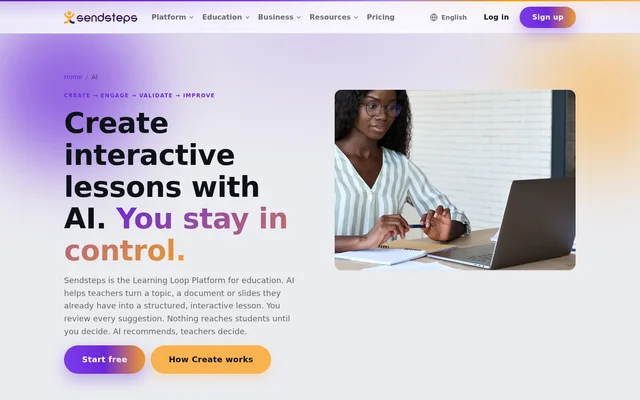
Sendsteps is a Learning Loop Platform for education that helps teachers turn topics and existing materials into structured, interactive lessons. Sendsteps describes AI as a drafting partner rather than a replacement for the teacher. Teachers review suggested content and decide what students see, with no automatic publication or independent changes to teaching.
Sendsteps organises teaching around Create, Engage, Validate and Improve. The Create step prepares lesson content, while participation and real-time understanding checks connect preparation with classroom activity. Sendsteps describes recommendations for future lessons as part of this loop, although the pricing page marks Learning Signals, AI lesson summaries and Improve this lesson as coming soon.
What Sendsteps can do
Sendsteps combines AI-assisted preparation with interactive teaching tools. Teachers can begin with a subject and an audience, reuse documents or import PowerPoint slides for editing. Sendsteps can suggest a lesson outline, explanations and participation activities together, so questions are planned alongside the material rather than added only after the lesson has been drafted.
- Sendsteps drafts lesson flows from topics, documents or slides.
- Sendsteps imports PowerPoint presentations as editable slides.
- Sendsteps suggests questions and activities during lesson creation.
- Sendsteps supports Bloom's taxonomy, RTTI, SOLO taxonomy and constructive alignment.
- Sendsteps provides live presenting, student responses and live results.
- Sendsteps offers PDF and Excel results exports on Starter and above.
How Sendsteps works
Sendsteps starts lesson creation from a topic, document or imported presentation. Teachers choose a teaching framework and, where applicable, a learning depth before AI drafts an outline. Bloom's taxonomy, RTTI and SOLO support either full progression through levels or a highest level, while constructive alignment and the no-framework option use the teacher's goals.
Sendsteps leaves review and delivery decisions with the teacher. Suggested material can be kept, rewritten or dropped, and teachers control tone, difficulty and publication. During teaching, students can respond and contribute while teachers see understanding in real time. Institutions and teachers also decide whether AI is used, and AI can be switched off according to policy.
Who Sendsteps is for
Sendsteps serves teachers who want to prepare interactive lessons without rebuilding existing materials from a blank page. Sendsteps also supports teaching teams through shared folders, a team dashboard and moderator mode on Professional. Campus/Enterprise addresses institutions that need access management, an LMS connection, institution-wide branding and governance rather than a replacement for their existing LMS.
- Teachers can turn existing slides into interactive lessons.
- Teachers can plan questions that check understanding during instruction.
- Teaching teams can share materials and coordinate sessions.
- Institutions can connect Sendsteps with an existing LMS.
Sendsteps pricing and plans
Sendsteps offers a free-forever plan with no credit card required. Free includes live presenting, unlimited participants, 20+ question types, 2 AI creations per 30 days and 2 PowerPoint imports per 30 days. Starter removes the AI and PowerPoint import limits and adds an editor assistant, branding removal, exports, premium themes and self-paced sessions.
Sendsteps Professional adds team collaboration, unlimited everyday surveys, voice-over, session transcripts and AI-suggested questions for imported PowerPoint decks. Campus/Enterprise uses a custom arrangement and adds SSO, role management, an LMS connection, institutional analytics and a dedicated account manager. Research Survey access is separate and requires an administrator to enable access for a team or institution.
Sendsteps strengths and limitations
Sendsteps combines reuse of existing teaching materials, framework-based drafting and teacher approval in the same lesson preparation workflow. Free live presenting supports unlimited participants, and Sendsteps states that teaching and student data are never used to train models. Access to expanded creation, collaboration and institutional controls depends on the selected plan or an agreed arrangement.
- Sendsteps restricts AI creation and PowerPoint imports on Free.
- Sendsteps reserves team collaboration for Professional and above.
- Sendsteps marks Learning Signals and Improve this lesson as coming soon.
- Sendsteps leaves grades and course records in the existing LMS.
Sendsteps FAQ
What is Sendsteps?
Sendsteps is a Learning Loop Platform for education that combines AI-assisted lesson preparation with student participation and checks for understanding. Sendsteps drafts lessons from topics, documents or slides, while teachers review suggestions and decide what reaches students.
Is Sendsteps free?
Sendsteps offers a free-forever plan with no credit card required. Free includes live presenting, unlimited participants, 20+ question types, 2 AI creations per 30 days and 2 PowerPoint imports per 30 days. Paid plans remove limits and add further features.
Can Sendsteps turn PowerPoint slides into interactive lessons?
Sendsteps can import PowerPoint presentations as editable slides and help turn existing materials into structured, interactive lessons. Professional also includes AI-suggested questions for imported decks. Teachers review the suggestions and decide which content to keep.
Does Sendsteps support Bloom's taxonomy and SOLO?
Sendsteps supports Bloom's taxonomy, RTTI, SOLO taxonomy, constructive alignment and a no-specific-framework option. Bloom, RTTI and SOLO also include learning-depth settings. Sendsteps drafts an outline from the selected framework, and teachers review and edit the result.
Does Sendsteps use student data to train AI models?
Sendsteps states that teaching and student data are never used to train AI models. Institutions and teachers decide when AI is used, and AI can be switched off according to policy. Campus/Enterprise also offers AI off on request for the whole licence.
Does Sendsteps replace an LMS?
Sendsteps does not replace an existing LMS. Sendsteps keeps grades and course records where institutions already maintain them, while adding visibility into teaching and the learning loop. Campus/Enterprise includes an LMS connection, SSO and role management.
From the community
No reviews yet
Be the first to review this tool. What you write helps the next person choose.