What is Shortwave?
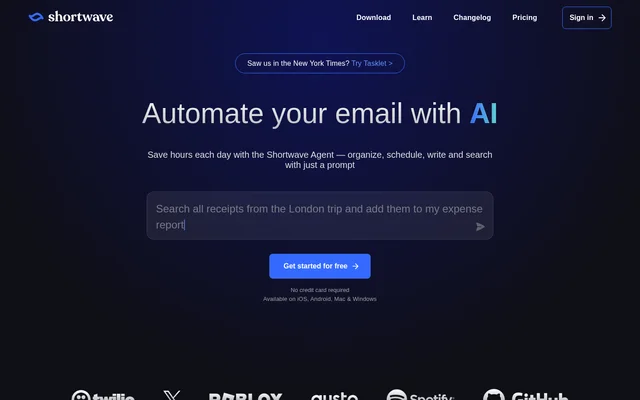
Shortwave is an AI email assistant for individuals and teams that brings inbox management, writing, search, and scheduling into an email workflow. Shortwave uses prompts to organize messages, draft responses, find information, and coordinate calendar activity. Shared threads and private comments support teams working together on email conversations.
Shortwave is available on iOS, Android, Mac, and Windows, and supports switching between Gmail accounts on any device. Alongside AI assistance, Shortwave includes inbox tabs, grouped messages, delivery schedules, keyboard shortcuts, and markdown support. These capabilities combine email handling with task management and collaboration.
What Shortwave can do
Shortwave combines AI assistance with inbox controls and collaboration features. Shortwave can work with email content, attachments, calendar availability, and connected services. Users can ask for answers in natural language, define automated actions for incoming messages, or use personalized writing assistance while composing replies.
- Shortwave labels, stars, archives, or deletes incoming emails using natural-language AI filters.
- Shortwave drafts emails using writing style, tone, and facts learned from sent messages.
- Shortwave searches emails and analyzes attachments to answer questions.
- Shortwave checks availability, creates calendar events, and writes scheduling emails.
- Shortwave turns emails into todos with notes, grouping, and priorities.
- Shortwave shares live threads, private comments, labels, snippets, and saved prompts.
- Shortwave tracks email opens and link clicks and provides follow-up reminders.
How Shortwave works
Shortwave accepts prompts for email organization, writing, search, and scheduling. Users can write filter instructions in plain English to automate actions on new messages. Shortwave also offers Gmail-style search filters and natural-language queries, while AI memory lets users customize assistant behavior with remembered facts and preferences.
Shortwave connects to services including Slack, Calendar, Notion, Asana, and Hubspot, with built-in integrations or MCP available for AI workflows. Shortwave also integrates with the sister product Tasklet for automated reply drafts, team comments, thread organization, and connections to 3,000+ apps. Calendar invitations can be accepted or rejected in-app.
Who Shortwave is for
Shortwave serves individuals managing their own email and teams coordinating work through shared conversations. Shortwave supports use cases involving inbox triage, recurring replies, scheduling, and finding information across team email history. Shared ownership and a team-wide done status help colleagues track responsibility and progress on important messages.
- Shortwave helps individuals separate important messages from newsletters and promotions.
- Shortwave helps teams discuss email privately without copying conversations into another tool.
- Shortwave helps colleagues create a shared, AI-searchable email archive.
- Shortwave helps users monitor recipient engagement and follow up when replies do not arrive.
Shortwave pricing and plans
Shortwave offers a 14 day free trial and lists Business at $30 per seat per month, Premier at $45 per seat per month, and Max at $120 per seat per month. The plans provide Standard, Advanced, and Expert intelligence respectively, with higher usage allowances and search context limits on higher tiers.
Shortwave Business includes 5 years of AI search history, a maximum of 50 threads per AI search, and 3 AI-powered filters. Premier includes unlimited AI search history, 100 threads per AI search, and 10 filters. Max includes unlimited AI search history, 150 threads per AI search, and 50 filters. Standard search history is unlimited across these plans.
Shortwave strengths and limitations
Shortwave combines AI email assistance with shared conversations, task organization, and calendar tools rather than focusing only on drafting. Shortwave also offers image proxying, tracking pixel blocking, and CASA Tier 2 compliance. Plan selection matters because AI intelligence, daily usage, search context, and automation allowances differ across the listed subscriptions.
- Shortwave applies daily AI quotas whose consumption varies with request complexity and intelligence level.
- Shortwave caps the number of threads loaded into each AI search according to the plan.
- Shortwave limits AI-powered filters and reserves unlimited AI search history for Premier and Max.
Shortwave FAQ
What is Shortwave?
Shortwave is an AI email assistant that organizes inboxes, drafts personalized emails, searches messages and attachments, and handles scheduling. Shortwave also supports team collaboration through shared threads, private comments, shared labels, and assigned next steps.
Is Shortwave free?
Shortwave offers a 14 day free trial and lists paid Business, Premier, and Max plans. Shortwave Business costs $30 per seat per month, Premier costs $45 per seat per month, and Max costs $120 per seat per month.
Which devices does Shortwave support?
Shortwave is available on iOS, Android, Mac, and Windows. Shortwave also supports switching between Gmail accounts on any device and includes keyboard shortcuts, a command palette, and customizable themes for navigating and managing email.
Does Shortwave support integrations?
Shortwave supports AI integrations through built-in connections or MCP, with named services including Slack, Calendar, Notion, Asana, and Hubspot. Shortwave also integrates with Tasklet to automate reply drafts, add team comments, organize threads, and connect to 3,000+ apps.
Can Shortwave search email attachments?
Shortwave can read, summarize, and analyze PDF, text, code, and other attachment types with the AI Assistant. Shortwave also supports natural-language email search and answers questions using information from team email history, with search history and thread limits varying by plan.
How does Shortwave help teams collaborate?
Shortwave lets teams share live email threads, discuss messages with private comments, assign owners, and track progress with a team-wide done status. Shortwave also supports shared labels for searchable email archives and shared snippets and saved prompts for recurring content.
From the community
No reviews yet
Be the first to review this tool. What you write helps the next person choose.