What is SlideSpeak?
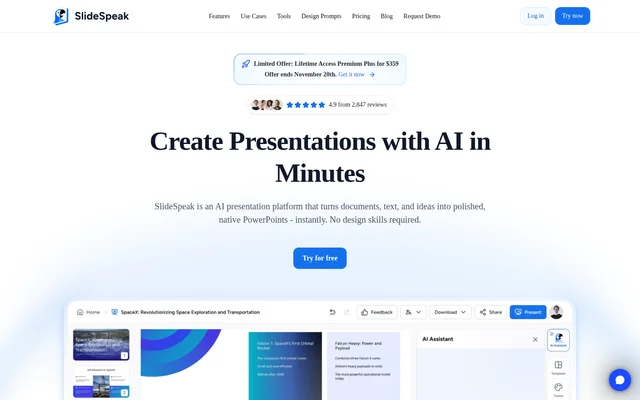
SlideSpeak is a web-based AI presentation maker that turns topics, text, and documents into editable PowerPoint presentations. SlideSpeak supports PDF, Word, and Excel inputs and serves teams, educators, consultants, creators, and students. The product combines presentation generation with editing, document analysis, visual content creation, and translation, so users can develop slides from existing material rather than manually formatting an entire presentation.
SlideSpeak provides native .pptx export with fonts and layouts intact. SlideSpeak also lists PDF and Google Slides exports, alongside video presentations with voiceovers. These output options support both editable slide delivery and recorded presentation content for training, social media, and explainers.
What SlideSpeak can do
SlideSpeak combines document-to-slide conversion with tools for revising text, creating visuals, and updating presentation design. SlideSpeak includes Charles, an assistant that works directly inside presentations to generate content, refine wording, summarize data, and adjust tone. The feature set also covers working with existing documents rather than only generating new slides.
- SlideSpeak converts PDFs, Word documents, Excel spreadsheets, and text into structured presentations.
- SlideSpeak shortens, expands, restructures, and rewrites slide content.
- SlideSpeak generates AI images, infographics, charts, and graphs.
- SlideSpeak translates presentations while preserving layout, formatting, and structure.
- SlideSpeak improves layouts, spacing, and visual hierarchy with AI.
- SlideSpeak summarizes PowerPoints, PDFs, and Word documents and answers document questions.
- SlideSpeak creates AI video presentations with voiceovers.
How SlideSpeak works
SlideSpeak accepts a topic, text, or supported document as the starting point for a presentation. SlideSpeak generates structured slides from that material, after which users can refine wording, change slide structure, or ask Charles for additional content and visuals. AI redesign tools adjust presentation layouts without requiring users to rebuild their slides from scratch.
SlideSpeak provides online sharing with invited viewers or editors on the free plan. Paid plans add exports, team workspaces, and version history. SlideSpeak also offers an API for developers and teams integrating presentation generation into their own products, with API pricing and documentation linked separately from the presentation subscriptions.
Who SlideSpeak is for
SlideSpeak serves teams, educators, consultants, creators, and students who need to turn source material into presentations. SlideSpeak also addresses companies and agencies that need consistent branding through fonts, colors, and logos. The website identifies training, social media, and explainer content as uses for video presentations.
- SlideSpeak helps educators turn teaching material into editable slides.
- SlideSpeak helps consultants convert documents and data into presentations.
- SlideSpeak helps teams translate presentations for multilingual audiences.
- SlideSpeak helps companies and agencies apply presentation branding.
- SlideSpeak helps creators produce narrated video presentations.
SlideSpeak pricing and plans
SlideSpeak offers a free plan with 100 credits at sign-up, a 50 MB file size limit, online sharing, Charles, and document chat. Premium costs $29 per month and includes 1,000 monthly credits, exports, team workspaces, and no file size limit. Premium Plus costs $34 per month and includes 2,500 monthly credits, brand kits, and longer version history.
SlideSpeak offers Enterprise with custom pricing, SSO, multiple custom templates, and custom credit volume. Paid-plan credits refresh each billing cycle, and optional top-up credits last 12 months. SlideSpeak lists a custom template add-on at $129 per template and a 25% discount for verified academic accounts.
SlideSpeak strengths and limitations
SlideSpeak brings document conversion, slide editing, visual generation, translation, and document chat into the same presentation workflow. SlideSpeak supports native PowerPoint output for users who need editable files with their fonts and layouts preserved. The free plan provides access to presentation assistance and document chat, but export access, file limits, credits, and branding options differ across plans.
- SlideSpeak restricts free-plan file uploads to 50 MB.
- SlideSpeak lists PDF and PPT exports under Premium rather than the free plan.
- SlideSpeak uses credits for generation, with paid allowances refreshed each billing cycle.
- SlideSpeak lists custom template imports as a paid add-on.
SlideSpeak FAQ
What is SlideSpeak?
SlideSpeak is a web-based AI presentation maker that converts topics, text, PDFs, Word documents, and Excel spreadsheets into editable presentations. SlideSpeak also provides AI slide editing, visual generation, translation, document summarization, and video presentations with voiceovers.
Is SlideSpeak free?
SlideSpeak offers a free plan with 100 credits at sign-up, a 50 MB file size limit, online sharing, Charles, and document chat. SlideSpeak also offers Premium at $29 per month, Premium Plus at $34 per month, and Enterprise with custom pricing.
Can SlideSpeak convert PDF and Word files into PowerPoint?
SlideSpeak converts PDF and Word documents into structured presentations and also accepts Excel spreadsheets and text. SlideSpeak provides native .pptx export with fonts and layouts intact, with export access listed among the paid-plan features.
Can SlideSpeak use custom branding and presentation templates?
SlideSpeak supports brand kits that apply fonts, colors, and logos across slides. SlideSpeak includes brand kits with custom fonts in Premium Plus and offers custom template imports as a separate $129-per-template add-on.
Does SlideSpeak have an API?
SlideSpeak offers an API for developers and teams integrating its presentation generation engine into their own products. SlideSpeak links to separate API pricing and documentation; the supplied page does not provide API pricing figures.
Can SlideSpeak create video presentations?
SlideSpeak creates AI video presentations with voiceovers for uses such as social media, training, and explainer content. SlideSpeak lists voice cloning, AI presenters, screen recording, video translation, live quizzes, and LMS export through SCORM among Premium features.
From the community
No reviews yet
Be the first to review this tool. What you write helps the next person choose.