What is Speechnotes?
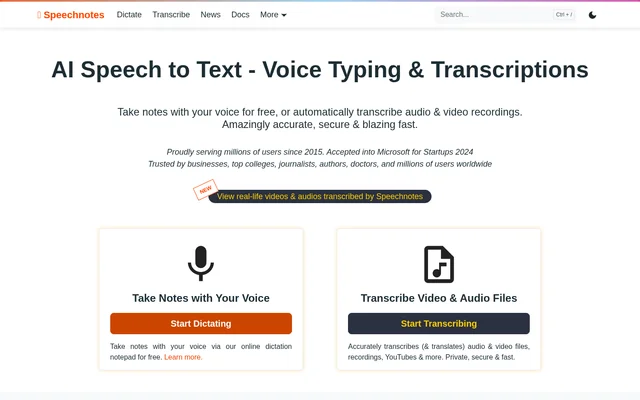
Speechnotes is an online speech-to-text service for dictating notes and transcribing recorded audio and video. Speechnotes serves people who need to turn speech into editable text, including authors, students, journalists, doctors, and businesses. The service separates live voice typing from recording transcription, allowing users to choose between speaking into a notepad and submitting existing recordings.
Speechnotes uses speech recognition engines from Google and Microsoft. The browser-based dictation notepad provides a writing environment with a clear page and interface elements that fade out of view. Alongside the notepad, Speechnotes offers a voice typing Chrome extension, an Android note-taking app, and tools for connecting transcription to automated workflows.
What Speechnotes can do
Speechnotes combines tools for capturing speech, editing recognized text, and producing transcripts or captions from recordings. Live dictation includes voice commands for punctuation and formatting, while recording transcription adds timestamps and speaker tagging. The website also lists translation and AI summaries among the capabilities of the online transcription service.
- Speechnotes converts live speech into text in an online notepad.
- Speechnotes supports automatic capitalization and punctuation commands.
- Speechnotes transcribes uploaded audio and video files.
- Speechnotes accepts recording sources from Google Drive and YouTube.
- Speechnotes generates timestamps and .srt caption files.
- Speechnotes provides speaker diarization in English.
- Speechnotes offers transcription through a REST API, webhooks, and Zapier.
How Speechnotes works
Speechnotes provides an online dictation notepad that works in Chrome without a download, installation, or registration. Users can speak instead of typing and edit the resulting text. The Chrome extension extends voice typing to forms and text boxes across the web, including Gmail. Dictation notes are saved locally through browser or app storage.
Speechnotes recording transcription starts with an uploaded file or a recording from an online source. Speechnotes processes the recording automatically and returns results within minutes, according to the website. For automated workflows, developers can submit files through standard POST requests and receive transcription results directly on their servers through the API and webhooks.
Who Speechnotes is for
Speechnotes addresses both writing and transcription tasks for individuals and organizations. The website names authors, students, doctors, journalists, and businesses among its audiences. Speechnotes also lists use cases for podcasters and people managing audio archives, where converting recordings into text can support publication, captioning, or text indexing.
- Authors can use Speechnotes to dictate notes, thoughts, and written drafts.
- Students can use Speechnotes to transcribe recorded lectures.
- Journalists can use Speechnotes to transcribe interviews.
- Podcasters can use Speechnotes to turn episodes into textual content.
- Businesses can use Speechnotes to transcribe phone calls and voice messages.
Speechnotes pricing and plans
Speechnotes offers free dictation with ads, including the online notepad and voice typing Chrome extension. Premium dictation costs $1.9 per month and includes an ad-free notepad, a premium voice typing extension, and support from the development team. Both dictation plans include unlimited dictation and editing.
Speechnotes charges $0.1 per minute for audio and video transcription on a pay-as-you-go basis without a subscription. The transcription plan lists English speaker diarization, timestamps, .srt caption generation, REST API access, webhooks, and Zapier integration. Speechnotes keeps recording transcription separate from the free and Premium live dictation offerings.
Speechnotes strengths and limitations
Speechnotes combines browser-based dictation with recording transcription and automation options. Speechnotes states that no human handles transcription recordings and that recordings are deleted from its servers when transcription finishes. Transcription results remain in a database until the user deletes them. Dictation follows a different privacy model: recognition is handled by the browser or operating system, whose privacy policy applies.
- Speechnotes displays ads in the free dictation tool.
- Speechnotes charges separately for recording transcription.
- Speechnotes specifies English speaker diarization in the transcription plan.
Speechnotes FAQ
What is Speechnotes?
Speechnotes is an online speech-to-text service for live dictation and automatic audio and video transcription. Speechnotes includes a browser notepad, a voice typing Chrome extension, caption generation, translation, and transcription automation through an API, webhooks, and Zapier.
Is Speechnotes free?
Speechnotes offers free, ad-supported dictation through its online notepad and Chrome extension. Premium dictation costs $1.9 per month and removes ads. Audio and video recording transcription costs $0.1 per minute on a pay-as-you-go basis without a subscription.
Can Speechnotes transcribe YouTube videos and audio files?
Speechnotes transcribes audio and video files, including recordings submitted from YouTube, Google Drive, and other online sources. Speechnotes supports timestamps, automatic punctuation, caption generation, and English speaker diarization, with recording transcription charged per minute.
Does Speechnotes have an API or integrations?
Speechnotes provides a REST API, webhooks, and Zapier integration for transcription workflows. Speechnotes accepts files through standard POST requests and can send transcription results directly to a server. The Zapier integration supports connections with workflows involving CRM systems, phone calls, documents, and email.
Does Speechnotes store recordings and notes?
Speechnotes automatically deletes recordings from its servers after transcription finishes, while transcription results remain stored until the user deletes them. Speechnotes saves dictation notes locally on the user's device. Dictation recognition is handled by the browser or operating system rather than Speechnotes.
Does Speechnotes require installation or registration?
Speechnotes offers an online dictation notepad that works in Chrome without downloading software, installing an app, or registering. Speechnotes also offers an optional Chrome extension for voice typing across websites and an Android app for mobile note-taking.
From the community
No reviews yet
Be the first to review this tool. What you write helps the next person choose.



