What is Stork Talking Photo?
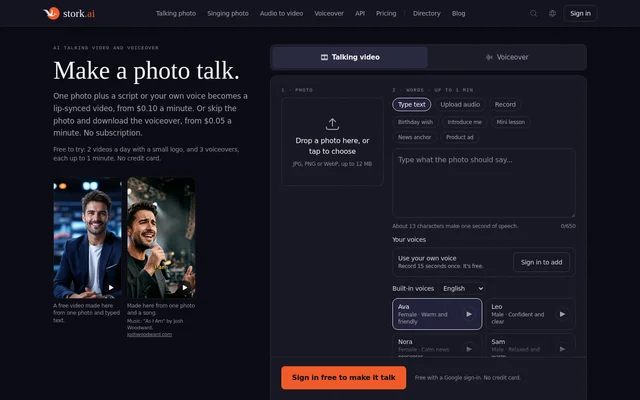
Stork Talking Photo is an AI tool for creating lip-synced talking videos from a single image and generating downloadable voiceovers from text. Stork Talking Photo supports greetings, introductions, advertisements, lessons and narrated content. Browser access serves people making content directly, while an API provides access for developers building video or speech generation into other workflows.
Stork Talking Photo accepts photos and illustrated characters rather than requiring a presenter avatar to be set up first. The source image needs a human-shaped face. The video model animates facial features and small head movements, blending the animation back into the original photo rather than creating a presenter who walks or gestures.
What Stork Talking Photo can do
Stork Talking Photo combines photo animation, speech generation and audio-driven video creation. A script can be read in a built-in voice or a user's own recorded voice, while uploaded audio can supply the speech directly. Stork Talking Photo also offers separate voiceover generation for users who need downloadable audio without a talking image.
- Stork Talking Photo turns a photo and typed text into a lip-synced video.
- Stork Talking Photo accepts uploaded audio or a voice recording for talking videos.
- Stork Talking Photo offers 28 built-in voices in 13 languages.
- Stork Talking Photo creates a personal voice from about 15 seconds of recorded or uploaded speech.
- Stork Talking Photo converts podcast episodes, lectures and narration into videos.
- Stork Talking Photo provides MP4 video and MP3 audio through an API.
How Stork Talking Photo works
Stork Talking Photo starts with an uploaded JPG, PNG or WebP image up to 12 MB. Users then type a script, upload audio or record their voice, choose a voice where needed, and select video quality and format. Available formats include the original photo shape, YouTube widescreen, vertical Shorts or Reels, and square video.
Stork Talking Photo requires a Google sign-in for free creation, with no credit card required. Voice previews let users hear speech before generating a video. Developers can submit a photo and text or audio through the API and retrieve the finished result. The API uses prepaid credits, and its documentation is in English.
Who Stork Talking Photo is for
Stork Talking Photo serves people who need a speaking face or narrated audio for short messages, promotional material and educational content. Stork Talking Photo also supports longer audio-led projects, including podcasts and lectures, because paid videos have no length limit. Developers can use the same generation capabilities through the Talking Photo API.
- Stork Talking Photo can make birthday wishes and personal introductions.
- Stork Talking Photo can create product ads from a photo and script.
- Stork Talking Photo can produce mini lessons with a speaking character.
- Stork Talking Photo can turn a lecture or podcast recording into a video.
Stork Talking Photo pricing and plans
Stork Talking Photo offers 2 free videos and 3 free voiceovers a day, each up to 1 minute. Free videos have a small logo and 720p resolution. Paid Standard video costs $0.20 per minute at 720p, while Pro costs $0.40 per minute. Standard video at 480p costs $0.10 per minute, and voiceovers cost $0.05 per minute.
Stork Talking Photo uses prepaid credits with a smallest top-up of $2. A subscription is not required, purchased credits never expire, and failed video or voiceover jobs receive their credits back. The API carries the same prices. Personal voice creation and use do not add an extra charge.
Stork Talking Photo strengths and limitations
Stork Talking Photo combines browser and API access with non-expiring prepaid credits and a daily free allowance. Support for personal voices, built-in multilingual voices and different image styles allows several presentation formats without setting up an avatar. The main trade-off is motion: talking videos animate the face and head rather than the body or surrounding scene.
- Stork Talking Photo leaves hands, shoulders and backgrounds unchanged in talking videos.
- Stork Talking Photo requires a human-shaped face and does not support pets, animals or toys.
- Stork Talking Photo limits free videos to a logo-bearing output up to 1 minute at 720p.
- Stork Talking Photo limits a single voiceover file to 20,000 characters.
- Stork Talking Photo requires permission for another real person's face or voice.
Stork Talking Photo FAQ
What is Stork Talking Photo?
Stork Talking Photo is an AI talking-video and voiceover tool that turns a photo plus text or recorded audio into a lip-synced video. Stork Talking Photo also converts scripts into downloadable speech and is available through a browser or API.
Is Stork Talking Photo free?
Stork Talking Photo offers 2 free videos and 3 free voiceovers daily, each up to 1 minute, without a credit card. Free videos include a small logo and use 720p resolution. Paid generation uses prepaid credits, with top-ups starting at $2 and no required subscription.
Can Stork Talking Photo use my own voice?
Stork Talking Photo can speak typed text in a user's own voice after a recording or upload of about 15 seconds. Personal voices work in videos and voiceovers without an extra charge. The source says results sound best in the recorded language, and users can delete the recording.
Does Stork Talking Photo have an API?
Stork Talking Photo provides an API that accepts a photo and text or audio to generate an MP4 video, or text to generate MP3 speech. API access uses the same prices, one key and no contract. Documentation is available in English.
What moves in a Stork Talking Photo video?
Stork Talking Photo animates the lips, jaw, eyes, brows and small head movements in sync with speech. Hands, shoulders and the background remain as they appear in the source image. A human-shaped face is required; pets, animals and toys do not work.
How long can Stork Talking Photo videos and voiceovers be?
Stork Talking Photo places no length limit on paid videos, while free videos are limited to 1 minute. A single voiceover file accepts up to 20,000 characters, described on the page as about 20 minutes of speech.
From the community
No reviews yet
Be the first to review this tool. What you write helps the next person choose.