What is Supreme AI for Divi?
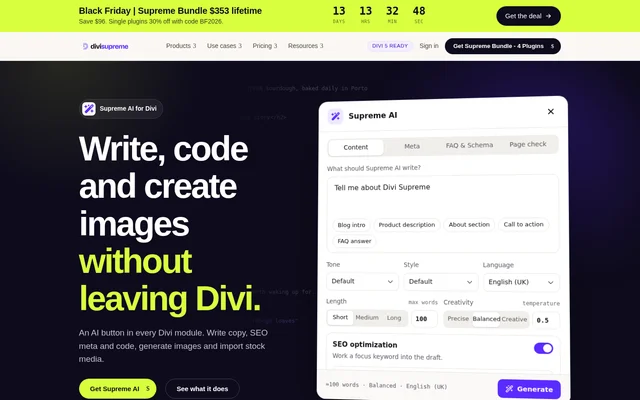
Supreme AI for Divi is an AI writing, image generation and stock media tool for WordPress websites built with Divi. Published by Divi Supreme, Supreme AI for Divi adds an AI button to Divi modules so website builders can create content directly in the fields they are editing.
Supreme AI for Divi combines website copywriting with supporting tasks such as SEO metadata creation, FAQ schema generation, image sourcing and code assistance. The workflow keeps these tasks inside the builder rather than requiring another tab or a separate copy-and-paste process.
What Supreme AI for Divi can do
Supreme AI for Divi generates content around the module being edited and provides controls for language, tone, writing style, maximum words and creativity. Beyond drafting text, Supreme AI for Divi supports visual assets, selected-text edits, code generation and checks of the open page before publication.
- Supreme AI for Divi writes headlines, introductions, product blurbs and FAQs.
- Supreme AI for Divi generates meta titles, descriptions and FAQPage JSON-LD.
- Supreme AI for Divi checks headings, alt text, link wording and focus keywords.
- Supreme AI for Divi generates images in square, landscape or portrait formats.
- Supreme AI for Divi imports Pexels and Pixabay photos and videos.
- Supreme AI for Divi writes or refactors HTML, CSS, JavaScript and PHP.
How Supreme AI for Divi works
Supreme AI for Divi opens from the AI button in a Divi module. Users enter a prompt, choose writing settings and generate a draft, then regenerate, copy or use the result. Settings are configured per module, and selected text can be improved, checked for grammar, shortened or expanded without rewriting the remaining content.
Supreme AI for Divi connects to OpenAI, Claude, Gemini or Grok through user-supplied API keys and works with Divi 5 and Divi 4. Generated images and imported stock media are saved to the WordPress Media Library. Stock media credits appear in captions, with attribution enabled by default.
Who Supreme AI for Divi is for
Supreme AI for Divi is aimed at people building WordPress pages with Divi who need text, images or code while editing a layout. The available writing styles support sales pages, instructional content and news, while language and regional settings support content intended for different audiences.
- Website builders can draft an About section or call to action inside a module.
- Content editors can adjust selected sentences without replacing the entire draft.
- Page creators can generate metadata and FAQs from existing module content.
- Developers can request new code or refactor existing code in code fields.
Supreme AI for Divi strengths and limitations
Supreme AI for Divi brings writing, media creation, code assistance and page checks into the same editing environment. Support for multiple AI providers and regional language settings gives users choices within that workflow. The stated environment is WordPress with Divi, and access to AI providers requires the user's own API keys.
- Supreme AI for Divi requires the Divi editing environment.
- Supreme AI for Divi uses separately paid AI provider access.
- Supreme AI for Divi labels Grok image generation experimental.
- Supreme AI for Divi defaults to OpenAI images because xAI content moderation can block Grok images.
Supreme AI for Divi FAQ
What is Supreme AI for Divi?
Supreme AI for Divi is an AI content and media tool for the WordPress Divi builder. Supreme AI for Divi generates website copy, images, SEO metadata, FAQs and code inside Divi modules, and includes stock media imports and page checks.
Which AI providers does Supreme AI for Divi support?
Supreme AI for Divi supports OpenAI, Claude, Gemini and Grok through user-supplied API keys. Supreme AI for Divi offers OpenAI image generation and experimental Grok image generation, with OpenAI as the default because xAI content moderation can block Grok images.
Does Supreme AI for Divi work with Divi 4 and Divi 5?
Supreme AI for Divi works with Divi 4 and Divi 5 on WordPress. Supreme AI for Divi opens through an AI button inside Divi modules, allowing users to generate and edit content within the builder rather than switching to another tab.
Can Supreme AI for Divi help with on-page SEO?
Supreme AI for Divi generates keyword-focused meta titles, meta descriptions, FAQs and FAQPage JSON-LD. Supreme AI for Divi also checks the open layout's headings, image alt text, links and body copy, assigns a page score and suggests fixes.
Can Supreme AI for Divi import stock photos and videos?
Supreme AI for Divi searches free stock photos and videos from Pexels and Pixabay inside the builder. Supreme AI for Divi saves imported media directly to the Media Library and places credits in captions, with attribution enabled by default.
From the community
No reviews yet
Be the first to review this tool. What you write helps the next person choose.