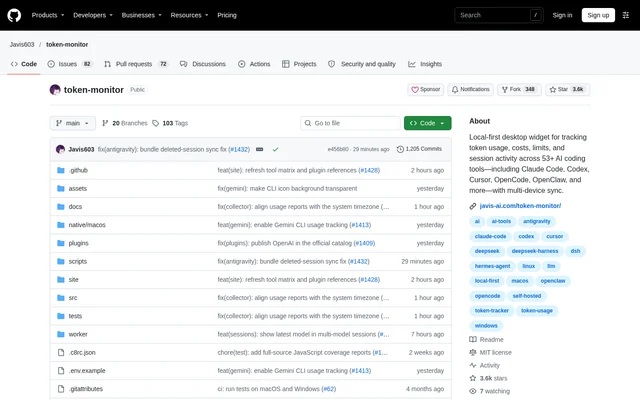
What is token-monitor?
token-monitor is an open-source desktop usage monitor for developers working with AI coding tools. The app brings token consumption, costs, provider limits, and session activity into a shared dashboard. The repository describes support for 53+ tools, including Claude Code, Codex, Cursor, GitHub Copilot, and Cherry Studio, with breakdowns across tools, devices, models, sessions, and projects.
token-monitor uses a local-first approach: each device watches its own usage data, and single-device tracking needs no server. Developers working across machines can add synchronization so connected widgets receive usage summaries. Prompts, responses, source code, and file contents remain on the local machine rather than being included in synchronized summaries.
What token-monitor can do
token-monitor combines live monitoring with historical analysis and account-limit visibility. The dashboard can show token counts alongside costs, separate cache hits from other input usage, and aggregate activity across supported tools. Capability coverage differs by tool: token usage, account-limit checks, and session details are documented separately in the repository.
- token-monitor displays live token usage and optional generation-rate readings.
- token-monitor tracks provider limits and multiple accounts.
- token-monitor shows prompt-level token splits and tools used for supported sessions.
- token-monitor groups usage and costs by project, model, tool, or device.
- token-monitor displays activity heatmaps and historical usage trends.
- token-monitor exports tool-agnostic CSV and JSON manually or automatically.
How token-monitor works
token-monitor starts tracking the current device after the desktop app launches, without requiring hub configuration. Downloads are available through GitHub Releases for macOS, Windows, and Linux, while macOS users can install through the official Homebrew Cask. Custom scan paths allow tracking when session folders are stored outside the default locations.
token-monitor supports optional synchronization through an in-widget hub, a Node CLI hub, or a Cloudflare Worker. Hub-backed synchronization uses Server-Sent Events, while iCloud Drive synchronization is eventually consistent. A headless agent reports usage from servers, SSH hosts, and WSL without running the desktop app. Session-level details are read on demand from local transcripts or databases and are never synchronized.
Who token-monitor is for
token-monitor serves developers who use several AI coding tools or move between computers and remote environments. The project-level and model-level views support comparisons across tools, while account-limit displays help users follow available quotas. Export options also serve users who want to examine their usage in spreadsheets, Obsidian, Grafana, or scripts.
- token-monitor helps developers compare AI coding usage across projects.
- token-monitor consolidates usage summaries for people working across devices.
- token-monitor reports usage from servers and SSH hosts through a headless agent.
- token-monitor provides export files for external analysis and reporting.
token-monitor pricing and access
token-monitor is distributed as an open-source project under the MIT license. The repository provides desktop downloads through GitHub Releases and a Homebrew installation route for macOS. Local tracking does not require a server, while users who want synchronized usage can configure one of the documented self-hosted backend options.
token-monitor strengths and limitations
token-monitor combines local data handling, cross-device summaries, and several desktop display options. Configurable status displays can show costs, tokens, quota bars, reset times, or live token rates. The ability to export usage and preserve observed daily history locally also supports analysis beyond the current session, including after source tools delete older session files.
- token-monitor does not provide every tracking capability for every supported tool.
- token-monitor reserves some display surfaces for particular operating systems.
- token-monitor plugins are experimental, are not sandboxed, and may need updates.
- token-monitor may need a headless agent for SQLite-backed tools inside WSL.
token-monitor FAQ
What is token-monitor?
token-monitor is a local-first desktop app for tracking token usage, costs, provider limits, and session activity across AI coding tools. The repository lists support for 53+ tools and offers breakdowns by tool, device, model, session, and project.
Is token-monitor open source?
token-monitor is an open-source project distributed under the MIT license. The repository provides downloads for macOS, Windows, and Linux through GitHub Releases, and macOS users can also install the app through the official Homebrew Cask.
Does token-monitor need a server?
token-monitor does not need a server for single-device tracking. Optional multi-device synchronization supports an in-widget hub, a Node CLI hub, or a Cloudflare Worker, and the project also describes eventually consistent iCloud Drive synchronization.
Does token-monitor upload prompts or source code?
token-monitor keeps prompts, responses, source code, and file contents on the local machine. Multi-device synchronization sends summary updates, while detailed session information is read on demand from local transcripts or databases and is never synchronized.
Can token-monitor export usage data?
token-monitor exports usage as tool-agnostic CSV and JSON files, either manually or automatically to a folder. The repository names spreadsheets, Obsidian, Grafana, and scripts as destinations for working with exported usage records.
Does token-monitor support every feature for every tool?
token-monitor supports token usage, account-limit checks, and session details separately, so coverage varies by tool. The repository's support table distinguishes those capabilities; some tools provide token usage without account limits or detailed session inspection.
From the community
No reviews yet
Be the first to review this tool. What you write helps the next person choose.