What is ToolPermit?
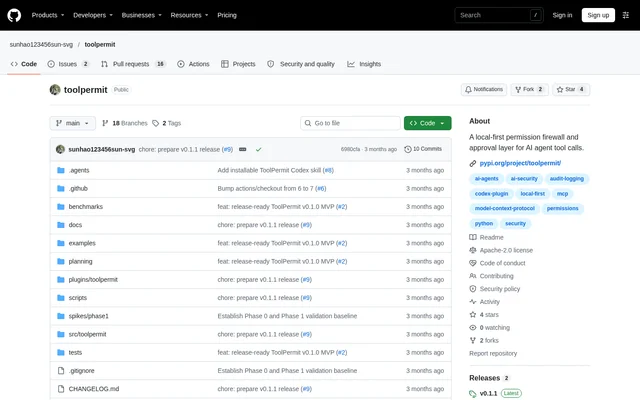
ToolPermit is an open-source permission firewall and approval layer for local AI agent tool calls using Model Context Protocol (MCP). ToolPermit sits between a local MCP client and a stdio server to observe requests, apply permission policies, and record redacted audit information. The project serves developers who want explicit control over local tool execution.
ToolPermit separates routine permission decisions from exceptional actions requiring review. Policies return allow, ask, or deny results with explanations, while approvals apply to exact requests rather than granting general permission. The supported scope is local use, with command-line workflows and an optional browser interface restricted to loopback.
What ToolPermit can do
ToolPermit combines policy enforcement, approval review, audit logging, and offline policy comparison. Strict YAML validation rejects unknown keys and invalid rules, while first-match evaluation makes policy decisions deterministic. Audit records are redacted before persistence, display, or export, and stored calls can be evaluated against a different policy without invoking the underlying tools.
- ToolPermit observes MCP calls between a local client and a stdio server.
- ToolPermit evaluates explainable allow, ask, and deny rules.
- ToolPermit binds approvals to the canonical request, policy, session, and expiry.
- ToolPermit consumes one-time approvals atomically.
- ToolPermit redacts recognized secrets and sensitive keys before SQLite storage.
- ToolPermit exports redacted audit records as JSONL.
- ToolPermit replays stored calls without starting the MCP server.
How ToolPermit works
ToolPermit requires Python 3.11–3.13 and can be installed from PyPI inside a virtual environment. The documented quickstart initializes ToolPermit, runs a contained demo in observe mode, and lists recorded runs. A local repository checkout is needed for the demo scripts, whose write target is a disposable directory supplied by the user.
ToolPermit can then run the demo in enforce mode, pausing a write until approval is granted from a second terminal or the loopback UI. The optional Codex Skill checks the environment, installs the compatible package when authorized, preserves existing files, and shows MCP client changes before writing them.
Who ToolPermit is for
ToolPermit is for developers operating local MCP clients and stdio servers who need permission checks around AI agent tool use. The documented workflow supports observing calls before enforcement, reviewing exceptional actions, and testing policy changes against recorded activity. The current scope supports a single local user rather than authenticated remote users.
- ToolPermit helps developers observe tool requests before enforcing a policy.
- ToolPermit supports local review of actions that require explicit approval.
- ToolPermit lets policy authors compare candidate rules against redacted call history.
ToolPermit licensing and access
ToolPermit is distributed as an open-source project under the Apache License 2.0. ToolPermit is available from PyPI, with a matching GitHub Release for the stated current release, v0.1.1. The repository also provides a Codex Skill that can be installed through the built-in plugin manager.
ToolPermit strengths and limitations
ToolPermit provides deterministic policy explanations, request-specific approvals, and redaction before audit data reaches storage or display. Offline replay supports policy comparison without executing tools. Core workflows are available through the CLI, and the optional approval UI includes Host, Origin, CSRF, CSP, and SameSite controls. The portable core is tested on Ubuntu, macOS, and Windows.
- ToolPermit does not provide an operating-system sandbox.
- ToolPermit does not authenticate remote users or inspect calls that bypass the proxy.
- ToolPermit cannot undo an executed tool action.
- ToolPermit does not guarantee that permitted paths are safe from every symlink or TOCTOU race.
ToolPermit FAQ
What is ToolPermit?
ToolPermit is a local-first permission policy, one-time approval, and redacted audit layer for MCP tool calls. ToolPermit sits between a local MCP client and a stdio server to observe requests, enforce rules, and review exceptional actions.
Is ToolPermit open source?
ToolPermit is an open-source project licensed under the Apache License 2.0. ToolPermit is available through its GitHub repository and as a Python package on PyPI, with a matching GitHub Release for the stated current release.
How does ToolPermit handle approvals?
ToolPermit binds each one-time approval to the canonical request, policy, session, and expiry, then consumes the approval atomically. ToolPermit supports approval review through the CLI or an optional loopback-only web interface.
Can ToolPermit test policies without executing tools?
ToolPermit supports offline replay of stored, redacted calls against a candidate policy. ToolPermit can compare policy behavior without starting the MCP server or executing a tool, allowing recorded activity to inform policy changes.
What does ToolPermit require?
ToolPermit requires Python 3.11–3.13 and supports a local MCP client communicating with a stdio server. ToolPermit is tested on Ubuntu, macOS, and Windows, and a local checkout is required for the contained demo scripts.
Does ToolPermit sandbox AI agent tools?
ToolPermit does not provide an operating-system sandbox. ToolPermit also cannot inspect calls that bypass the proxy, undo executed actions, or guarantee that every permitted path is safe from symlink or TOCTOU races.
From the community
No reviews yet
Be the first to review this tool. What you write helps the next person choose.