What is ttsMP3?
ttsMP3 is a browser-based text-to-speech service that converts written text into spoken audio and downloadable MP3 files. ttsMP3 supports uses including video voiceovers, podcasts, presentations, e-learning, websites and apps. The free converter works without an account or sign-up, and users do not need an app or an AWS account.
ttsMP3 uses Amazon Polly for its regular voices, offering 74 voices across 41 languages and accents. Available options include US and British English, German, Spanish, French, Japanese and Arabic. Many languages have several male and female speakers, so users can select a language and speaker for their text.
What ttsMP3 can do
ttsMP3 combines speech generation with controls for how text is spoken. Users can listen to the result directly in a browser or download an MP3 file for another project. Beyond choosing a voice, users can insert SSML tags to change delivery and use speaker markers to create conversations within the same text.
- ttsMP3 converts typed or pasted text into speech.
- ttsMP3 saves generated audio as MP3 files.
- ttsMP3 supports SSML pauses and word emphasis.
- ttsMP3 adjusts speaking speed, pitch and whispering through SSML.
- ttsMP3 switches between named speakers within a single text.
- ttsMP3 provides text-to-speech API access with yearly plans.
How ttsMP3 works
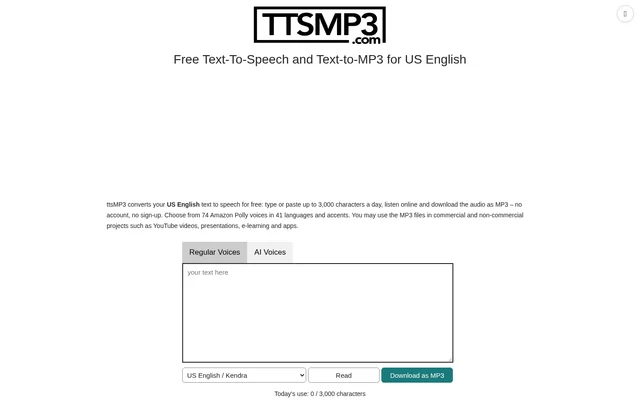
ttsMP3 starts with text entered into the website's converter. Users type or paste their content, then choose a voice from a list showing the language and speaker name. The Read button plays the speech in the browser, while Download as MP3 saves the audio file. Longer texts are processed in the background, and the page must remain open until the audio is ready.
ttsMP3 accepts speech-control tags directly within the input text rather than requiring a separate editing application. The website supplies examples for breaks, emphasis, speed, pitch and whispered speech, along with speaker-switching syntax. Speaker names with diacritical marks must be entered without those marks. The website also recommends leaving a space after a sentence-ending dot for better pronunciation.
Who ttsMP3 is for
ttsMP3 serves people who need spoken audio for content, teaching materials or digital products. The website explicitly permits commercial and non-commercial projects, including audio created through free usage. Generated MP3 files do not require a credit to ttsMP3, which makes the stated usage terms relevant to creators publishing or distributing their work.
- ttsMP3 supplies voiceovers for YouTube videos.
- ttsMP3 creates spoken audio for podcasts and presentations.
- ttsMP3 generates narration for e-learning courses.
- ttsMP3 produces audio for websites and apps.
ttsMP3 pricing and plans
ttsMP3 offers a free allowance of 3,000 characters per day, described on the website as about 375 words. Daily usage appears below the converter and resets every day. Paid options range from a 24-hour pass to monthly and yearly plans, with allowances reaching up to 10 million characters. Every yearly plan includes access to the text-to-speech API.
ttsMP3 strengths and limitations
ttsMP3 combines account-free browser access, multilingual Amazon Polly voices and MP3 export. Commercial usage permission applies to both free and paid conversions, and attribution is not required. SSML controls and speaker switching support more varied delivery than selecting a voice alone. The main access constraints concern the free daily allowance, processing longer texts and obtaining API access.
- ttsMP3 caps free usage at 3,000 characters per day.
- ttsMP3 needs the page to stay open while longer texts finish processing.
- ttsMP3 provides API access as a yearly-plan benefit.
ttsMP3 FAQ
What is ttsMP3?
ttsMP3 is a browser-based text-to-speech converter that lets users listen online and download generated speech as MP3 files. ttsMP3 uses Amazon Polly voices and supports content such as YouTube voiceovers, presentations, podcasts, e-learning, websites and apps.
Is ttsMP3 free?
ttsMP3 offers free conversion of up to 3,000 characters per day, including browser playback and MP3 downloads without an account or sign-up. ttsMP3 also offers paid options ranging from a 24-hour pass to monthly and yearly plans for higher usage.
Can ttsMP3 audio be used commercially?
ttsMP3 allows generated MP3 files to be used in commercial and non-commercial projects, including YouTube videos, podcasts, presentations, e-learning courses, websites and apps. This permission applies to both free and paid usage, and crediting ttsMP3 is not required.
Which voices and languages does ttsMP3 support?
ttsMP3 offers 74 regular Amazon Polly voices across 41 languages and accents, including US and British English, German, Spanish, French, Japanese and Arabic. Many languages include multiple male and female speakers, and users can switch speakers within a single text.
Can ttsMP3 change speech speed or add pauses?
ttsMP3 supports SSML tags entered directly into the text to add pauses, emphasize words, change speaking speed, adjust pitch and produce whispered speech. ttsMP3 also provides examples and links to an SSML guide and Amazon Polly tag documentation.
Does ttsMP3 have an API?
ttsMP3 includes text-to-speech API access with every yearly plan. ttsMP3 also offers a free browser converter and shorter premium options, while the website specifically identifies yearly plans as including API access.
From the community
No reviews yet
Be the first to review this tool. What you write helps the next person choose.