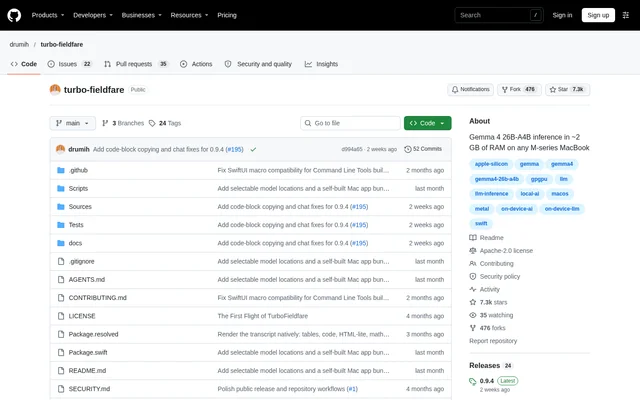
What is TurboFieldfare?
TurboFieldfare is an open-source runtime for running the instruction-tuned Gemma 4 26B-A4B model on Apple Silicon Macs. TurboFieldfare targets local inference on machines with limited memory, including Macs with 8 GB of RAM. The project provides a native Mac app, command-line tools, and an experimental local server rather than requiring a single interface.
TurboFieldfare uses a custom Swift and Metal implementation specific to the supported model, rather than wrapping MLX or llama.cpp. The runtime keeps the shared core and FP16 KV cache in memory and streams the experts needed for each token from SSD. This design avoids loading the entire 14.3 GB text model into memory.
What TurboFieldfare can do
TurboFieldfare supports local text generation through interfaces that share the same .gturbo model directory. The native app handles Gemma chat formatting automatically and saves conversations locally. The CLI supports instruction chat and raw completion, while the experimental loopback server exposes an OpenAI-compatible Chat Completions interface for local clients.
- TurboFieldfare generates responses to instruction prompts and conversation messages.
- TurboFieldfare accepts image input after installation of the companion vision pack.
- TurboFieldfare provides streaming responses through the local server.
- TurboFieldfare returns model-produced tool calls for clients to authorize and execute.
- TurboFieldfare exposes sampling, context-length, and expert-cache controls.
- TurboFieldfare verifies completed model installations using manifests and file hashes.
How TurboFieldfare works
TurboFieldfare starts with cloning the repository and building the complete release package with Swift. The complete build includes the foreground Mac app and its sibling decode service. In the app, users choose Download Model, wait for installation, select Load Model, enter a prompt, and choose Generate. Existing installations can also be selected from their .gturbo folder.
TurboFieldfare downloads required byte ranges from a pinned Hugging Face revision and repacks them directly into the model layout. The installer avoids creating a second full source checkpoint and supports resuming interrupted downloads. The app, CLI, and server reuse the installed model, but only one model-owning product should run at a time.
Who TurboFieldfare is for
TurboFieldfare serves Apple Silicon Mac users who want to run the supported Gemma model locally, including users of memory-constrained machines. TurboFieldfare also provides developer-facing access through a Swift library, CLI, and local server. Text-only inference remains available on M1 Macs, while image input requires an M2 or newer Apple Silicon Mac.
- TurboFieldfare supports local instruction conversations in the native Mac app.
- TurboFieldfare supports scripted generation through standard output from the CLI.
- TurboFieldfare supports image questions through the optional vision companion pack.
- TurboFieldfare supports local client connections through OpenAI-compatible Chat Completions.
TurboFieldfare pricing and access
TurboFieldfare is distributed as an open-source project under the Apache-2.0 license, with installation instructions based on building the repository. The app-bundling script uses ad-hoc signing, so an Apple developer account is not required. Model weights remain in their selected folder rather than being included in the app bundle, and the first model installation requires an internet connection.
TurboFieldfare strengths and limitations
TurboFieldfare combines memory-bounded inference, shared model storage, and app, CLI, and server access. The installer reduces duplicate checkpoint storage, and the app keeps chat history locally. Performance depends on hardware, prompt length, generated length, and page-cache state. TurboFieldfare can still produce repetitive or incorrect answers, so important results require checking.
- TurboFieldfare requires an arm64 Apple Silicon Mac with macOS 26 and Metal 4.
- TurboFieldfare requires Apple Command Line Tools or Xcode with Swift 6.2+ and the macOS 26 SDK or newer.
- TurboFieldfare needs about 14.3 GB for the text model, plus about 1.1 GB for the optional image pack.
- TurboFieldfare does not support audio or video.
- TurboFieldfare does not expose or execute tools in the app or CLI; server clients must authorize and execute tool calls.
TurboFieldfare FAQ
What is TurboFieldfare?
TurboFieldfare is an open-source Swift and Metal runtime for local Gemma 4 26B-A4B inference on Apple Silicon Macs. TurboFieldfare streams model experts from SSD instead of loading the entire model into memory and provides a native app, CLI, and experimental local server.
Is TurboFieldfare open source?
TurboFieldfare is an open-source project available under the Apache-2.0 license. TurboFieldfare is obtained by cloning the repository and building the Swift package, with a separate model installation required before generation. The app-building script does not require an Apple developer account.
What Mac does TurboFieldfare require?
TurboFieldfare requires an Apple Silicon Mac, macOS 26 with Metal 4, and Apple Command Line Tools or Xcode with Swift 6.2+ and the macOS 26 SDK or newer. Text-only inference supports M1 Macs, while image input requires M2 or newer hardware.
How much memory and storage does TurboFieldfare use?
TurboFieldfare lists about 2 GB for weights and a 4K KV cache, with about 14.3 GB of storage for the text model. The optional image pack adds about 1.1 GB. TurboFieldfare supports Macs with 8 GB of RAM by streaming required experts from SSD.
Does TurboFieldfare have an OpenAI-compatible API?
TurboFieldfare includes an experimental loopback OpenAI-compatible server supporting Chat Completions, streaming, function tools, and single-prefix prompt reuse. TurboFieldfare returns model-produced tool calls, but the client must authorize and execute them. The app and CLI do not expose or execute tools.
Does TurboFieldfare support images, audio, or video?
TurboFieldfare supports images through an optional companion vision pack used by the app, CLI, and server. Image input requires an M2 or newer Apple Silicon Mac. TurboFieldfare reports image support as unavailable without the companion pack and does not support audio or video.
From the community
No reviews yet
Be the first to review this tool. What you write helps the next person choose.