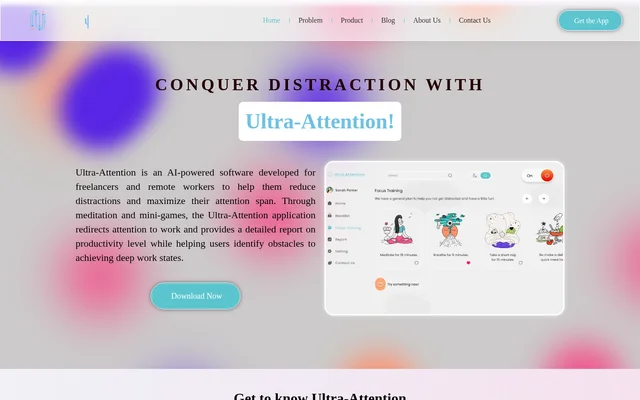
What is Ultra-Attention?
Ultra-Attention is AI-powered software for detecting distractions and supporting focus during computer work. Ultra-Attention is designed especially for freelancers and remote workers who find it difficult to maintain attention over extended working periods. The software combines monitoring, notifications, application restrictions, and attention exercises rather than relying on application blocking alone.
Ultra-Attention uses machine learning to become familiar with individual working habits and facial expressions. The website describes this personalization as a way to adapt distraction detection to users’ needs. Ultra-Attention also provides productivity reports intended to help users understand obstacles to deep work and recognize patterns in their attention.
What Ultra-Attention can do
Ultra-Attention combines signals from computer activity and webcam-based observation to identify distraction. Ultra-Attention then offers ways to respond, including notifications, limits on distracting applications, and Focus Training activities. Reporting complements these immediate interventions by giving users a longer-term view of their working habits.
- Ultra-Attention tracks eye movements through a webcam to detect distraction and fatigue.
- Ultra-Attention follows mouse cursor movements and tracks application use.
- Ultra-Attention tracks website activity.
- Ultra-Attention limits selected applications through its Blocklist.
- Ultra-Attention sends real-time notifications when distraction is detected.
- Ultra-Attention offers meditation and mini-games for attention training.
- Ultra-Attention produces daily, weekly, and monthly productivity reports.
How Ultra-Attention works
Ultra-Attention observes gaze direction, mouse cursor movements, and application activity while users work on a computer. Ultra-Attention also describes analyzing mood and facial expressions as part of distraction detection. Webcam-based eye tracking supplies information used to identify signs of distraction and fatigue.
Ultra-Attention allows users to designate applications as unnecessary or distracting through the Blocklist. When distraction is detected, real-time notifications draw attention to the interruption. Users can also choose Focus Training activities that suit them, while productivity reports provide information for reviewing habits and scheduling work around more productive periods.
Who Ultra-Attention is for
Ultra-Attention targets freelancers, remote workers, self-employed people, and other computer users who struggle to stay focused while working. Ultra-Attention addresses home-working situations where interruptions interfere with normal workflows, alongside broader computer-based tasks that demand sustained attention. The stated use cases center on managing distractions and understanding personal work patterns.
- Ultra-Attention helps remote workers recognize interruptions during computer-based work.
- Ultra-Attention lets freelancers limit applications they consider unrelated to their tasks.
- Ultra-Attention provides attention exercises for users practicing sustained focus.
- Ultra-Attention helps users review productivity patterns before planning their working day.
Ultra-Attention strengths and limitations
Ultra-Attention brings distraction monitoring, application limits, attention exercises, and reporting into the same application. This combination supports both immediate responses to interruptions and later review of working habits. Ultra-Attention’s eye-tracking functionality depends on a webcam, so that part of distraction detection requires camera access rather than application activity alone.
Getting started with Ultra-Attention
Ultra-Attention is offered through download links on the product website. The described features include selecting distracting applications for the Blocklist, choosing suitable Focus Training activities, and reviewing productivity reports. The supplied page does not specify supported operating systems, installation requirements beyond the described webcam functionality, or pricing and subscription options.
Ultra-Attention FAQ
What is Ultra-Attention?
Ultra-Attention is AI-powered focus software that detects distractions and helps computer users redirect attention to work. Ultra-Attention combines application blocking, real-time notifications, attention exercises, and productivity reporting, with particular emphasis on freelancers and remote workers.
How does Ultra-Attention detect distractions?
Ultra-Attention detects distractions using machine learning, webcam-based eye tracking, mouse cursor movements, and application activity. Ultra-Attention also describes analyzing facial expressions and mood, while learning individual working habits to adapt distraction detection to users’ needs.
Can Ultra-Attention block distracting applications?
Ultra-Attention includes a Blocklist that lets users limit applications they consider unnecessary or distracting during work. Ultra-Attention also tracks application and website activity and provides notifications when distraction is detected.
What is Ultra-Attention Focus Training?
Ultra-Attention Focus Training provides activities intended to help users practice attention and return focus to their tasks. Ultra-Attention describes meditation and mini-games as part of its approach and allows users to choose activities that suit them.
What productivity reports does Ultra-Attention provide?
Ultra-Attention provides daily, weekly, and monthly productivity reports. Ultra-Attention uses these reports to help users understand working habits, identify obstacles to deep work, and schedule their day around periods of higher productivity.
Does Ultra-Attention require a webcam?
Ultra-Attention requires a webcam for its eye-tracking functionality, which follows eye movements to detect signs of distraction and fatigue. Ultra-Attention also describes other monitoring signals, including mouse cursor movements and application activity.
From the community
No reviews yet
Be the first to review this tool. What you write helps the next person choose.