What is UXSniff?
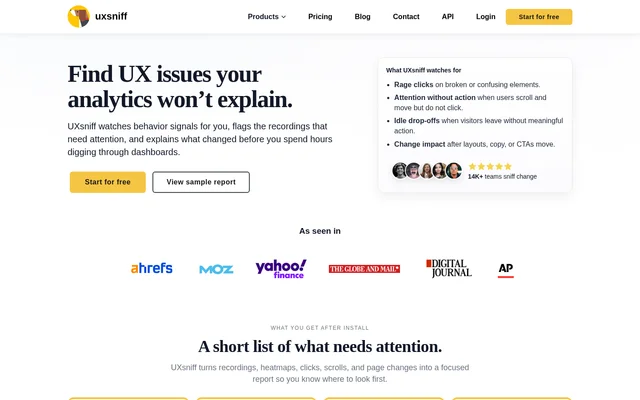
UXSniff is a website behavior analytics tool that helps teams investigate what happened after a site change. Designed for websites ranging from small startup sites to those managed by agencies and enterprises, UXSniff combines change detection with historical comparisons, heatmaps, and session recordings. The focus is on changes that have already shipped, including releases that went live without a planned experiment.
What UXSniff can do
UXSniff helps teams decide where to look when visitor behavior shifts. Change Radar detects UX changes and flags those that coincide with behavior shifts. Impact Reports summarize what changed and where, while heatmaps and recordings provide evidence for a closer look at how visitors interacted with the site.
- Change Radar continuously detects UX changes.
- Impact Reports connect detected changes with behavior signals.
- Retro A/B Testing compares historical visitor behavior before and after a change.
- Heatmaps and session recordings show how visitors interact with a website.
- Site audits and LinkGuard support ongoing site checks.
How UXSniff works
UXSniff collects website interaction data through a tracking code installed on the site. A recorded session covers a visitor’s journey, including the pages they visit and their interactions. UXSniff provides installation guides for WordPress, Shopify, Wix, Webflow, ClickFunnels, Squarespace, Unbounce, Weebly, and Google Tag Manager.
UXSniff uses historical data for its Retro A/B workflow. After an update ships, a team can compare visitor behavior before and after the change without having set up an experiment or split traffic in advance. Heatmaps and session recordings can then help the team inspect the behavior behind a reported shift.
Who UXSniff is for
UXSniff is for website teams that need to investigate releases even when they did not plan an experiment. The Poodle plan is aimed at small sites and startups, while the Wolf Pack plan is aimed at agencies and enterprises. The same workflow can support ongoing UX monitoring or a focused review after a metric moves.
- Investigate behavior changes after a quiet release.
- Review heatmaps and recordings when a metric shifts.
- Prioritize which detected changes need a closer look.
- Monitor for UX changes between planned experiments.
UXSniff strengths and limitations
UXSniff is useful when a team needs to narrow an investigation after a website update has already shipped. Change Radar and Impact Reports help identify where to look, and heatmaps and recordings support a closer review. UXSniff presents these comparisons as a complement to traditional A/B testing, not a substitute for a controlled experiment. The team still decides what to ship next.
- A before-and-after comparison does not isolate the effect of a change.
- Recording volume, pageviews, and data retention depend on the plan.
- The Developer API is listed from Hound upward.
- Website tracking requires an installed tracking code.
UXSniff FAQ
What is UXSniff?
UXSniff is a website behavior analytics tool for detecting UX changes and investigating shifts in visitor behavior. Change Radar flags changes that line up with behavior shifts, while Impact Reports summarize what changed and provide heatmaps and recordings as supporting evidence.
Does UXSniff replace traditional A/B testing?
UXSniff does not replace traditional A/B testing. Its Retro A/B Testing feature compares historical visitor behavior before and after a change has shipped, without requiring a preconfigured experiment or a traffic split. The comparison helps teams investigate releases that went live without a test.
How do you install UXSniff on a website?
UXSniff is installed by copying its tracking code into the website that will be monitored. UXSniff provides installation guides for WordPress, Shopify, Wix, Webflow, ClickFunnels, Squarespace, Unbounce, Weebly, and Google Tag Manager.
Does UXSniff have a developer API?
UXSniff lists a Developer API on the Hound plan. The K-9 plan includes everything in Hound, and Wolf Pack includes everything in K-9, so the Developer API is listed on those higher tiers as well.
From the community
No reviews yet
Be the first to review this tool. What you write helps the next person choose.