What is Verkada?
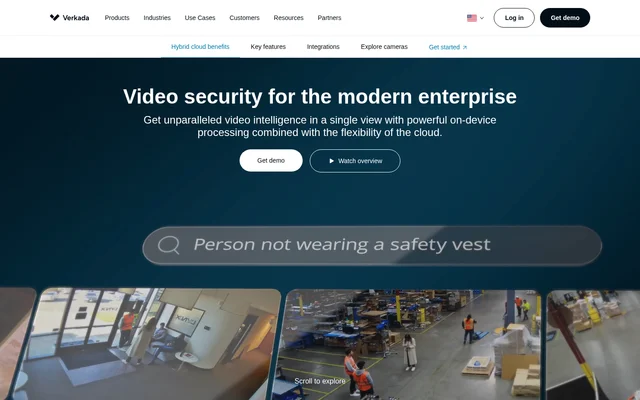
Verkada is an enterprise video security system that combines security cameras with a cloud-based management platform called Verkada Command. The hybrid cloud design processes and stores data both on the camera and in the cloud, so organizations can manage cameras across sites without separate network video recorders or servers. Security teams can review footage and alerts in Verkada Command, while operations teams can use video analytics to study activity on site.
What Verkada can do
Verkada uses computer vision to help teams find footage, monitor events, and analyze activity. Teams can search for people and vehicles, turn AI search queries into alerts, or review events from multiple cameras on a map-based timeline. Alerts can go to a security operations center, specific individuals, or a third-party mass notification system.
- Verkada searches footage using people and vehicle analytics.
- Verkada supports face search and reverse image search.
- Verkada sends alerts for motion, line crossings, and camera tampering.
- Verkada combines events from multiple cameras into a map-based timeline.
- Verkada analyzes movement patterns, sales conversion rates, and customer wait times.
How Verkada works
Verkada runs video analytics on the camera and uses Verkada Command for cloud-based management. Administrators can provision users, receive system and device health notifications, and get software and firmware updates over the air. Feature Manager lets organizations control which privacy-sensitive features, such as facial recognition and selective face blurring, are available to users. APIs and built-in integrations support connections to third-party systems, while Command Connector helps migrate legacy cameras to the cloud.
Who Verkada is for
Verkada is designed for enterprise security and operations teams that manage cameras across properties. Security teams can use footage and alerts to review incidents and monitor premises. Retail teams can link point-of-sale events to footage of specific transactions, and manufacturing teams can use logged events to find footage of particular stages in an operation.
- Investigate incidents across cameras on a property.
- Review video tied to a retail transaction.
- Find footage of a logged manufacturing step.
- Measure customer wait times and study movement patterns.
Verkada pricing and plans
Verkada lists camera hardware prices in its US catalog and requires an additional license. For example, the CM22 mini camera is listed at $699 USD MSRP, and the CD22 indoor dome camera is listed at $799 USD MSRP. Both figures cover hardware only. The pricing page says every purchase includes AI-based analytics, unlimited users, automatic updates, and technical support. Organizations can request a quote or start a 30-day free trial that includes one device and full access to Verkada Command.
Verkada strengths and limitations
Verkada combines onboard video processing and storage with centralized cloud management. Cameras encrypt video at rest and in transit by default, and organizations can use enterprise-controlled encryption and choose where data is stored and processed. Camera models differ in their onboard retention options, so organizations should check retention when selecting hardware. The catalog hardware price does not include the required license.
- Camera hardware requires a separate license.
- Onboard retention options vary by model.
- The trial includes only one device.
Getting started with Verkada
Verkada offers a demo, a product catalog, a quote request, and a free trial. Organizations can compare camera types by the area they need to cover, such as a mini camera for tight spaces, a fisheye camera for expansive areas, or a remote model with a built-in battery and LTE modem. The catalog provides model datasheets and retention options, while the trial provides access to Verkada Command.
Verkada FAQ
What is Verkada?
Verkada is an enterprise video security system that combines on-camera processing and storage with cloud-based management in Verkada Command. Security teams can use Verkada to manage cameras across sites, search footage with AI, and configure alerts for events such as motion or camera tampering.
Is Verkada free?
Verkada is a paid system with a 30-day free trial that includes one device and full access to Verkada Command. The US pricing catalog lists hardware prices separately from the required license and offers a quote request.
How does Verkada search security camera footage?
Verkada uses AI-based people and vehicle analytics, face search, and reverse image search to find relevant footage. Verkada can also combine video events from multiple cameras on a map-based timeline to show how people and vehicles moved across a property.
Does Verkada have an API or third-party integrations?
Verkada offers APIs and out-of-the-box integrations for connecting cameras and third-party systems. For example, Verkada can link point-of-sale events or logged manufacturing steps to camera footage so teams can review the video associated with a specific transaction or process.
How long do Verkada cameras store video?
Verkada cameras offer onboard storage ranging from 30 to 365 days, depending on the model and retention option. The US catalog lists 30 to 90 days of retention for the CM22 mini camera and 30 to 365 days for the CD43 indoor dome camera.
From the community
No reviews yet
Be the first to review this tool. What you write helps the next person choose.