What is Video Tap?
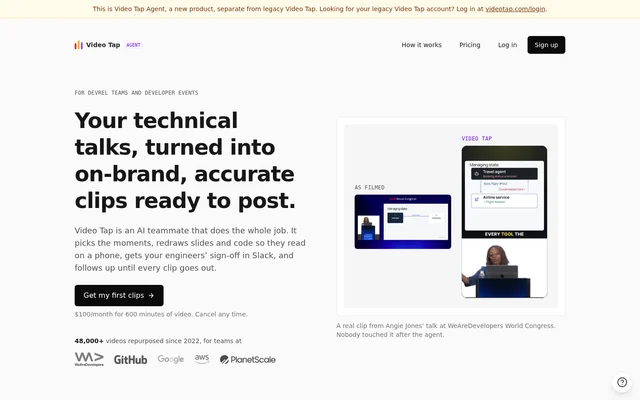
Video Tap is an AI video repurposing tool focused on technical content for developer relations teams and developer events. Video Tap selects moments from recordings and turns them into branded clips, with code, diagrams and slides rebuilt for viewing on a phone. The workflow also covers technical questions, team approval and scheduling rather than stopping at clip generation.
Video Tap’s current agent offering is a new product separate from legacy Video Tap. The source describes a focus on teams with backlogs of developer talks that marketing or developer relations staff repurpose alongside their other work. The new offering has its own accounts and subscription, with no carryover from the legacy service.
What Video Tap can do
Video Tap combines video editing with a review workflow for technical material. Video Tap uses website branding for captions, hooks and end cards while retaining the original speaker’s fonts, colors and layout in rebuilt slides. The source also describes posts written in the team’s voice and LinkedIn carousels containing code and slides.
- Video Tap finds moments from talks to turn into shareable clips.
- Video Tap redraws code, diagrams and slides for phone screens.
- Video Tap produces vertical, square or portrait clips with captions and posts.
- Video Tap checks on-screen words against the speaker’s statements.
- Video Tap asks engineers about claims that cannot be confirmed.
- Video Tap reminds reviewers, sends a Monday digest and tracks clip performance.
How Video Tap works
Video Tap accepts a file upload, a talk dropped into Slack or a pasted link. Supported link sources include YouTube, Google Drive, Dropbox, Loom, Vimeo, Wistia and Vidyard, along with webinar pages and direct video files. Slack is optional: the source states that the complete workflow also works in the web app.
Video Tap sends clips to chosen approvers and reviewers through Slack or email, with browser review available without an account. Reviewers can approve clips or request fixes. After social accounts are connected, Video Tap schedules approved clips; clips with open questions still wait for a person. The source lists YouTube Shorts, LinkedIn, X and Instagram Reels among supported services.
Who Video Tap is for
Video Tap is designed for developer relations teams, developer events and marketers working with technical recordings. Video Tap focuses on content containing code, diagrams and demos, where a simple crop can remove information or make slides unreadable. Supported recording types also include interviews, webinars and livestreams, allowing teams to repurpose more than conference presentations.
- Video Tap turns recorded developer talks into social clips.
- Video Tap prepares technical clips for engineer review before publication.
- Video Tap makes presentation slides and code readable in mobile formats.
- Video Tap repurposes interviews, webinars and livestreams into captioned posts.
Video Tap pricing and plans
Video Tap’s agent subscription costs $100/month and includes 600 minutes of video each month. Video Tap usually produces 3 to 5 clips per talk, each with captions and a post, and users can request more or fewer. Billing is monthly, and cancellation is available at any time.
Video Tap holds new talks until the next month when the included 600 minutes are used. Teams needing additional capacity can contact [email protected] for custom pricing. The listed subscription also includes an accuracy pass, questions before publication, an account-free review link for an approver and a team glossary that learns from corrections.
Video Tap strengths and limitations
Video Tap addresses a specific problem in technical video editing: preserving readable slides, code and diagrams while adapting a recording for mobile viewing. Video Tap also brings engineers into the review process and retains product terminology through corrections. The source states that submitted videos are not used to train AI, and reviewers can participate without creating an account.
- Video Tap pauses new talk processing after the monthly allowance is exhausted unless additional capacity is arranged.
- Video Tap requires human approval for clips with unresolved questions.
- Video Tap’s new agent accounts and subscription are separate from legacy Video Tap.
Video Tap FAQ
What is Video Tap?
Video Tap is an AI video repurposing tool for developer relations teams and developer events. Video Tap turns technical recordings into branded clips, rebuilds slides and code for phone screens, checks technical claims and routes content through team review.
How much does Video Tap cost?
Video Tap costs $100/month for its agent subscription, including 600 minutes of video each month. Billing is monthly, and users can cancel at any time. New talks wait until the next month once the allowance is used, with custom pricing available for additional minutes.
What recordings can you send to Video Tap?
Video Tap accepts recordings of talks, interviews, webinars and livestreams through uploads, Slack or pasted links. Supported sources include YouTube, Google Drive, Dropbox, Loom, Vimeo, Wistia and Vidyard, as well as webinar pages and direct video files.
Does Video Tap need Slack?
Video Tap does not require Slack because the workflow also works in the web app. Video Tap supports Slack submissions and review conversations, while chosen approvers can also receive review requests by email and review clips in a browser without an account.
Does Video Tap publish clips automatically?
Video Tap schedules clips after social accounts are connected and publishing is authorized. Chosen reviewers can approve content, or users can allow the agent to approve clips it is confident about. Any clip with an unresolved question still requires a person.
Does Video Tap train AI on uploaded videos?
Video Tap states that uploaded videos are not used to train AI. Video Tap separately describes a team glossary that learns product names from corrections and a performance feedback process that helps select moments for future clips.
From the community
No reviews yet
Be the first to review this tool. What you write helps the next person choose.