What is VideoEditorAI?
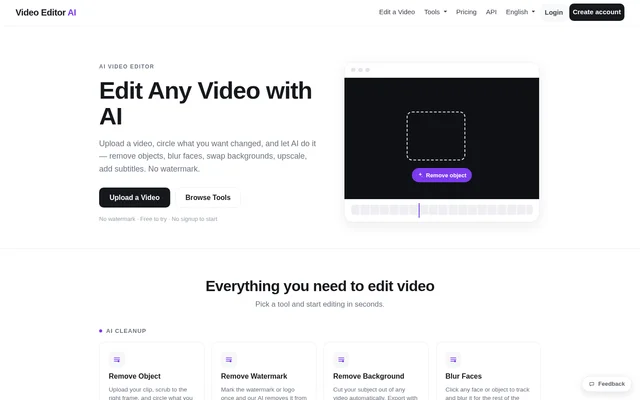
VideoEditorAI is a web-browser video editor that combines AI cleanup, enhancement, basic editing, and audio and text tools. VideoEditorAI supports people preparing social clips, removing distractions from footage, protecting identities, or making spoken content available as captions and translations. The website offers an upload-based starting point without requiring signup.
VideoEditorAI groups its tools around specific editing tasks rather than presenting only a general editing workspace. The listed options range from removing an object or background to merging clips and generating a voiceover. VideoEditorAI also advertises watermark-free editing, a free trial and a paid Pro subscription.
What VideoEditorAI can do
VideoEditorAI provides tools for changing visual content, improving footage and adding spoken or written material. The cleanup tools use marking or selection to identify what should change, while enhancement tools address resolution and motion. Basic editing options cover clip length, framing, sequence and playback speed.
- VideoEditorAI removes marked objects and reconstructs the space behind them across the clip.
- VideoEditorAI removes watermarks or logos after a user marks them.
- VideoEditorAI removes backgrounds and supports transparent export or background replacement.
- VideoEditorAI tracks and blurs selected faces or objects.
- VideoEditorAI upscales footage and adds interpolated frames for slow motion.
- VideoEditorAI trims, crops, merges and changes video speed.
- VideoEditorAI generates styled captions and transcripts with timed SRT files.
- VideoEditorAI translates and dubs videos or generates voiceovers from scripts.
How VideoEditorAI works
VideoEditorAI starts with uploading a video and choosing an editing tool. For object removal, the stated workflow is to scrub to the relevant frame and circle the unwanted object. VideoEditorAI then tracks the object across the frames and fills the area behind it. Watermark removal similarly begins with marking the watermark or logo.
VideoEditorAI uses different controls for basic edits: users drag handles to trim a clip, drag clips to reorder a merged video, or choose a speed multiplier. Voiceover creation starts with writing a script and selecting a voice. VideoEditorAI generates the voiceover track and combines the track with the video.
Who VideoEditorAI is for
VideoEditorAI supports social video preparation, identity protection and footage cleanup through its listed tools. The website specifically names Instagram, TikTok and YouTube as cropping destinations and describes captions for social clips watched on mute. Blurring applies to faces, objects and license plates, while upscaling targets old or low-quality footage.
- VideoEditorAI helps social creators reframe clips and add readable captions.
- VideoEditorAI helps users obscure faces and license plates in footage.
- VideoEditorAI helps users improve the resolution of older videos.
- VideoEditorAI helps users translate and dub spoken video content.
VideoEditorAI pricing and plans
VideoEditorAI is free to try, and the website states that signup is not required to start. VideoEditorAI Pro costs $12 per month. The paid plan lists unlimited video editing, no conversion limit, no restricted functions, faster and higher-quality videos, and the ability to request additional conversion tools.
VideoEditorAI also lists team pricing: each extra person costs 15% less when a team has 3 or more people. The pricing page provides a people selector and a subscription option. The supplied text does not specify the free trial's editing allowance, conversion allowance or individual feature restrictions.
VideoEditorAI strengths and limitations
VideoEditorAI combines visual cleanup, standard clip editing, subtitles, transcription, dubbing and voiceover generation in a browser-based offering. The free-to-try entry point requires no signup, and the website advertises no watermark. These stated features cover several tasks involved in preparing a video without describing separate software installation.
- VideoEditorAI does not specify free-trial usage limits in the supplied text.
- VideoEditorAI does not list supported upload formats or file-size limits in the supplied text.
- VideoEditorAI does not provide export-resolution specifications in the supplied text.
VideoEditorAI FAQ
What is VideoEditorAI?
VideoEditorAI is a browser-based AI video editor with tools for object removal, background removal, face blurring, upscaling and subtitles. VideoEditorAI also includes basic clip editing, transcription, translation, dubbing and script-based voiceover generation.
Is VideoEditorAI free?
VideoEditorAI is free to try without signup, and the website advertises no watermark. VideoEditorAI also offers a Pro subscription at $12 per month, including unlimited video editing, no conversion limit and unrestricted functions.
How does VideoEditorAI remove objects from videos?
VideoEditorAI removes objects after a user uploads a clip, scrubs to the relevant frame and circles the unwanted object. VideoEditorAI tracks the object across every frame and fills the space behind the removed object.
Can VideoEditorAI add subtitles and export transcripts?
VideoEditorAI automatically transcribes video and burns in styled captions. VideoEditorAI also converts spoken audio into text and a ready-to-use SRT file with word-level or segment-level timing.
Can VideoEditorAI blur faces and license plates?
VideoEditorAI lets users click a face or object to track and blur the selection for the rest of the clip. VideoEditorAI describes this feature as a way to protect identities and obscure license plates.
Can VideoEditorAI translate videos or create voiceovers?
VideoEditorAI automatically translates and dubs videos into another language with natural-sounding voices. VideoEditorAI also generates a voiceover from a written script and selected voice, then combines the generated track with the video.
From the community
No reviews yet
Be the first to review this tool. What you write helps the next person choose.