What is VideoProc?
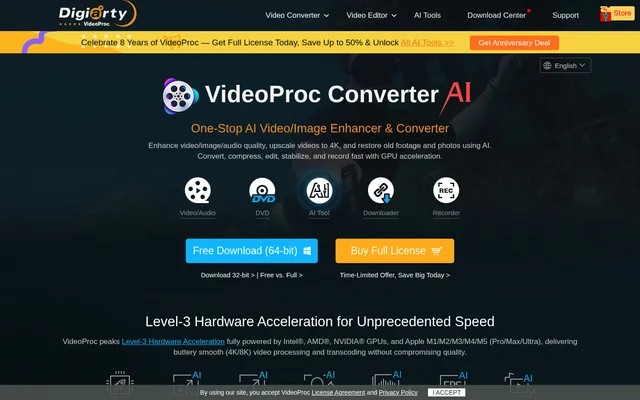
VideoProc is a downloadable video converter and AI media processing tool for video, images and audio. VideoProc combines enhancement and restoration with practical tasks such as format conversion, compression, editing and recording. The page describes uses for beginners, camera enthusiasts and full-time DSLR professionals, including preparing footage for playback, storage and online sharing.
VideoProc supports footage from smartphones, action cameras, drones, DSLR cameras, camcorders and computer cameras. VideoProc also includes DVD conversion and backup tools, alongside audio extraction and conversion. This combination covers media preparation tasks beyond video editing, such as restoring photographs, separating song vocals and recording screen activity.
What VideoProc can do
VideoProc combines AI enhancement with conventional media utilities. VideoProc offers video super resolution, frame interpolation and stabilization, while image tools address blur, noise, facial details and black-and-white photographs. Audio processing includes vocal separation and noise suppression. Conversion and editing tools handle file formats, clip arrangement, subtitles and output settings.
- VideoProc upscales videos and generates frames for smoother playback or slow motion.
- VideoProc enhances images, restores faces and colorizes black-and-white photos.
- VideoProc extracts vocals or instrumentals and suppresses background noise.
- VideoProc converts, remuxes and compresses video and audio files.
- VideoProc cuts, crops and merges clips and adds external subtitles.
- VideoProc converts DVDs and records screens or webcams.
How VideoProc works
VideoProc is obtained through download links on the product page, with separate builds for different system architectures and graphics-driver ages. VideoProc supports video cropping on Windows and Mac. The page also provides technical specifications and describes hardware acceleration using Intel, AMD and NVIDIA GPUs, as well as Apple chips.
VideoProc lets users tailor output through format conversion, resolution changes and quality controls. VideoProc includes bitrate settings, variable or constant bitrate options and encoding controls. For recording, users can capture the screen, webcam or both, record system sound or voice, and add drawings, text, highlights or voiceover during capture.
Who VideoProc is for
VideoProc addresses beginners and experienced camera users who need to prepare recorded media for practical use. VideoProc specifically describes workflows for iPhone footage, GoPro action clips, DJI drone recordings and DSLR video. Social sharing, device compatibility and storage management recur throughout the page, alongside photo restoration and audio cleanup for vlogs and podcasts.
- VideoProc stabilizes action footage from cycling, surfing and snowboarding recordings.
- VideoProc compresses smartphone videos for storage and sharing.
- VideoProc converts camera footage for playback across devices.
- VideoProc reduces background noise in vlogs, podcasts and recordings.
VideoProc pricing and plans
VideoProc offers a free trial download and a paid full license. VideoProc provides links to a free-versus-full comparison and license purchase options, but the supplied page text does not state a license price or describe the trial restrictions. Download choices include versions suited to newer systems and alternatives for older graphics drivers.
VideoProc strengths and limitations
VideoProc brings enhancement, conversion, editing and recording into a single media toolbox. VideoProc supports varied camera sources and offers GPU acceleration alongside output controls for users who need to adjust encoding settings. Access and installation still require attention: the full version uses a paid license, and the page distinguishes downloads by system architecture and graphics-driver age.
- VideoProc requires purchasing a license for the full version.
- VideoProc directs users to different downloads based on their system.
- VideoProc does not specify trial restrictions in the supplied page text.
VideoProc FAQ
What is VideoProc?
VideoProc is a downloadable media processing tool that combines AI enhancement with video conversion, compression, editing and recording. VideoProc also processes images and audio, with tools for photo restoration, colorization, vocal separation and background noise suppression.
Is VideoProc free?
VideoProc offers a free trial download and a paid full license. VideoProc links to a free-versus-full comparison, but the supplied page text does not state the license price or explain which restrictions apply to the trial.
Can VideoProc enhance old videos and photos?
VideoProc provides AI video upscaling and image restoration tools for low-quality footage and photographs. VideoProc can reduce blur and noise, restore faces, colorize black-and-white photos and generate additional frames for smoother video playback or slow-motion sequences.
Does VideoProc record screens and webcams?
VideoProc captures video from the screen, webcam or both, with options to record system sound or voice. VideoProc also supports chroma key, drawing, typing, highlighting and voiceover during recording, plus recording quality and format settings.
Who is VideoProc for?
VideoProc serves video editing beginners, camera enthusiasts and full-time DSLR professionals. VideoProc describes workflows for smartphone, GoPro, DJI, camcorder and computer-camera footage, including stabilization, compression, format conversion and editing before online sharing or playback on other devices.
From the community
No reviews yet
Be the first to review this tool. What you write helps the next person choose.