What is VoxDeck?
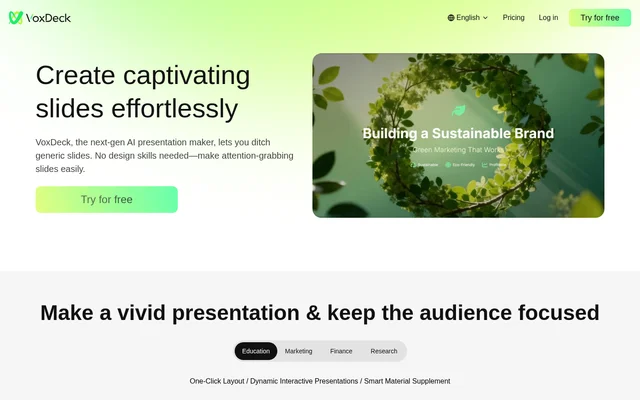
VoxDeck is an AI presentation maker for building slide decks for lessons, client pitches, work reports, and research briefings. The product page presents VoxDeck as a tool for people who do not have slide design skills. In addition to generating slides, VoxDeck handles visual tasks such as matching animations to slide content and keeping logos and colors consistent across a deck. VoxDeck also offers digital avatars to help deliver presentations.
What VoxDeck can do
VoxDeck combines slide creation, visual styling, and presentation delivery. The feature descriptions distinguish between animations that match the content of a slide and themes that set the look of the deck as a whole. Branding is handled separately through imported brand elements. For delivery, users can customize a digital avatar to narrate the deck and field questions from the audience.
- VoxDeck automatically adds animations that match slide content.
- VoxDeck switches themes without changing the underlying content.
- VoxDeck applies imported logos and brand colors across a deck.
- VoxDeck lets users customize a digital avatar to narrate slides and field audience questions.
How VoxDeck works
VoxDeck’s product page gives examples of decks built from raw ideas, rough notes, and imported lab experiment logs. Once the slide content is in place, users can change the deck’s style by selecting a different theme rather than reworking the content. Each theme includes a matching palette, fonts, and layout templates. Users who want a consistent branded look can import their brand elements rather than adjust the logo position or colors slide by slide.
Who VoxDeck is for
VoxDeck highlights education, marketing, finance, and research as settings for its presentation maker. In education, the examples include preparing lecture decks and using animation to explain concepts such as forces. Sales and marketing examples emphasize client pitches and consistent slides for brand events. Finance and research examples show how the tool can be used to present market outlooks, compare models, and turn experiment logs into step-by-step visuals.
- Create lecture decks from teaching notes.
- Build sales presentations from early ideas.
- Apply consistent branding to event slides.
- Prepare market outlook and board review decks.
- Show research procedures in step-by-step slides.
VoxDeck pricing and free access
VoxDeck can be tried for free through its product website. The free-access invitation appears alongside descriptions of animated slides, themes, brand consistency, and digital avatars. The page does not say whether all of those features are included in free access. VoxDeck’s product page also does not state how long free access lasts, list usage allowances, or provide a paid plan comparison.
VoxDeck strengths and limitations
VoxDeck is useful when a deck’s content needs to stay the same while its visual style changes. A theme can change the fonts, colors, and layouts without requiring revisions to the slide content, and imported brand elements reduce the need to adjust logos manually. VoxDeck also describes avatars that can field audience questions, although the page does not explain how that feature is configured or how the avatar handles those questions.
VoxDeck FAQ
What is VoxDeck?
VoxDeck is an AI presentation maker that generates slides and automatically adds animations that match their content. VoxDeck also provides themes, deck-wide branding, and customizable digital avatars for narration and audience questions.
Is VoxDeck free to try?
VoxDeck is available to try for free through its product website. The page does not specify how long free access lasts, which features are included, or whether paid plans are available.
Who is VoxDeck for?
VoxDeck is for educators, marketers, sales teams, finance professionals, and researchers who create presentations. The product page shows examples of lecture decks, client pitches, market outlooks, and research briefings.
Can VoxDeck apply branding across a slide deck?
VoxDeck can apply imported brand elements across a slide deck. Users import their branding once, and VoxDeck keeps logos and colors consistent across slides without requiring manual adjustments to each slide.
Can a VoxDeck avatar present slides and answer questions?
VoxDeck offers customizable digital avatars that can narrate slides and field audience questions. The product page describes the avatar as a digital co-presenter that helps deliver the presentation as well as interact with the audience.
From the community
No reviews yet
Be the first to review this tool. What you write helps the next person choose.