What is WasItAI?
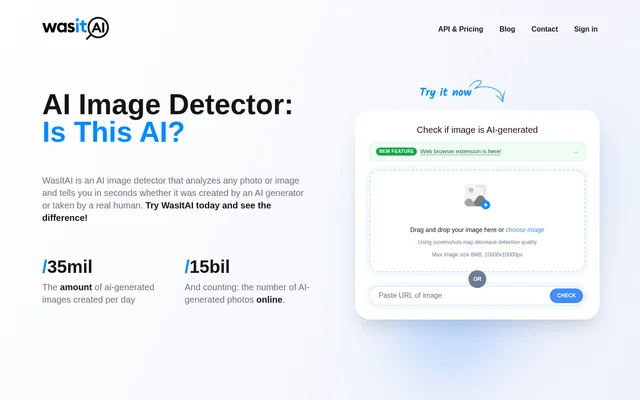
WasItAI is an AI image detector for checking whether a photo or image was generated by AI or created by a human. WasItAI supports individual image checks in a web browser and automated verification through an API. The website identifies marketplaces, dating apps and media workflows as business applications, alongside everyday checks of images encountered online.
WasItAI analyzes image characteristics and patterns against a database of real and AI-generated images. The website lists support for generators including Midjourney, DALL·E, GPT Image, Stable Diffusion, Adobe Firefly, Flux and Imagen. WasItAI also states that its detection model is updated to address new and emerging generators.
What WasItAI can do
WasItAI combines a browser-based image checker with optional extensions and an API. WasItAI provides detailed reports with confidence scores, while the extension displays a verdict directly over the image being checked. These access methods support both occasional manual checks and business workflows that need to examine larger volumes of images.
- WasItAI analyzes uploaded images and image URLs.
- WasItAI provides detailed reports with confidence scores.
- WasItAI extensions check images through hover buttons or right-click menus.
- WasItAI offers an API for automated image verification.
- WasItAI accepts reports of incorrect classifications.
How WasItAI works
WasItAI accepts a photo through an upload, drag-and-drop action or image URL. WasItAI then analyzes the image and returns a result indicating whether AI was used to generate it. The web checker works on desktop computers, smartphones and tablets without requiring an app or extension installation.
WasItAI also offers extensions for Chrome, other Chromium browsers such as Edge, Brave and Opera, and Firefox. Users can hover over an image and select the check button or use the right-click menu. WasItAI displays the verdict over the image, and users can disable the extension for individual sites. Extension access requires a free account that includes API access.
Who WasItAI is for
WasItAI serves people evaluating images online and businesses adding image authenticity checks to existing systems. The website describes risks involving misleading news images, fraudulent product listings, fake travel photographs and fabricated profile portraits. WasItAI offers manual checks for individual images and API access for businesses that need to verify large volumes automatically.
- WasItAI can check images encountered on news sites and social networks.
- WasItAI can support image verification in marketplace workflows.
- WasItAI can examine profile images on dating apps.
- WasItAI can check photographs used in travel listings.
WasItAI pricing and access
WasItAI permits limited guest usage and offers a free account when guest credits run out. Free sign-up credits renew monthly, and registration does not require a payment card. WasItAI directs users to its API & Pricing page for plans that include API access, which is also required for the optional browser extensions.
WasItAI strengths and limitations
WasItAI supports browser uploads, in-page extension checks and API-based automation. WasItAI states that images submitted for ordinary classification are processed once and are not stored for future use. Users reporting a wrong classification can separately consent to share and store the image to help evaluate and improve the model.
- WasItAI detection can be affected by image quality, resolution and generator complexity.
- WasItAI recommends original images because screenshots may decrease detection quality.
- WasItAI limits guest usage and requires API-enabled accounts for extensions.
- WasItAI lists its Safari extension as coming soon.
WasItAI FAQ
What is WasItAI?
WasItAI is an AI image detector that analyzes photos and images to identify whether they were generated by AI or created by a human. WasItAI examines image characteristics and patterns and provides detection results with confidence scores.
Is WasItAI free?
WasItAI offers limited guest usage and free account credits that renew monthly, with no payment card required for sign-up. WasItAI requires an account with API access for its optional browser extensions and directs users to its API & Pricing page for eligible plans.
Does WasItAI have a browser extension?
WasItAI offers browser extensions for Chrome, Chromium browsers including Edge, Brave and Opera, and Firefox. WasItAI lets users check images through a hover button or right-click menu. A free account with API access is required, and a Safari extension is listed as coming soon.
Does WasItAI have an API?
WasItAI provides an API for businesses to automate AI image detection across large volumes of images. WasItAI identifies marketplaces, dating apps and media workflows as examples of systems that can integrate image authenticity checks.
Does WasItAI store uploaded images?
WasItAI states that images uploaded for classification are processed once and are not stored on its servers for future use. WasItAI can store an image submitted with an incorrect-result report only when the user agrees to share that image.
What affects WasItAI detection quality?
WasItAI detection can be affected by image quality, resolution and the complexity of the AI used to generate an image. WasItAI recommends using the original image when possible because screenshots may decrease detection quality.
From the community
No reviews yet
Be the first to review this tool. What you write helps the next person choose.