What is Websim?
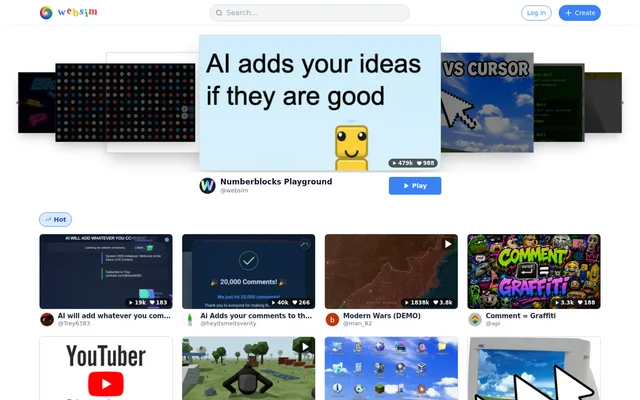
Websim is a community website that showcases playable games, simulators, and interactive projects. The homepage puts Numberblocks Playground in a featured spot and lists other projects with creator handles. Titles such as Windows XP Simulator, YouTuber Simulator, and Animation vs Cursor illustrate the range: some projects recreate a familiar interface or activity, while others focus on a playful interaction. Websim gives players a place to discover projects and offers a Create link for people interested in making one.
What Websim can do
Websim combines a featured playable project with feeds for discovering other work. Hot and Top are separate browse areas, and Top can be viewed over different time periods. Some projects use participation as part of the experience: the titles of several listings describe adding visitor comments to a game or turning comments into graffiti. These are examples from individual projects, not capabilities that the homepage promises for every project.
- Open Numberblocks Playground with the featured Play now button.
- Browse community projects in the Hot feed.
- Filter the Top feed by Today, Week, Month, or All time.
- Find comment-driven games among the listed projects.
- Use the Create link to reach the creation entry point.
How Websim works
Websim offers a direct Play now button for Numberblocks Playground and a broader browsing route through Hot and Top. The listings pair project titles with creator handles and counts, so visitors can identify who posted a project while browsing. Show more appears below both feeds for exploring beyond the initial entries. Websim also displays a Log In link and views labeled All, Liked, and Posted, but the homepage does not say which actions require an account.
Who Websim is for
Websim is relevant to people looking for community-made games to play and to prospective creators looking for examples of interactive project ideas. Players can look for simulations such as Windows XP Simulator or YouTuber Simulator. People interested in creative interaction can look at projects such as Make A Symbol Band! or Vehicle Construction Creator ALPHA. Comment-based projects offer a different kind of example for visitors interested in games shaped by audience contributions.
- Explore a simulation of a familiar interface or activity.
- Find a music or construction project to try.
- See how a community game incorporates comments.
Websim pricing and access
Websim does not state a price or describe any subscription plans on the homepage. The page shows Play now, Create, and Log In as separate entry points, but does not explain whether playing, creating, or account access carries a charge. A community project title beginning with Free AI Stuff appears in the Top feed. That wording belongs to a specific listing and does not establish whether Websim itself has a free tier.
Websim strengths and limitations
Websim makes it possible to move from a prominent playable example to a wider selection of projects without relying on a single feed. The time filters in Top let visitors distinguish recent listings from all-time ones, while visible creator handles help identify the people behind different projects. The homepage is more informative about discovery than about creation: it shows what community projects can look like without explaining the steps or tools used to build them.
- The homepage does not describe the project creation workflow.
- The homepage does not specify which actions require an account.
- The homepage does not list prices or plan terms.
Websim FAQ
What is Websim?
Websim is a community website for discovering and playing web games, simulators, and interactive projects. Websim highlights Numberblocks Playground on the homepage and shows creator handles on listings in its Hot and Top feeds.
Is Websim free?
Websim does not state its pricing on the homepage. Websim shows Play now, Create, and Log In links, but the page does not say whether gameplay or project creation is free, requires a paid plan, or has usage limits.
How do you find popular projects on Websim?
Websim lists popular projects in Hot and Top feeds on the homepage. The Top feed has Today, Week, Month, and All time views, and both feeds have a Show more option for browsing beyond the initial listings.
What kinds of projects can you play on Websim?
Websim showcases games, simulators, and creative experiments such as Numberblocks Playground, Windows XP Simulator, and Animation vs Cursor. Some community projects describe using comments as part of the experience, including a multiplayer listing whose title says AI adds whatever visitors comment.
Can you create projects on Websim?
Websim provides a Create link on its homepage and shows projects credited to individual creator handles. The homepage also displays a Log In link, but it does not explain the creation workflow or say whether logging in is required to start.
From the community
No reviews yet
Be the first to review this tool. What you write helps the next person choose.