What is Word Spinner?
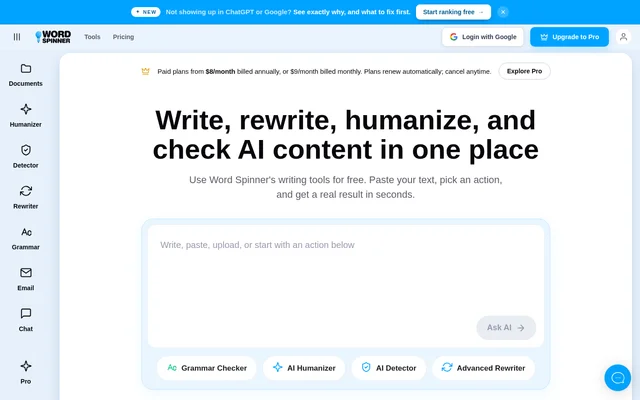
Word Spinner is a web-based AI writing toolkit that brings rewriting, humanization, grammar checking, AI detection, email generation, and chat into one place. Word Spinner serves business owners, job seekers, professionals, and students who need to turn rough notes or existing text into clearer writing.
Word Spinner supports both revising existing material and drafting new content. The website describes a workflow built around pasting text and selecting an action, alongside conversational tools for brainstorming and research. Free starting access does not require signup, while upgrade plans offer longer text handling and higher limits.
What Word Spinner can do
Word Spinner combines writing assistance with content checks and document utilities. The core tools address grammar, spelling, clarity, rewriting, and AI-generated text. Word Spinner also includes email drafting and conversational assistance, while a separate collection of free utilities converts documents, structured data, and web content into Markdown.
- Word Spinner humanizes pasted AI text.
- Word Spinner rewrites text using selectable rewrite modes.
- Word Spinner checks grammar, spelling, and clarity.
- Word Spinner provides a human-versus-AI signal for pasted text.
- Word Spinner drafts emails, subject lines, and calls to action from a brief.
- Word Spinner supports brainstorming, research, and drafting through AI chat.
- Word Spinner converts document and web formats into Markdown.
How Word Spinner works
Word Spinner runs on the web and presents separate tools for different writing tasks. Users paste text into the humanizer, detector, rewriter, or grammar checker and choose the relevant action. For email generation, users supply a short brief. AI Chat provides a conversational route for brainstorming, drafting, and getting answers.
Word Spinner uses different inputs for its conversion tools. The Google Docs converter accepts a shareable link, the Notion converter works with public pages, and the webpage converter accepts a URL. The PDF converter works in the browser, while the DOCX and RTF converters are described as requiring no uploads.
Who Word Spinner is for
Word Spinner identifies business owners, job seekers, professionals, and students as its intended audiences. The listed uses range from business communication and application materials to research-based writing. Word Spinner also supports people who want to revise a paragraph, tighten an email, or polish a full document within the same toolkit.
- Business owners can draft proposals, reports, and updates.
- Job seekers can refine resumes and tailor cover letters to a role.
- Professionals and students can turn research and rough notes into clearer writing.
- Email writers can generate drafts from short briefs.
- Document users can convert supported files and web content into Markdown.
Word Spinner pricing and plans
Word Spinner offers Free, Student, Pro, and Unlimited plans. Free includes basic grammar fixes, quick text summaries, AI brainstorming help, and limited AI Detector access. The website describes Free as suitable for short text and states that users can start without signup. Numerical subscription prices are not provided in the supplied pricing text.
Word Spinner lists access to every tool, Web + Scholar mode, human score, tone and insights, unlimited AI Detector checks, and accidental plagiarism checks under Student, Pro, and Unlimited. Pro and Unlimited also include priority support. Unlimited adds unlimited words per month. Pro plans renew automatically, and cancellation is available anytime.
Word Spinner strengths and limitations
Word Spinner brings several writing tasks together rather than requiring separate tools for rewriting, grammar checks, email drafts, and AI detection. Free access without signup provides a starting point, and the Markdown utilities cover multiple file and web formats. However, the Free plan has narrower access, and longer text and higher limits require upgrading.
- Word Spinner limits AI Detector access on the Free plan.
- Word Spinner positions the Free plan for short text and essential tasks.
- Word Spinner requires an upgrade for longer text and higher limits.
- Word Spinner Pro plans renew automatically unless canceled.
Word Spinner FAQ
What is Word Spinner?
Word Spinner is a web-based AI writing toolkit for humanizing, rewriting, checking, and drafting text. Word Spinner combines an AI humanizer, AI detector, grammar checker, email generator, and conversational writing assistant, alongside free document conversion utilities.
Is Word Spinner free?
Word Spinner offers free starting access without signup. The Free plan includes basic grammar fixes, quick summaries, brainstorming help, and limited AI Detector access. Student, Pro, and Unlimited upgrades offer broader access, and longer text and higher limits require an upgrade.
Who is Word Spinner for?
Word Spinner is for business owners, job seekers, professionals, and students. The website lists proposals, reports, business updates, resumes, tailored cover letters, and writing based on research or rough notes as concrete uses.
How do you use Word Spinner to rewrite text?
Word Spinner lets users paste text into the Advanced Rewriter and choose a rewrite mode. Word Spinner also offers separate tools for humanizing AI text and correcting grammar, spelling, and clarity while keeping the writer's natural voice.
Can Word Spinner convert documents to Markdown?
Word Spinner provides free, no-signup Markdown converters for CSV, DOCX, Google Docs, HTML, JSON, public Notion pages, PDFs, RTF, webpages, and XML. Word Spinner also supports pasted rich text, HTML, or plain text, with no-upload conversion stated for DOCX and RTF.
What does Word Spinner Unlimited include?
Word Spinner Unlimited includes unlimited words per month, access to every tool, Web + Scholar mode, human score, tone and insights, unlimited AI Detector checks, accidental plagiarism checks, and priority support.
From the community
No reviews yet
Be the first to review this tool. What you write helps the next person choose.