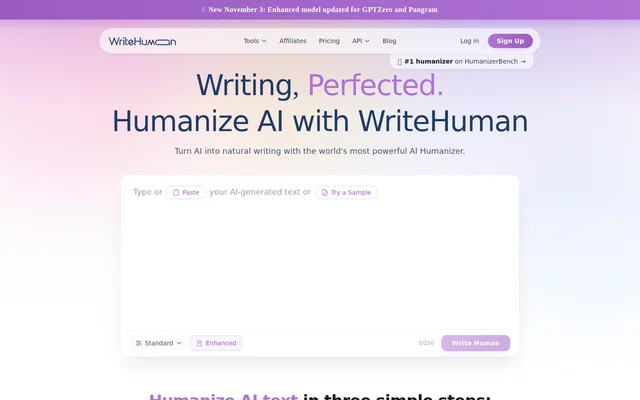
What is WriteHuman AI Humanizer?
WriteHuman AI Humanizer is an AI text rewriting tool for turning machine-generated drafts into prose with more natural phrasing and rhythm. WriteHuman AI Humanizer serves marketers, freelancers, business professionals, content creators, agencies, founders, and product teams. The stated goal is to retain the draft’s meaning while changing the writing patterns associated with AI-generated text.
WriteHuman AI Humanizer works with text from ChatGPT, Claude, Gemini, Grok, DeepSeek, and other AI writing tools. The source describes support for both long-form writing and short snippets, across forty-plus languages. The product is a revision tool rather than an original content generator: an existing draft supplies the ideas and arguments.
What WriteHuman AI Humanizer can do
WriteHuman AI Humanizer changes several aspects of a draft together, including template phrasing, predictable cadence, uniform sentence length, and mechanical transitions. A built-in AI detector adds sentence-level feedback before publication. The Chrome extension supplements rewriting with spelling, grammar, and style suggestions on websites where users already write.
- WriteHuman AI Humanizer replaces generic template phrases with more specific alternatives.
- WriteHuman AI Humanizer varies sentence length and structure.
- WriteHuman AI Humanizer reduces repetitive transitions.
- WriteHuman AI Humanizer assigns AI probabilities to individual sentences.
- WriteHuman AI Humanizer offers humanization from a Chrome side panel.
- WriteHuman AI Humanizer includes an image detector in the mobile apps.
How WriteHuman AI Humanizer works
WriteHuman AI Humanizer uses a copy-and-paste workflow on the website. Users copy an AI-generated draft, paste the text into the humanizer, and select Write Human. The page says the resulting rewrite changes cadence, word choice, and sentence structure while retaining the original meaning. Input can be plain text or writing copied directly from a chat assistant.
WriteHuman AI Humanizer also provides a Chrome extension through the Chrome Web Store and mobile apps for iPhone, iPad, and Android. The extension supports rewriting without switching tabs. The mobile apps combine the humanizer, AI detector, and image detector, and the page states that an existing web subscription can link to the apps.
Who WriteHuman AI Humanizer is for
WriteHuman AI Humanizer addresses people who use AI-generated drafts but want the finished writing to match a more natural or consistent voice. The page names marketing, freelance work, business communications, content creation, and agency workflows. Founders and product teams are also identified as users working on launch materials and product-related writing.
- Marketers can revise AI-drafted articles and SEO content.
- Freelancers can refine client deliverables.
- Professionals can edit business communications and reports.
- Creators can revise blog posts and newsletters.
- Agencies can adapt copy for social media campaigns.
- Founders and product teams can refine landing pages, launch posts, and changelogs.
WriteHuman AI Humanizer pricing and access
WriteHuman AI Humanizer has a free offer in the website’s structured product information. The mobile apps start with 5 free humanizations, and the page also refers to linking a web subscription. The supplied text does not specify subscription prices, named plans, or detailed usage allowances beyond the introductory mobile humanizations.
WriteHuman AI Humanizer strengths and limitations
WriteHuman AI Humanizer combines rewriting and sentence-level AI feedback with access across the web, Chrome, and mobile devices. Support for multiple languages and different content lengths makes the tool applicable to several writing workflows. The page also sets explicit boundaries: rewriting does not supply original research or establish that the resulting claims are accurate.
- WriteHuman AI Humanizer does not write the original draft.
- WriteHuman AI Humanizer cannot invent ideas, sources, or arguments absent from the input.
- WriteHuman AI Humanizer is not a plagiarism remover.
- WriteHuman AI Humanizer output still requires rereading, fact-checking, and editing.
WriteHuman AI Humanizer FAQ
What is WriteHuman AI Humanizer?
WriteHuman AI Humanizer is a writing tool that rewrites AI-generated text into more natural prose. WriteHuman AI Humanizer changes phrasing, sentence structure, and cadence while preserving the original meaning, rather than creating the initial draft.
Is WriteHuman AI Humanizer free?
WriteHuman AI Humanizer has a free offer listed in the website’s structured product information, and the mobile apps start with 5 free humanizations. The page also mentions web subscriptions but does not state subscription prices or detailed plan allowances.
Which AI writing tools work with WriteHuman AI Humanizer?
WriteHuman AI Humanizer accepts writing from ChatGPT, Claude, Gemini, Grok, DeepSeek, and other AI writing tools through copied text. The website describes pasting plain text or copying a draft directly from a chat assistant, rather than requiring a named integration.
Does WriteHuman AI Humanizer have a Chrome extension or mobile app?
WriteHuman AI Humanizer offers a Chrome extension and apps for iPhone, iPad, and Android. The extension includes spelling, grammar, style suggestions, and side-panel humanization. The mobile apps include the humanizer, AI detector, and image detector.
Does WriteHuman AI Humanizer check for AI-generated text?
WriteHuman AI Humanizer includes a built-in AI detector that gives each sentence an AI probability. This sentence-level feedback highlights lines that may need revision before publication, alongside the separate functionality for rewriting AI-generated drafts.
Can WriteHuman AI Humanizer replace fact-checking or remove plagiarism?
WriteHuman AI Humanizer does not replace fact-checking and is not a plagiarism remover. The page explicitly advises rereading the rewritten output, checking facts, and editing the result as with any first draft.
From the community
No reviews yet
Be the first to review this tool. What you write helps the next person choose.