What is Yomu AI?
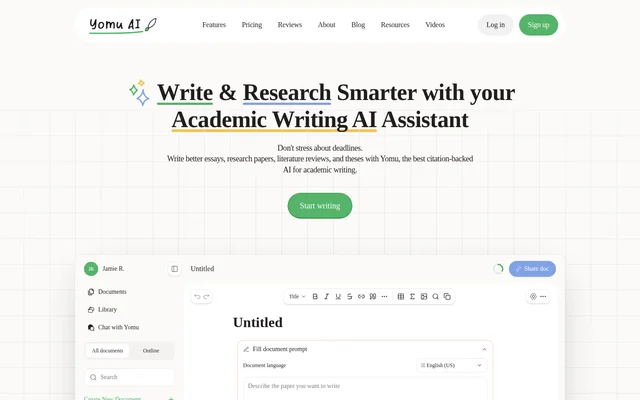
Yomu AI is an academic writing assistant for students and writers preparing essays, research papers, literature reviews, and theses. Yomu AI brings drafting, source discovery, citation formatting, and originality checking into a browser-based application. The service supports both creating new academic documents and improving existing work imported from Word.
What Yomu AI can do
Yomu AI combines writing assistance with tools for handling research material and document structure. The Document Assistant can generate sections and provide feedback, while autocomplete suggests sentence and paragraph continuations. Editing commands support changes to existing text, and citation, library, and chat features help users work with sources alongside their drafts.
- Yomu AI paraphrases, expands, shortens, and summarizes text.
- Yomu AI turns bullet points into detailed prose.
- Yomu AI finds and formats citations in 700+ styles through Sourcely.
- Yomu AI saves sources in a personal library for reuse.
- Yomu AI supports chat with PDFs, images, academic search, and web search.
- Yomu AI checks plagiarism and suggests grammar improvements.
- Yomu AI adds, captions, and references figures and tables.
How Yomu AI works
Yomu AI runs in a modern web browser with JavaScript enabled. Users can create a new document or import a Word file in .docx format. The document interface includes options for outlining and generating researched text with citations. Once writing begins, users can accept suggestions, request paragraphs or sections, and revise selected text with AI commands.
Who Yomu AI is for
Yomu AI serves students and academic writers working on source-based assignments and longer research documents. The website specifically names essays, research papers, literature reviews, and theses. Yomu AI also supports writers revising existing drafts through feedback, grammar improvements, paraphrasing, and source management rather than only generating new text.
- Yomu AI helps draft essay and research paper sections.
- Yomu AI supports literature review writing with saved research sources.
- Yomu AI helps revise thesis text and format citations.
- Yomu AI lets users discuss PDF research material through chat.
Yomu AI strengths and limitations
Yomu AI combines drafting, revision, citations, source reuse, and originality checking in the same academic writing workflow. Word import supports work already in progress, while figures and tables extend document editing beyond prose. Access conditions still matter: Yomu AI requires a modern browser, and subscriptions distinguish between AI action allowances and frontier chat usage.
- Yomu AI requires JavaScript in a modern web browser.
- Yomu AI Pro has a monthly AI action limit.
- Yomu AI Ultra frontier chat access remains subject to monthly usage allowances.
Yomu AI FAQ
What is Yomu AI?
Yomu AI is a browser-based academic writing assistant for essays, research papers, literature reviews, and theses. Yomu AI combines drafting and editing tools with citation management, research chat, grammar improvements, and plagiarism checking.
Can Yomu AI find and format citations?
Yomu AI finds, includes, and formats citations using a citation tool powered by Sourcely, with support for 700+ citation styles. Yomu AI also lets users save sources to a personal library and reuse those sources across documents.
Can Yomu AI work with PDFs and Word documents?
Yomu AI supports chat with PDF research sources and imports Word documents in .docx format for AI-assisted revision. Yomu AI chat also accepts images and includes academic search, web search, and access to saved library material.
Does Yomu AI Ultra include unlimited usage?
Yomu AI Ultra includes unlimited AI actions, but frontier chat models have monthly usage allowances. Yomu AI states that the default chat model and document editing never use credits, while extra credits are available to purchase and never expire.
Does Yomu AI check plagiarism?
Yomu AI includes a plagiarism checker to evaluate writing and provide insights into originality and authenticity. Yomu AI also offers grammar and text improvements, academic feedback, and citation support for reviewing academic drafts.
From the community
No reviews yet
Be the first to review this tool. What you write helps the next person choose.