What is AI Background Remover?
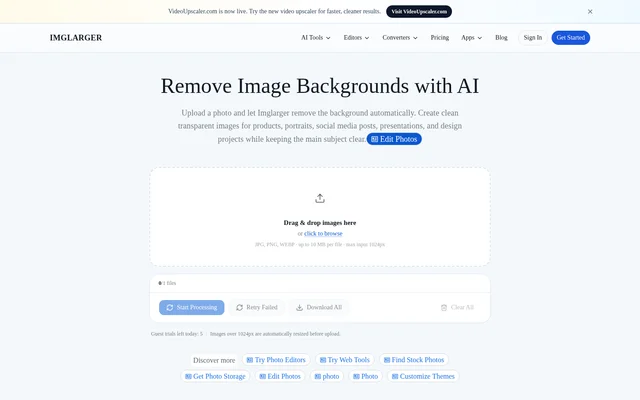
AI Background Remover is an online image editing tool on Imglarger that uses artificial intelligence to separate a main subject from its background. AI Background Remover creates transparent images for product listings, portraits, profile pictures, presentations, and design projects. The workflow replaces manual subject tracing with automatic foreground detection and background removal.
AI Background Remover runs in a web browser without requiring software installation. The page describes support for product photos, portraits, graphics, and images with solid, gradient, or complex backgrounds. The resulting cutouts can become assets for online stores, marketing graphics, social media posts, thumbnails, and other visual materials.
What AI Background Remover can do
AI Background Remover focuses on creating cutout images through automatic subject detection, background removal, and transparent output. The page also provides a before-and-after preview so users can review the processed result alongside the original before downloading. Common image formats are supported, with the uploader displaying the applicable file and input limits.
- AI Background Remover detects the main subject automatically.
- AI Background Remover removes the surrounding image background.
- AI Background Remover creates transparent PNGs for products and portraits.
- AI Background Remover accepts JPG, PNG, and WebP images.
- AI Background Remover displays processed results alongside original images.
How AI Background Remover works
AI Background Remover starts with an image uploaded by dragging and dropping a file or browsing for one. Users start processing, wait while the subject is detected and the background is removed, then preview and download the result. The displayed uploader accepts files up to 10 MB with a maximum input of 1024 px.
AI Background Remover shows progress while creating the transparent result. Processing time varies with image size and current server demand, rather than following a fixed turnaround time. Uploaded and processed images are automatically deleted within six hours instead of being retained as a permanent public gallery.
Who AI Background Remover is for
AI Background Remover serves people who need isolated subjects for commercial, personal, or presentation graphics. The source specifically names online stores, portraits, profile pictures, social images, marketing graphics, and design projects. These use cases center on preparing reusable cutout images without manually outlining the subject in an editor.
- Online sellers can prepare transparent product images.
- Creators can prepare cutouts for thumbnails and social posts.
- Presentation authors can isolate subjects for slides.
- People editing portraits can create transparent profile images.
AI Background Remover strengths and limitations
AI Background Remover combines automatic subject isolation, browser-based processing, transparent output, and visual comparison in a focused workflow. Support for common upload formats and automatic image deletion are additional practical features. Output precision still depends on the image: the page explicitly warns that some subject details and background conditions can produce less precise edges.
- Complex hair, fur, transparent objects, and shadows may reduce edge precision.
- Similar foreground and background colors may make separation less precise.
- The displayed uploader applies file-size and input-dimension limits.
- Processing speed varies with image size and server demand.
AI Background Remover FAQ
What is AI Background Remover?
AI Background Remover is an online Imglarger tool that detects the main subject in an image and removes the surrounding background automatically. AI Background Remover creates transparent images for product photos, portraits, profile pictures, presentations, and design assets.
Is AI Background Remover free?
AI Background Remover can be tried with free credits, subject to the requirements shown in the product interface. Imglarger lists a free plan with 100 credits per month alongside paid subscriptions, and tool-specific credit requirements and usage limits may vary.
How do you remove a background with AI Background Remover?
AI Background Remover uses an upload, process, preview, and download workflow in a browser. Users drag and drop an image or browse for a file, start processing, review the transparent result alongside the original, and download the edited image.
What image formats and sizes does AI Background Remover support?
AI Background Remover accepts JPG, PNG, and WebP files. The background removal uploader displays a limit of 10 MB per file and a maximum input of 1024 px, so users should check the tool interface for applicable upload limits.
Can AI Background Remover handle hair and complex edges?
AI Background Remover aims to preserve the main subject, but complex hair, fur, transparent objects, shadows, and similar foreground and background colors may produce less precise edges. The before-and-after preview lets users inspect the result before downloading.
Does AI Background Remover keep uploaded images?
AI Background Remover uses Imglarger’s processing workflow, which automatically deletes uploaded and processed images within six hours. The page states that these images are not kept as a permanent public gallery.
From the community
No reviews yet
Be the first to review this tool. What you write helps the next person choose.