What is AI Photo & Art Enhancer?
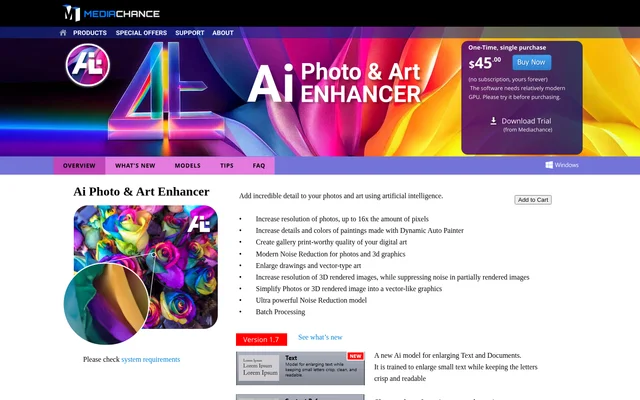
AI Photo & Art Enhancer is Windows software from Mediachance that uses artificial intelligence to enlarge and enhance images. AI Photo & Art Enhancer serves photo, digital painting, drawing and rendered graphics workflows through specialized models rather than a single general-purpose enlargement method.
AI Photo & Art Enhancer supports photo enlargement with up to 16x the amount of pixels. Other models focus on preserving artistic texture, cleaning noise, sharpening small text or retaining crisp drawing edges. The page also describes enhancement of AI-generated images, including output from Midjourney, Stable Diffusion and Dall-E.
What AI Photo & Art Enhancer can do
AI Photo & Art Enhancer provides models for different image types and enhancement goals. The page distinguishes photo and rendered graphics models from painting, drawing and document models. These options address resolution, noise, texture, edges and readability, while additional tools handle batch processing and changes to image framing.
- AI Photo & Art Enhancer enlarges photos with up to 16x the amount of pixels.
- AI Photo & Art Enhancer enhances brush strokes and textures in Dynamic Auto Painter paintings.
- AI Photo & Art Enhancer reduces noise in photos and partially rendered images.
- AI Photo & Art Enhancer enlarges small drawings and pixel art with clean edges.
- AI Photo & Art Enhancer enhances small or blurry text while preserving letter shapes.
- AI Photo & Art Enhancer simplifies photos and rendered images into vector-like graphics with outlines.
- AI Photo & Art Enhancer supports batch processing and image reframing.
How AI Photo & Art Enhancer works
AI Photo & Art Enhancer uses different models according to the source material. The DAP painting model targets Dynamic Auto Painter paintings created at about 2400 pixels wide. Photo, 3D Graphics + NR and Photo, 3D Graphics Soft models combine noise reduction with image enhancement, while the TEXT model addresses document enlargement.
AI Photo & Art Enhancer relies on GPU processing and lists Windows 8, 10 and 11 as supported systems. The page recommends testing the trial version, whose included GPU benchmark checks hardware support. NVIDIA GeForce and AMD Radeon cards are named, while support for Intel HD and UHD integrated notebook graphics varies.
Who AI Photo & Art Enhancer is for
AI Photo & Art Enhancer addresses photographers enlarging images for cropping or printing, digital artists preparing artwork, and creators processing rendered graphics. The available models also cover small drawings, pixel art and text. A dedicated edge-enhancing model targets intricate AI-generated images and small previews while keeping gradients smooth.
- Photographers can enlarge photos and reduce high ISO noise.
- Digital painters can enhance brush strokes and surface texture.
- Rendered graphics creators can process noisy, partially rendered images.
- AI art creators can upscale generated artwork and previews.
- Document users can enlarge small text with attention to letter clarity.
AI Photo & Art Enhancer strengths and limitations
AI Photo & Art Enhancer offers task-specific models across photography, painting, rendered graphics and text. The TEXT model is particularly relevant when letter shapes matter: the page notes that photo models may alter small letters and make OCR more difficult. Hardware compatibility remains an important constraint because neural network processing is computationally demanding.
- AI Photo & Art Enhancer lists support for Windows 8, 10 and 11.
- AI Photo & Art Enhancer can run in CPU mode, but the page describes this as very slow.
- AI Photo & Art Enhancer does not support every Intel HD or UHD integrated notebook graphics card.
- AI Photo & Art Enhancer requires AMD users to install an AMD Adrenalin version containing the specified driver.
- AI Photo & Art Enhancer reserves its strong AI Noise Reduction model for extreme noise cases.
AI Photo & Art Enhancer FAQ
What is AI Photo & Art Enhancer?
AI Photo & Art Enhancer is Windows image enhancement software from Mediachance for enlarging photos, artwork, drawings and text. AI Photo & Art Enhancer also provides noise reduction for photos and rendered graphics, specialized painting models, image reframing and batch processing.
What hardware does AI Photo & Art Enhancer require?
AI Photo & Art Enhancer requires Windows 8, 10 or 11 and a suitable graphics card for practical performance. The page names NVIDIA GeForce and AMD Radeon cards, with limited Intel integrated graphics support. CPU mode is available but described as very slow.
Can AI Photo & Art Enhancer upscale AI-generated images?
AI Photo & Art Enhancer includes models for enlarging AI-generated images, including output from Midjourney, Stable Diffusion and Dall-E. The page describes a filament-based edge-enhancing model for intricate details and the DA Supreme model for digital art and AI-generated images.
Can AI Photo & Art Enhancer improve text for OCR?
AI Photo & Art Enhancer includes a TEXT model trained to enlarge small or blurry text while preserving letter shapes and readability. The page contrasts this with photo models, which may alter small letters and make OCR processing more difficult.
From the community
No reviews yet
Be the first to review this tool. What you write helps the next person choose.