What is AI STUDIOS?
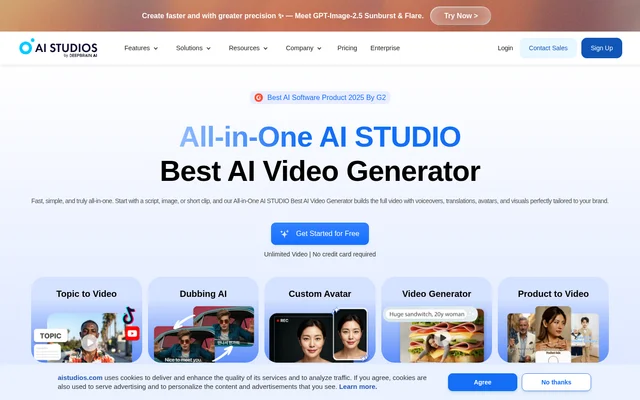
AI STUDIOS is a browser-based AI video generator by DeepBrain AI that creates videos from text, documents, links, images, and short clips. AI STUDIOS serves content creators, educators, marketers, and organizations that need avatar-led presentations, social videos, multilingual content, or training materials. The product brings video generation, editing, dubbing, and translation into a shared online workspace.
AI STUDIOS also includes interactive conversational avatars and course-building tools. These capabilities extend beyond producing finished videos: conversational avatars respond to users in real time, while training videos can include questions and branching scenarios. The website distinguishes AI STUDIOS by DeepBrain AI from Google AI Studio.
What AI STUDIOS can do
AI STUDIOS combines input-to-video workflows with avatar creation, speech generation, and localization. Users can start with existing materials or an idea, then create videos with narration and visuals. The training and conversational features support separate uses, including interactive courses and customer-facing avatars that answer questions.
- AI STUDIOS turns topics, URLs, documents, and product pages into videos.
- AI STUDIOS offers 2,000+ ready-to-use AI avatars.
- AI STUDIOS creates custom avatars from short recordings and photos.
- AI STUDIOS dubs videos into 150+ languages with voice cloning and lip-sync.
- AI STUDIOS detects multiple speakers and assigns distinct cloned voices.
- AI STUDIOS adds quizzes, polls, and branching decisions to training videos.
- AI STUDIOS exports training content with SCORM and xAPI support.
- AI STUDIOS provides conversational avatars for real-time interactions.
How AI STUDIOS works
AI STUDIOS accepts a typed idea, pasted script, web link, or uploaded document as a starting point. Supported document inputs include PowerPoint, PDF, and Word files. AI STUDIOS generates video content with avatars, voiceovers, and visuals, while the online workspace provides editing and translation tools. Dubbing scripts remain editable so users can adjust timing, tone, and wording.
AI STUDIOS supports a separate conversational-avatar workflow using a short video upload to create a custom avatar. Users can upload company documents and connect OpenAI, Claude, Gemini, or their own language model. Website embedding uses a line of code, and the listed deployment channels include WhatsApp, iOS, Android, and kiosks. Enterprise connections include a RESTful API and webhooks.
Who AI STUDIOS is for
AI STUDIOS addresses creators publishing to YouTube, TikTok, and Reels, as well as teams producing marketing, education, and customer-service content. Product-to-video generation supports social advertising and e-commerce, while document conversion supports presentations. Educators and training teams can combine avatar-led explanations with interactive questions and export content for learning management systems.
- AI STUDIOS helps creators produce videos with avatars and voiceovers.
- AI STUDIOS turns product pages into UGC-style advertising videos.
- AI STUDIOS helps educators create multilingual lectures and presentations.
- AI STUDIOS supports training teams building interactive courses.
- AI STUDIOS provides conversational avatars for customer support and purchase guidance.
AI STUDIOS pricing and plans
AI STUDIOS offers a free plan with limited credits, according to the website's structured product information. Paid Personal, Team, and Enterprise plans unlock higher limits and advanced features. The page offers free access without a credit card and directs organizations to contact the company about Enterprise. The supplied text does not list paid subscription prices.
AI STUDIOS strengths and limitations
AI STUDIOS brings several related production tasks together: generating videos, creating avatars, dubbing speech, translating content, and building interactive training. Support for existing documents and web links gives users ways to reuse source material. Enterprise features include real-time collaborative editing, role-based access control, version history, dedicated account management, and technical support.
AI STUDIOS has access limits that matter when evaluating the free offering. The structured pricing information specifies limited credits, while paid plans provide higher limits and advanced features. Although the page also promotes unlimited video, the supplied text does not explain how that statement relates to the free plan's credit allowance or individual paid plans.
AI STUDIOS FAQ
What is AI STUDIOS?
AI STUDIOS is a browser-based AI video generator by DeepBrain AI. AI STUDIOS creates videos from scripts, topics, documents, and URLs, combining avatars, voiceovers, and visuals with editing, translation, and dubbing tools for creators, educators, marketers, and organizations.
Is AI STUDIOS free?
AI STUDIOS offers a free plan with limited credits and advertises free access without a credit card. Paid Personal, Team, and Enterprise plans unlock higher limits and advanced features. The supplied page does not provide paid subscription prices.
Can AI STUDIOS translate and dub videos?
AI STUDIOS translates and dubs videos into 150+ languages, with automatic lip-sync and voice cloning. AI STUDIOS detects multiple speakers, uses distinct cloned voices, and provides editable scripts so users can refine timing, tone, and accuracy.
Can AI STUDIOS create interactive training courses?
AI STUDIOS creates interactive training videos with avatars, embedded quizzes, polls, and branching scenarios. AI STUDIOS includes a Course Builder and supports SCORM 1.2, 2004, and xAPI for exporting training content to learning management systems.
Does AI STUDIOS have an API or integrations?
AI STUDIOS lists a RESTful API, webhook integrations, bulk operations, and developer documentation among its Enterprise capabilities. Conversational avatars can connect to OpenAI, Claude, Gemini, or a user's own language model, and training content supports learning management system integration.
How do custom avatars work in AI STUDIOS?
AI STUDIOS creates custom avatars from short video recordings and photo avatars from uploaded photos. Conversational avatars support customization of appearance, voice, tone, and personality, and can use uploaded company documents to inform responses during real-time interactions.
From the community
No reviews yet
Be the first to review this tool. What you write helps the next person choose.