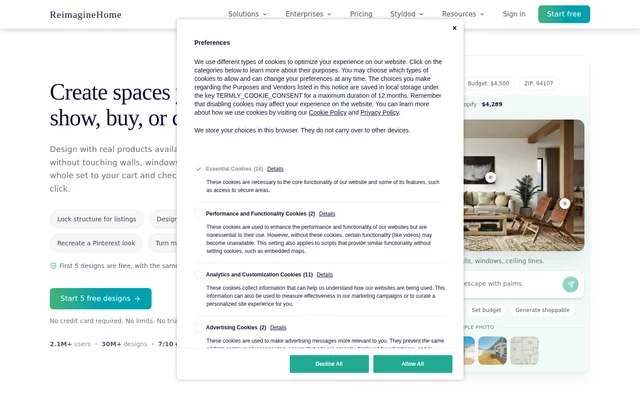
What is AI Virtual Renovation By REimagineHome?
AI Virtual Renovation By REimagineHome is an AI tool for visualizing changes to rooms, properties, and outdoor spaces from photos. The service supports homeowners considering purchases, designers developing concepts, and real estate professionals preparing listing imagery. Users describe an intended result and refine the resulting design rather than starting from a blank canvas.
AI Virtual Renovation By REimagineHome focuses on staging, finishes, lighting, and objects within an existing space. The page states that the original layout is preserved by default unless a user asks for structural changes. Examples include bathroom renovation concepts, kitchen style changes, room repurposing, and outdoor landscaping.
What AI Virtual Renovation By REimagineHome can do
AI Virtual Renovation By REimagineHome combines image-based design exploration with furniture selection and property photo preparation. Users can supply an inspiration image, specify which elements to borrow, and request targeted revisions. The page also describes a listing workflow that sorts rooms, flags compliance issues, applies enhancements, and exports a gallery.
- AI Virtual Renovation By REimagineHome stages empty rooms for property listings.
- AI Virtual Renovation By REimagineHome changes furniture, colors, and surfaces through targeted instructions.
- AI Virtual Renovation By REimagineHome uses reference images and moodboards to guide designs.
- AI Virtual Renovation By REimagineHome selects real furniture around space, style, and budget.
- AI Virtual Renovation By REimagineHome processes up to 50 listing photos in a batch.
- AI Virtual Renovation By REimagineHome exports high-resolution, print-ready images.
How AI Virtual Renovation By REimagineHome works
AI Virtual Renovation By REimagineHome starts with a photo of the room, listing, or yard being considered. Users describe the outcome they want and can optionally upload a reference image or moodboard. Instructions can distinguish between elements to preserve and elements to change, such as keeping a layout while replacing furniture.
AI Virtual Renovation By REimagineHome builds subsequent edits on previous results so users can compare directions and refine details. For shoppable designs, users provide preferences and a budget, review a furniture set, and swap items as needed. The selected set can be sent to a cart, with checkout completed on Amazon or Shopify.
Who AI Virtual Renovation By REimagineHome is for
AI Virtual Renovation By REimagineHome serves homeowners, real estate agents, interior designers, and landscape designers. The page presents design visualization as a way to evaluate choices before buying furniture, presenting a concept, or preparing property marketing. Examples also show store owners, property developers, architects, and renovation contractors using visual concepts.
- Homeowners can compare furniture and finish choices before purchasing.
- Real estate teams can prepare staged listing galleries and marketing images.
- Interior designers can explore directions with clients using reference images.
- Landscape designers can visualize planting, patios, seating areas, and pools.
AI Virtual Renovation By REimagineHome pricing and plans
AI Virtual Renovation By REimagineHome offers Decision Mode with 5 free designs, full AI access, and no credit card requirement. The page says these designs use the same AI and quality as paid plans. Execution Mode Pro provides unlimited designs and clean downloads for repeat work, sharing results, and reusing a direction across spaces.
AI Virtual Renovation By REimagineHome links to full pricing and plans but does not state a subscription price in the supplied text. The page says users can cancel anytime. Furniture purchases are separate retailer checkouts, and the service earns a commission on qualifying purchases made through its designs at no extra cost to the user.
AI Virtual Renovation By REimagineHome strengths and limitations
AI Virtual Renovation By REimagineHome offers specific controls for preserving layouts, borrowing from references, and editing selected elements without restarting. Shoppable furniture connects visual concepts with product selection, while batch processing supports property marketing work. Access limits distinguish free exploration from Pro use, and purchasing furniture requires completing checkout with the retailer.
- Free access includes 5 designs rather than unlimited generation.
- Unlimited designs and clean downloads are listed under Pro.
- Furniture checkout happens on the retailer's site.
AI Virtual Renovation By REimagineHome FAQ
What is AI Virtual Renovation By REimagineHome?
AI Virtual Renovation By REimagineHome is a photo-based AI design tool for visualizing renovations, staging rooms, and exploring furniture or outdoor changes. Users describe their intended result, optionally add a reference image, and refine specific elements across successive edits.
Is AI Virtual Renovation By REimagineHome free?
AI Virtual Renovation By REimagineHome offers 5 free designs without a credit card, using the same AI and quality as paid plans. Pro includes unlimited designs and clean downloads. The supplied page does not state a paid subscription price.
Does AI Virtual Renovation By REimagineHome preserve room layouts?
AI Virtual Renovation By REimagineHome preserves the existing layout by default, focusing on staging, finishes, lighting, and objects unless structural changes are requested. Users can ask for targeted edits, such as changing furniture while keeping the layout.
Can you buy furniture through AI Virtual Renovation By REimagineHome?
AI Virtual Renovation By REimagineHome creates designs with real furniture selected for a space, style, and budget. Users can swap products and add a set to a cart, then complete checkout on Amazon or Shopify. Qualifying purchases earn the service a commission at no extra cost to the user.
Can AI Virtual Renovation By REimagineHome process property photos in bulk?
AI Virtual Renovation By REimagineHome supports batches of up to 50 listing photos. The workflow sorts images by room, flags compliance issues, applies fixes and enhancements, and provides room-sorted high-resolution downloads for property listings and marketing materials.
From the community
No reviews yet
Be the first to review this tool. What you write helps the next person choose.