What is aiCarousels.com?
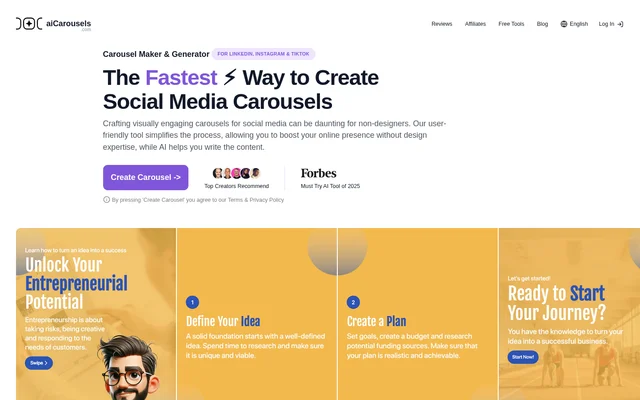
aiCarousels.com is an AI-assisted carousel maker for creating visual social media posts for LinkedIn, Instagram, and TikTok. aiCarousels.com combines content generation with design controls so that creators, businesses, and individuals can prepare carousels without design expertise. The website describes both business and personal uses, including branded content and posts that tell a story across multiple slides.
aiCarousels.com focuses on writing and arranging carousel content rather than requiring users to design every element manually. Users can start with a topic or existing text, then adjust the generated copy and customize the template. The available design tools include coordinated colors, font pairings, and automatic resizing.
What aiCarousels.com can do
aiCarousels.com provides writing, layout, and branding features within the carousel creation workflow. The website also lists topic, text, website, YouTube, and PDF-to-carousel options. Beyond carousels, the PRO plan includes generators for other social media assets, allowing users to prepare related formats alongside their slide-based posts.
- aiCarousels.com generates editable carousel copy from a topic or existing content.
- aiCarousels.com automatically resizes elements to support positioning and readable font sizes.
- aiCarousels.com provides predefined color palettes and font pairings.
- aiCarousels.com lets users customize templates to reflect their branding.
- aiCarousels.com supports LinkedIn, Instagram feed, Instagram story, and TikTok carousel designs.
- aiCarousels.com includes post, quote card, infographic, and headshot generators with PRO.
How aiCarousels.com works
aiCarousels.com presents a Create Carousel entry point on the website. The described workflow starts with choosing a topic or entering existing content for the AI writing assistant. Users can edit the resulting text, customize the carousel template, and export visuals. Automatic resizing handles element sizing and positioning, while preset palettes and font combinations provide design starting points.
aiCarousels.com explains publishing as a separate step on the destination network. For LinkedIn, the instructions describe downloading a multipage PDF and uploading that file as a document in a new post. Instagram and TikTok instructions describe selecting images within their apps. Bonus features are accessed through the menu grid icon at the top left of the screen.
Who aiCarousels.com is for
aiCarousels.com is intended for people creating social media content for business or personal purposes, particularly users without design expertise. The branding controls support a consistent visual identity across social channels. The website also explicitly supports carousel advertising, while advising users to check each advertising platform's specifications and guidelines before using the designs.
- Creators can turn topics or existing content into social media carousels.
- Businesses can customize carousel templates to match their branding.
- Individuals can create content for their personal social media presence.
- Advertisers can prepare carousel ads for Facebook, LinkedIn, Instagram, and other supported platforms.
aiCarousels.com pricing and plans
aiCarousels.com lists free tools for LinkedIn, Instagram, TikTok, and other content tasks, alongside a PRO plan. The advertised PRO bonus features include a LinkedIn post generator, post ideas generator, quote card generator, infographic generator, and headshot generator at no extra cost. The supplied page does not state subscription prices or explain the carousel maker's free usage allowance.
aiCarousels.com strengths and limitations
aiCarousels.com combines AI-assisted writing with editable templates, automatic resizing, and predefined visual styles. These capabilities address both copy preparation and design work for non-designers. Important boundaries are that the advertised bonus generators belong to PRO, and the documented publishing instructions involve uploading content through the social networks themselves. Carousel ads also need to meet the requirements of each destination advertising platform.
aiCarousels.com FAQ
What is aiCarousels.com?
aiCarousels.com is an AI-assisted social media carousel maker for LinkedIn, Instagram, and TikTok. aiCarousels.com generates editable content from topics or existing text and provides customizable templates, automatic resizing, predefined colors, and font pairings for users without design expertise.
Is aiCarousels.com free?
aiCarousels.com offers free social media tools and a PRO plan with additional content generators. The supplied page does not state subscription prices or define a free carousel creation allowance. The advertised bonus generators are included with PRO at no extra cost.
Which social networks does aiCarousels.com support?
aiCarousels.com supports carousel creation for LinkedIn, Instagram feeds, Instagram stories, and TikTok. The website also states that users can create carousel ads for Facebook, LinkedIn, Instagram, and other platforms that support carousel advertising formats.
Can aiCarousels.com create carousel ads?
aiCarousels.com can create carousel ads for Facebook, LinkedIn, Instagram, and other platforms supporting carousel ad formats. The website advises reviewing each platform's advertising specifications and guidelines to ensure that the resulting ads meet the destination platform's requirements.
How do you publish an aiCarousels.com carousel on LinkedIn?
aiCarousels.com describes a LinkedIn publishing workflow using a downloaded multipage PDF. Users upload the PDF through the document option in a new LinkedIn post, add a caption and any relevant hashtags, and publish the document as a carousel.
What bonus features does aiCarousels.com PRO include?
aiCarousels.com includes a LinkedIn post generator, LinkedIn post formatter, post ideas generator, quote card generator, infographic generator, and headshot generator with PRO at no extra cost. Users access the bonus features through the menu grid icon at the top left of the screen.
From the community
No reviews yet
Be the first to review this tool. What you write helps the next person choose.