What is Airbrush Studio?
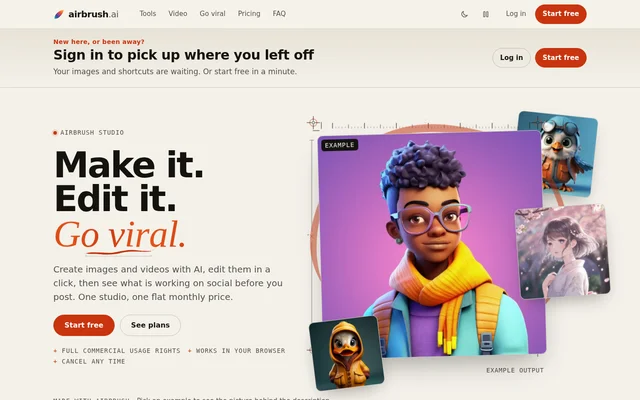
Airbrush Studio is a browser-based AI workspace for creating and editing images and videos. Airbrush Studio serves online sellers, marketers, agencies and creators who need product photos, advertising assets, headshots or social content. The website describes Airbrush Studio as the new home of Airbrush, bringing creation tools and a saved media library together.
Airbrush Studio combines media production with social research capabilities that are rolling out. The listed research tools cover viral videos, trending sounds and hooks, advertising examples and product trends. Commercial usage rights are included across plans, allowing generated images and videos to be used in advertising, product listings, client projects and social posts.
What Airbrush Studio can do
Airbrush Studio accepts short descriptions, photos and videos as starting material for different creative tasks. The available tools cover image generation, photo adjustments, professional portraits and video production. A shared library saves created assets for later download or reuse, while the research features connect social content planning with production.
- Airbrush Studio generates product photos, ad creatives, illustrations and art from descriptions.
- Airbrush Studio removes backgrounds and objects, upscales images, vectorizes artwork and adjusts lighting.
- Airbrush Studio creates professional headshots from selfies.
- Airbrush Studio turns ideas or scripts into videos with voiceover.
- Airbrush Studio edits footage into captioned videos in the browser.
- Airbrush Studio produces video variations with different styles, pacing and captions.
- Airbrush Studio saves generated media in a library for download or reuse.
How Airbrush Studio works
Airbrush Studio follows a tool-first workflow: choose Create, Edit, Headshots or Video, then upload media or describe the desired result. Users can save the result to the library, download the file and share the output. The website states that design skills are not required and that video editing takes place in the browser.
Airbrush Studio also supports developer workflows through an API and an MCP server available on all plans. The API can generate images from another application or bring social video research into external tools. Every studio tool runs on credits, and the credit cost is shown before a job runs.
Who Airbrush Studio is for
Airbrush Studio addresses commercial and social content workflows for sellers, marketing teams, agencies and creators. Online sellers can prepare product listings, while marketers and agencies can produce advertising assets from a shared library. Developers can access image generation and social video research programmatically rather than relying only on the browser interface.
- Online sellers can create product photos, clean backgrounds and upscale listing images.
- Marketers and agencies can make ad creatives and short product videos.
- Creators can produce images, edits and videos with voiceover and captions.
- Teams and individuals can create headshots for LinkedIn and profiles.
- Developers can connect image generation and social video research to their own tools.
Airbrush Studio pricing and plans
Airbrush Studio offers a Free plan with 5 starter credits, access to studio tools through those credits, a saved library and commercial usage rights. The Monthly plan costs $39 per month and includes 500 credits, renewing on the 1st. The Monthly plan has no contract and can be canceled at any time.
Airbrush Studio also links to a lifetime deal starting from $29, with separate tiers and terms on the lifetime deal page. Credit consumption varies by task, and premium engines can cost more. API and MCP server access are included on both Free and Monthly plans. Payments are handled through Stripe.
Airbrush Studio strengths and limitations
Airbrush Studio combines image creation, editing, headshots and video production with a saved library in a browser-based workflow. Commercial usage rights on the Free plan support testing outputs for business projects. Displaying credit costs before execution makes usage charges visible, while API and MCP access extend the available workflows beyond manual studio use.
- Airbrush Studio requires credits for every tool, including tools used on the Free plan.
- Airbrush Studio premium engines can require more credits than other options.
- Airbrush Studio lists social growth features as rolling out rather than fully available.
Airbrush Studio FAQ
What is Airbrush Studio?
Airbrush Studio is a browser-based AI image and video workspace that combines image creation, photo editing, headshots, video tools and a saved library. Airbrush Studio also lists social research features that are rolling out, including viral research, ad discovery and product trends.
Is Airbrush Studio free?
Airbrush Studio offers a Free plan with 5 starter credits, library storage and commercial usage rights. Airbrush Studio also offers a $39 Monthly plan with 500 credits each month. Every tool uses credits, and the cost is displayed before a job runs.
Can Airbrush Studio images and videos be used commercially?
Airbrush Studio includes full commercial usage rights on every plan, including Free. Airbrush Studio images and videos can be used in ads, product listings, client projects and social posts; the website also explicitly permits images in prints and merchandise.
What are Airbrush Studio video variations?
Airbrush Studio video variations re-edit an uploaded video into several versions with different styles, pacing and captions. Airbrush Studio presents these variations as content that users can post across accounts or test to compare performance.
Does Airbrush Studio have an API or MCP server?
Airbrush Studio provides an API and MCP server on all plans. Airbrush Studio supports generating images from an external application and retrieving social video research for other tools. The website directs developers to the API page for endpoints and credit costs.
Who is Airbrush Studio for?
Airbrush Studio is for online sellers, marketers, agencies, creators and developers. Airbrush Studio supports product photography, listing-image improvements, advertising assets, professional headshots and short videos with voiceover and captions, alongside programmatic image generation and social video research.
From the community
No reviews yet
Be the first to review this tool. What you write helps the next person choose.