What is Plimo?
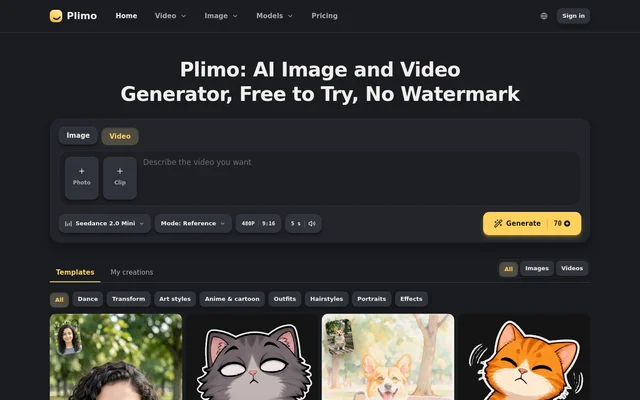
Plimo is an AI image and video generator for creating pictures, editing photographs and producing short clips from text or images. Plimo serves people making social media content, product photos, profile pictures and personal creative projects. Image and video tools use the same account and credit balance.
Plimo lists 16 image models and 17 video models, with options from companies including OpenAI, Google, ByteDance and Kuaishou. Model selection depends on the task: some options focus on readable text or combining reference photos, while others support video generation with sound, longer clips or higher resolutions.
What Plimo can do
Plimo combines prompt-based generation with dedicated photo and video tools. Plimo accepts written descriptions, uploaded photos and, for motion control, an uploaded movement video. Templates supply prepared prompts and settings for specific looks, allowing users to generate without composing their own instructions.
- Plimo generates images from text and optional reference photos.
- Plimo edits photo backgrounds, ages and styles using written instructions.
- Plimo creates videos from prompts, photos or both.
- Plimo animates still photos with movement and camera moves.
- Plimo creates headshots, anime images, outfit previews and hairstyle previews.
- Plimo makes a photographed person copy movements from an uploaded video.
- Plimo exports pictures and videos without watermarks.
How Plimo works
Plimo requires an account to upload a photo or generate content, although users can type a prompt before signing in. Sign-in options include Google and an emailed code, and no credit card is required to start. Users choose a tool, upload a photo or enter a prompt, select a model and generate.
Plimo lets users download a result or change a detail and generate again. A generated picture can become the first frame of an Image to Video clip. Plimo also supports comparing the same prompt or photo across different models to see which result suits the intended task.
Who Plimo is for
Plimo is aimed at social media creators, small-shop owners and people working with personal photographs. Plimo describes uses ranging from product listing images and event posters to animated family photos and profile pictures. Business use is available through membership, while free results are restricted to personal, non-commercial projects.
- Plimo creates short clips for TikTok, Reels and Shorts.
- Plimo turns product photos into staged listing images.
- Plimo adds movement to old family photographs.
- Plimo creates work headshots and profile pictures from selfies.
- Plimo previews haircuts, hair colors and clothing on uploaded photos.
Plimo pricing and plans
Plimo provides 100 one-time free credits that do not expire. Free access covers trial models, 1K images and 480p video, with creations kept for 7 days. Monthly subscriptions are listed at $15 for Plus, $29 for Pro and $129 for Ultra, with discounted rates for yearly billing.
Plimo includes 3,000 monthly credits with Plus, 8,000 with Pro and 50,000 with Ultra. Paid memberships include all models and resolutions, commercial use, priority queue access, priority support and access to credit packs. Creation retention increases by plan, while unused plan credits reset at the end of each monthly period.
Plimo strengths and limitations
Plimo combines several creative workflows under one login, with shared credits for images and videos. Prepared templates reduce the need to write prompts, and watermark-free downloads apply to both free and paid accounts. Plimo states that uploads and results are not used to train its models, while model providers follow their own terms.
- Plimo requires membership for commercial use.
- Plimo limits free accounts to trial models and lower output resolutions.
- Plimo keeps free-account creations for 7 days.
- Plimo provides sound on most video models, not all.
- Plimo does not support adult content.
Plimo FAQ
What is Plimo?
Plimo is an AI image and video generator with tools for photo editing, text-to-video creation, photo animation, headshots and visual style changes. Plimo combines multiple models and prepared templates in one account, with shared credits for image and video generation.
Is Plimo free?
Plimo offers 100 one-time free credits that do not expire, with access to trial models. Free accounts support 1K images and 480p video. Paid Plus, Pro and Ultra memberships add monthly credits, all models and resolutions, commercial use and priority processing.
Can Plimo turn a photo into a video?
Plimo turns photos into videos through Image to Video. Users upload a photo and describe what should move; the uploaded photo becomes the first frame of the clip. Most supported video models also add sound.
Does Plimo add watermarks?
Plimo does not add watermarks to downloaded images or videos, whether generated with a free account or a paid membership. Watermark-free downloads do not change usage permissions: free results remain limited to personal, non-commercial use.
Can Plimo images and videos be used commercially?
Plimo allows commercial use only with a paid membership. Results made without membership are for personal, non-commercial use. Plus, Pro and Ultra plans list commercial use among their included benefits, alongside access to all models and resolutions.
Does Plimo use uploaded photos to train AI?
Plimo states that uploaded photos and generated results are not used to train its models. Plimo also notes that the model companies processing each request follow their own terms, so that statement does not replace the providers' separate policies.
From the community
No reviews yet
Be the first to review this tool. What you write helps the next person choose.