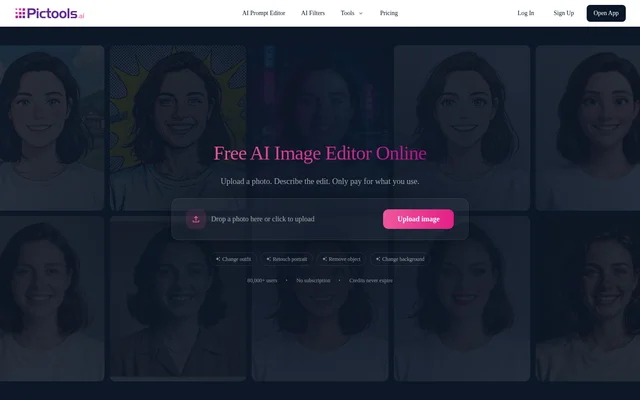
What is PicTools AI?
PicTools AI is an online AI photo editor that lets users change existing images through written instructions or preset filters. PicTools AI serves personal and commercial photo-editing needs, including portraits, product photography and family photo restoration. The service runs in a browser on any device rather than requiring installed editing software.
PicTools AI presents editing as an upload, describe and download workflow. Users can request changes without working with layers or masks, or choose a filter without writing a prompt. Alongside photo editing, the website provides tools for image expansion, upscaling, reframing and conversion into editable vector artwork.
What PicTools AI can do
PicTools AI combines prompt-based edits with dedicated image tools and preset styles. Changes can focus on a particular element, such as clothing or an unwanted object, or alter the wider presentation through backgrounds, lighting and artistic treatments. The vector generator produces SVG files with editable paths rather than only enlarged raster images.
- PicTools AI changes outfits while keeping the same person, face and pose.
- PicTools AI removes backgrounds or replaces them with described scenes.
- PicTools AI removes objects, logos, watermarks and stray text.
- PicTools AI creates headshots and retouches skin, teeth, glare and expressions.
- PicTools AI repairs visible damage in old photo scans and can add interpreted colors.
- PicTools AI sharpens photos, adjusts lighting and upscales images.
- PicTools AI expands photos and changes aspect ratios without cropping.
- PicTools AI converts photos and logos into editable SVG paths.
How PicTools AI works
PicTools AI accepts photo uploads from a phone or computer in JPG, PNG and WEBP formats. Users can upload from the website without signing in, then continue into the app. The app guides users through any sign-in needed to generate and save edits, and displays the credit cost before generation.
PicTools AI lets users describe an outfit, background, expression or other change in plain words, or select a one-click filter. After generation, users can compare the result with the original and review download options. Uploaded and generated images are stored together in My Images, where either can be deleted.
Who PicTools AI is for
PicTools AI supports people preparing professional portraits, maintaining personal photo collections or creating business imagery. The website includes examples from freelancers, a photo enthusiast, small business owners and a writer-photographer. Commercial use is permitted when users have the necessary rights to uploaded images and respect third-party trademarks and the likeness of real people.
- Freelancers can turn phone selfies into LinkedIn-ready headshots.
- Small businesses can polish product photos and create clean backgrounds.
- Photo enthusiasts can repair faded or scratched family pictures.
- Teams can create images for presentations, campaigns and social media.
- Design users can prepare editable vector artwork for Figma, Illustrator, print and cutting machines.
PicTools AI pricing and plans
PicTools AI provides a limited free allowance and advertises 2 free credits without a credit card. Photo edits start at 1 credit, with the actual cost depending on the tool and editing options. Continued use is available through one-time credit packs or subscriptions with monthly or annual billing.
PicTools AI credit-pack credits never expire, while unused subscription credits do not roll over at the next billing period. Subscription credits are spent first when both types are available. Monthly credits refresh each month, and annual plans provide the year's credits upfront. Subscriptions can be canceled through account billing and remain active until the paid period ends.
PicTools AI strengths and limitations
PicTools AI offers browser access, plain-language editing and prompt-free filters within the same service. Uploaded and created images are private by default, and the website says images are not sold or used to train AI models. Commercial projects require no attribution, although users remain responsible for applicable laws and third-party rights.
- Watermark-free downloads are paid, and availability depends on the account and exported result.
- Results vary, and requests must follow the terms for editing real people.
- Colors added during photo restoration are an AI interpretation.
- Credit-pack purchases are final, while subscription refunds have eligibility conditions.
PicTools AI FAQ
What is PicTools AI?
PicTools AI is an online AI image editor for changing photos with text prompts or one-click filters. PicTools AI supports portrait retouching, outfit changes, background editing, object removal, restoration and image enhancement, along with tools for upscaling, expansion and editable SVG generation.
Is PicTools AI free?
PicTools AI offers a limited free allowance and advertises 2 free credits without a credit card. Additional edits require a paid credit pack or subscription. Photo edits start at 1 credit, and the app shows the applicable cost before generation.
How do you edit a photo with PicTools AI?
PicTools AI lets users upload a JPG, PNG or WEBP photo, describe a desired change or choose a filter, and generate an edited result in the app. Users can compare the output with the original and review download options. No software installation is required.
Can PicTools AI images be used commercially?
PicTools AI allows results to be used in personal or commercial projects without attribution. Users must have the necessary rights to uploaded images, follow applicable laws and respect third-party rights, including trademarks and the likeness of real people.
Do PicTools AI credits expire?
PicTools AI credit-pack credits never expire, but unused subscription credits do not roll over when the next billing period begins. Subscription credits are used first when an account holds both types. Monthly credits refresh each month, while annual plans provide the year's credits at the start.
Are photos uploaded to PicTools AI private?
PicTools AI keeps uploads and creations private by default and says images are never shared, published or used to train AI models. Images are processed to provide the service, including by service providers. Users can delete uploaded and generated images from My Images.
From the community
No reviews yet
Be the first to review this tool. What you write helps the next person choose.