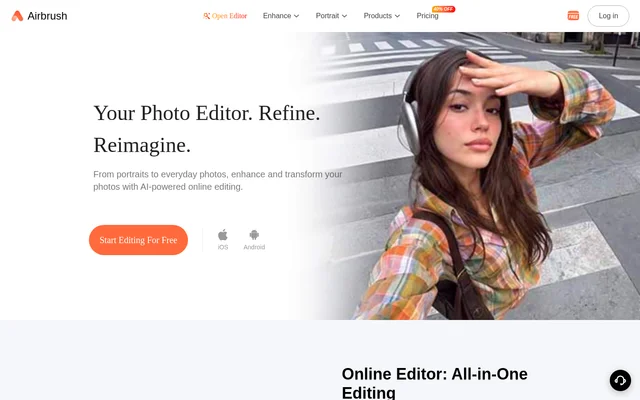
What is AirBrush Studio?
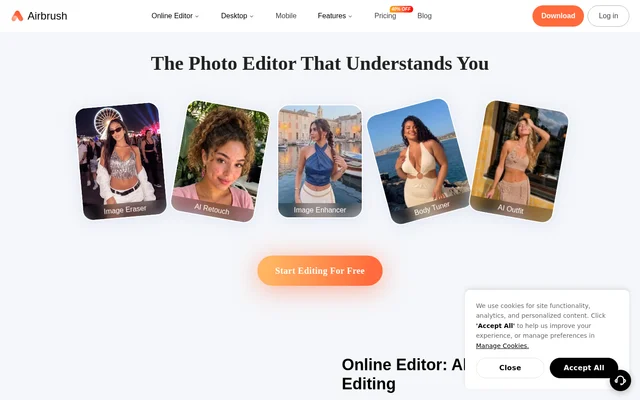
AirBrush Studio is an AI-powered photo and video editor for everyday photos, portraits, and professional images. AirBrush Studio serves everyday users, content creators, photographers, and professionals who want to enhance images, refine appearances, or adjust backgrounds. Browser-based tools allow online editing without installation, while iOS and Android apps provide mobile access. The available tools span image clarity, lighting, portrait retouching, object removal, and video quality improvement.
What AirBrush Studio can do
AirBrush Studio provides dedicated tools for image enhancement, portrait editing, and video adjustments. The website names individual tools for specific tasks, including Image Enhancer, Relight, Photo Restoration, Magic Retouch, and Video Background Remover. These capabilities cover both general image cleanup and changes to personal appearance.
- AirBrush Studio improves photo clarity and detail with Image Enhancer.
- AirBrush Studio adjusts lighting with Relight.
- AirBrush Studio refreshes old photos with Photo Restoration.
- AirBrush Studio refines portraits with Magic Retouch and Body Editor.
- AirBrush Studio removes unwanted objects and adjusts backgrounds.
- AirBrush Studio supports hairstyle, hair color, and outfit changes.
- AirBrush Studio improves video quality with Video Enhancer.
- AirBrush Studio removes video backgrounds with Video Background Remover.
How AirBrush Studio works
AirBrush Studio supports a browser workflow in which users choose a tool, upload a photo or video, and begin editing. No installation is required for the online tools. The website describes AI analysis of uploaded photos and videos to support tasks such as smoothing skin, adjusting features, and removing unwanted objects. AirBrush Studio also offers iOS and Android apps for editing photos and videos on mobile devices.
Who AirBrush Studio is for
AirBrush Studio addresses everyday users who want to refine personal photos, creators preparing visual content, and professionals editing portraits or headshots. The website also identifies photographers as an audience. Specific examples include LinkedIn photos, document photos, social posts, and creative portrait styles, connecting the tools to personal, professional, and content-production tasks.
- AirBrush Studio helps everyday users touch up personal photos.
- AirBrush Studio helps content creators edit images for social posts.
- AirBrush Studio supports portrait and headshot retouching for professionals.
- AirBrush Studio supports background cleanup for professional photos.
AirBrush Studio pricing and access
AirBrush Studio offers free features with optional premium tools for more advanced editing capabilities. The website also advertises a 7-day free trial and links to free editing and mobile downloads. The supplied pricing text does not list subscription prices, named paid plans, or a feature-by-feature comparison of free and premium access. AirBrush Studio can be accessed through its online editor or downloaded through the listed iPhone and Android app links.
AirBrush Studio strengths and limitations
AirBrush Studio combines photo enhancement, portrait retouching, and video editing with browser and mobile access. The installation-free online workflow is a practical option for users who want to edit through a browser, while dedicated tools address distinct tasks such as restoration or lighting correction. The main access limitation stated by the website is that advanced editing includes optional premium tools; the supplied text does not identify which individual tools require premium access.
AirBrush Studio FAQ
What is AirBrush Studio?
AirBrush Studio is an AI-powered photo and video editor with tools for image enhancement, portrait retouching, object removal, and background adjustments. AirBrush Studio serves everyday users, photographers, content creators, and professionals through online tools and mobile apps.
Is AirBrush Studio free?
AirBrush Studio offers free features alongside optional premium tools for advanced editing. The website also advertises a 7-day free trial, but the supplied pricing text does not specify subscription prices or identify which individual tools require premium access.
Can I use AirBrush Studio without downloading an app?
AirBrush Studio supports photo and video editing directly in a browser without installation. Users choose an online tool, upload a photo or video, and start editing. Mobile apps are also available for iOS and Android.
What portrait editing tools does AirBrush Studio offer?
AirBrush Studio offers Magic Retouch, Body Editor, Face Shape Detector, and Relight for portrait editing. The website also describes hairstyle, hair color, and outfit changes, along with skin refinement and feature adjustments intended to preserve a natural appearance.
Can AirBrush Studio improve video quality?
AirBrush Studio includes Video Enhancer to improve visual quality and Video Background Remover to remove distracting backgrounds. AirBrush Studio supports video editing through online tools and offers mobile editing on both iOS and Android.
From the community
No reviews yet
Be the first to review this tool. What you write helps the next person choose.