What is Cutout Pro?
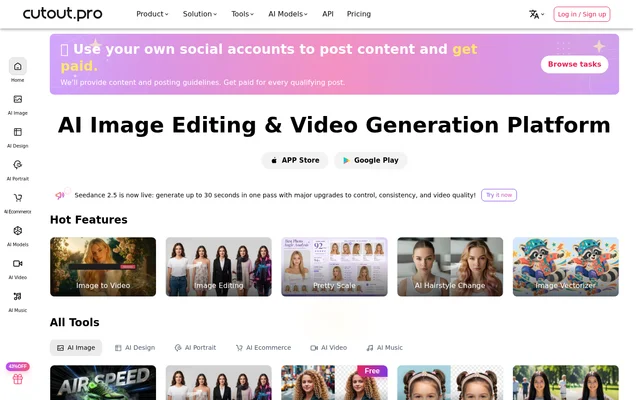
Cutout Pro is an AI image editing and video generation platform serving businesses, creative professionals and developers. Cutout Pro uses artificial intelligence and computer vision for visual tasks, including removing backgrounds, restoring photographs and generating images or videos. The website groups these capabilities into image, design, portrait, e-commerce and video tools.
Cutout Pro presents both individual editing tools and options for incorporating visual processing into business workflows. The website includes customer accounts of product photo editing, batch background changes, video background removal and print-on-demand customization. These examples describe how customers use the tools rather than establish guaranteed results for every project.
What Cutout Pro can do
Cutout Pro covers visual cleanup, restoration and generation within the same product catalogue. Cutout Pro lists tools for modifying existing images, preparing product imagery, creating portraits and producing videos from photographs. The model catalogue also offers named image and video models, while the gallery supplies templates for visual projects.
- Cutout Pro removes backgrounds from photos and videos.
- Cutout Pro removes unwanted objects and creates face cutouts.
- Cutout Pro enhances, upscales and colorizes photographs.
- Cutout Pro generates images and converts images into videos.
- Cutout Pro creates passport photos, portraits and cartoon selfies.
- Cutout Pro offers virtual models and product staging tools.
How Cutout Pro works
Cutout Pro provides tool pages and a template gallery through its website, alongside desktop and mobile apps and a Shopify plugin. Cutout Pro also publishes API documentation for developers who want to add image and video processing to their own applications. The API offering supports processing large amounts of visual content.
Cutout Pro connects full-resolution image processing to a credit balance. Different operations consume different amounts: background removal and image retouching use 1 credit per image, while cartoon selfies, passport photos, enhancement and colorization use 2 credits per image. The pricing page separates free previews from access to full-resolution images.
Who Cutout Pro is for
Cutout Pro serves e-commerce teams, photographers, video creators, designers and developers working with visual content. Cutout Pro lists solutions for customized printing, ID photos, old photo restoration and interior design. Customer testimonials also describe agency video production, photography editing and promotional materials, providing concrete examples of the audiences using the service.
- Cutout Pro helps e-commerce teams prepare product images and posters.
- Cutout Pro helps photographers edit backgrounds and enhance photographs.
- Cutout Pro helps video creators remove backgrounds from footage.
- Cutout Pro lets developers integrate visual tools into applications.
Cutout Pro pricing and plans
Cutout Pro offers a free account with free previews forever and 5 free credits. Cutout Pro lists image subscriptions starting at $5.00 for 80 credits/month and pay-as-you-go packs starting at $4.99 for 30 credits. The pricing page also offers custom arrangements through direct contact and links to separate video pricing.
Cutout Pro allows subscription changes or cancellation at any time. Unused subscription credits roll over up to 5× the monthly credit budget and remain available while the subscription is active. Pay-as-you-go credits remain available forever. The stated 14 Days Money Back Guarantee is restricted to 50 downloads.
Cutout Pro strengths and limitations
Cutout Pro brings background removal, photo restoration, visual generation and developer access into a shared catalogue. Free previews provide an evaluation route, while subscriptions and non-expiring pay-as-you-go credits support different purchasing preferences. Cutout Pro also offers apps and a Shopify plugin, extending access beyond the website's individual editing tools.
- Cutout Pro requires credits for the listed full-resolution image operations.
- Cutout Pro limits subscription credit rollover and requires an active subscription to retain those credits.
- Cutout Pro uses different credit rates for different image operations.
Cutout Pro FAQ
What is Cutout Pro?
Cutout Pro is an AI image editing and video generation platform. Cutout Pro offers background removal, object retouching, photo enhancement, image generation and image-to-video tools for businesses, creative professionals and developers.
Is Cutout Pro free?
Cutout Pro offers a free account with free previews forever and 5 free credits. Cutout Pro also sells subscriptions and pay-as-you-go credit packs for additional processing, including the full-resolution image operations listed on its pricing page.
How much does Cutout Pro cost?
Cutout Pro lists image subscriptions starting at $5.00 for 80 credits/month and pay-as-you-go packs starting at $4.99 for 30 credits. Cutout Pro also offers larger credit packages and custom plans through direct contact.
Does Cutout Pro have an API or integrations?
Cutout Pro provides APIs for integrating image and video processing into applications, along with API documentation. Cutout Pro also lists a Shopify plugin, desktop and mobile apps, and a video realtime AI SDK.
Do Cutout Pro credits expire?
Cutout Pro pay-as-you-go credits remain available forever. Cutout Pro subscription credits roll over up to 5× the monthly credit budget and remain available as long as the subscription stays active.
Can Cutout Pro remove video backgrounds?
Cutout Pro offers video background removal alongside image background removal. Cutout Pro lists Video Background Remover and Video Cutout among its video tools, and customer testimonials describe using background removal for campaign and promotional footage.
From the community
No reviews yet
Be the first to review this tool. What you write helps the next person choose.