What is ImageEditor.AI?
ImageEditor.AI is an online AI photo editing suite for people who need to remove unwanted image elements, improve photo clarity or restore older pictures. ImageEditor.AI runs in a web browser and brings background removal, image enhancement and restoration capabilities into the same service. The service offers free access, while a paid Pro subscription adds unlimited editing, premium tools and longer retention of results.
What ImageEditor.AI can do
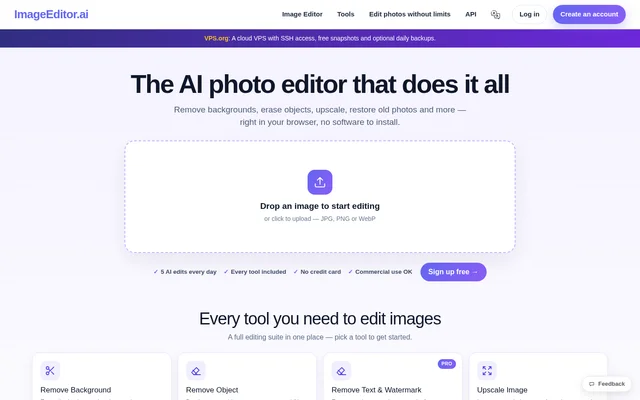
ImageEditor.AI covers both image cleanup and photo enhancement. The listed tools address backgrounds, unwanted objects, image resolution, blur and facial detail. ImageEditor.AI also includes restoration and colorization for older photographs, alongside generative fill and inpainting for editing image areas. The source lists the following capabilities.
- ImageEditor.AI removes image backgrounds with AI.
- ImageEditor.AI removes objects and people from photos.
- ImageEditor.AI upscales images.
- ImageEditor.AI restores old photographs.
- ImageEditor.AI colorizes black-and-white photos.
- ImageEditor.AI unblurs and sharpens photos.
- ImageEditor.AI enhances faces.
- ImageEditor.AI supports generative fill and inpainting.
How ImageEditor.AI works
ImageEditor.AI starts with an image upload in the browser. Users can drag in a JPG, PNG or WebP file and then choose a tool for the intended edit. The upload instructions state that the file never leaves until the user chooses a tool. This statement describes the stage before tool selection; the supplied page does not explain processing or file handling after that selection.
Who ImageEditor.AI is for
ImageEditor.AI serves people editing photos online and teams that need access for multiple people. The capabilities support practical tasks such as cleaning up a photograph, improving a blurry image or restoring an older picture. ImageEditor.AI also provides team pricing, with a discount on each extra person when the team meets the stated size requirement.
- ImageEditor.AI can clean up photos by removing backgrounds, objects or people.
- ImageEditor.AI can restore old photos and add color to black-and-white images.
- ImageEditor.AI can improve photos through upscaling, sharpening and face enhancement.
ImageEditor.AI pricing and plans
ImageEditor.AI offers free access and a Pro plan priced at $12 per month with monthly billing. Pro includes no conversion limit, unlimited image editing and no restricted functions. The premium tools named on the pricing page include photo restoration, colorization and sharpening. Pro also lets subscribers request additional conversion tools and keeps results saved instead of deleting them after 12 hours.
ImageEditor.AI allows subscribers to upgrade or cancel from their account. The pricing page includes a people selector for team subscriptions and states that each extra person costs 15% less when a team has 3 or more people. The supplied text does not detail the free access limits or provide a complete comparison of tool availability across plans.
ImageEditor.AI strengths and limitations
ImageEditor.AI combines several photo-editing functions in a browser-based service and accepts JPG, PNG and WebP uploads. The range spans removal, enhancement, restoration and generative editing rather than a single photo task. ImageEditor.AI Pro provides a stated route to unlimited usage and saved results, but those benefits distinguish the paid subscription from free access.
- ImageEditor.AI reserves unlimited editing and unrestricted functions for Pro.
- ImageEditor.AI deletes results after 12 hours without Pro.
- ImageEditor.AI does not specify free usage quotas in the supplied page text.
ImageEditor.AI FAQ
What is ImageEditor.AI?
ImageEditor.AI is a browser-based AI photo editing suite for removing backgrounds and objects, enhancing images, and restoring photographs. ImageEditor.AI also lists colorization, face enhancement, generative fill and inpainting among its capabilities.
Is ImageEditor.AI free?
ImageEditor.AI offers free access alongside a Pro subscription costing $12 per month with monthly billing. ImageEditor.AI Pro includes unlimited editing, no conversion limit, premium tools and results that remain saved instead of being deleted after 12 hours.
What image formats does ImageEditor.AI accept?
ImageEditor.AI accepts JPG, PNG and WebP images through its browser upload workflow. ImageEditor.AI instructs users to drag in an image and states that the file never leaves until a tool is chosen.
Can ImageEditor.AI restore and colorize old photos?
ImageEditor.AI lists old photo restoration and black-and-white photo colorization among its capabilities. ImageEditor.AI names photo restoration, colorization and sharpening as premium tools included with the Pro subscription.
Does ImageEditor.AI offer team pricing?
ImageEditor.AI offers team pricing with a people selector on the Pro pricing page. ImageEditor.AI states that each extra person costs 15% less when a team has 3 or more people, with monthly billing.
From the community
No reviews yet
Be the first to review this tool. What you write helps the next person choose.