What is Imgkits?
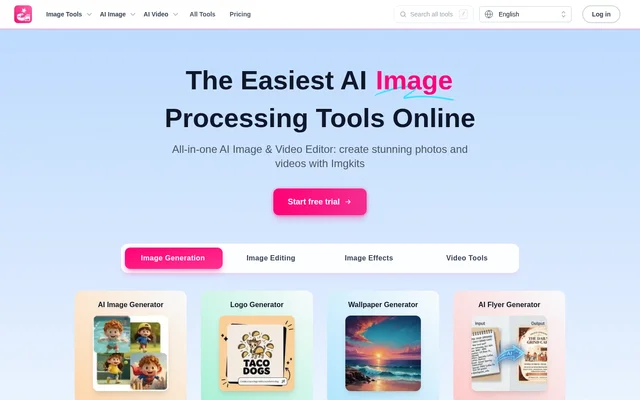
Imgkits is an online AI image and video editor that brings generation, editing, enhancement, and style-transfer tools into a browser-based service. Imgkits serves teams and creators working on personal or professional visuals, including product photographs, restored family pictures, promotional flyers, and creative artwork. The service also includes tools for generating videos from written prompts or still images.
Imgkits does not require desktop software installation. Imgkits can also be used through a supported mobile browser, making browser access the main way to work with its tools. The homepage groups tools by task and lets users browse or describe what they want to create, edit, or improve.
What Imgkits can do
Imgkits covers image creation, photo cleanup, visual effects, and video generation through separate tools. Imgkits includes natural-language image editing alongside focused options for backgrounds, resolution, restoration, and artwork styles. Creative generators extend beyond general images to flyers, logos, wallpapers, tattoos, emojis, and fantasy maps.
- Imgkits generates images from text prompts and edits images using natural-language instructions.
- Imgkits removes image backgrounds and replaces background colors or pictures.
- Imgkits restores photographs, colorizes black-and-white images, and reduces blur.
- Imgkits increases image resolution and enhances photo clarity and detail.
- Imgkits converts photographs into cartoon, anime, sketch, and painting styles.
- Imgkits creates videos from still images or written prompts.
- Imgkits generates flyers and fantasy maps for creative projects.
- Imgkits processes multiple images in batches.
How Imgkits works
Imgkits follows a tool-based workflow: choose a tool, upload an image or video when required, adjust the available settings, and let the service process the input. Imgkits then provides a preview and a downloadable result. Common image upload formats include JPG, JPEG, PNG, and WebP, but supported formats and file-size limits depend on the selected tool.
Who Imgkits is for
Imgkits is designed for users with minimal technical expertise as well as teams handling larger image workloads. Imgkits describes uses for people, landscapes, products, and pets, with both personal and professional applications. The page highlights online store owners and photographers, while flyer and fantasy-map tools address promotional and creative work.
- Imgkits helps online store owners remove backgrounds from product photos.
- Imgkits helps photographers restore, enhance, and retouch photographs.
- Imgkits creates promotional flyers for events, sales, and businesses.
- Imgkits generates maps for D&D campaigns, novels, and game design.
Imgkits pricing and plans
Imgkits gives new accounts a limited free trial without adding a credit balance at signup. Imgkits then offers subscriptions or one-time credit packs. Pro Monthly costs $12.00 USD per month, while Pro Yearly costs $72 USD billed yearly, equivalent to $6.00 USD per month. Both listed plans include 100 credits monthly for AI image and video work.
Imgkits offers one-time packs of 10 credits for $5.00 USD, 50 credits for $19.00 USD, 150 credits for $29.00 USD, and 500 credits for $59.00 USD. Separately purchased credits do not expire. Subscription credits do not roll over, and Imgkits uses subscription credits before one-time credits. Cancellation requests go to [email protected] and take effect after the current paid term.
Imgkits strengths and limitations
Imgkits combines several visual workflows without requiring separate desktop installations, and batch processing supports users working with multiple images. Imgkits also offers a choice between recurring subscriptions and non-recurring credit purchases. Access and usage still depend on the trial allowance, available credits, and the requirements of each tool.
- Imgkits requires paid access after the limited free trial is exhausted.
- Imgkits does not carry unused subscription credits into the next billing cycle.
- Imgkits applies tool-specific upload format and file-size limits.
- Imgkits handles subscription cancellation through email.
Imgkits FAQ
What is Imgkits?
Imgkits is a browser-based AI image and video editor with tools for image generation, photo editing, enhancement, style transfer, and video generation. Imgkits supports tasks such as background removal, photo restoration, text-to-image generation, and animation of still images.
Is Imgkits free to use?
Imgkits offers new accounts a limited free trial, with no credit balance added at signup. Imgkits requires a subscription or one-time credit purchase after the trial is used up. Separately purchased credits do not expire, while subscription credits do not roll over.
How do you use Imgkits?
Imgkits works by letting users choose a tool, upload an image or video when required, adjust available settings, and start processing. Imgkits provides a preview and download when processing finishes. No desktop installation is required, and supported mobile browsers can access the service.
Which file formats does Imgkits support?
Imgkits accepts common image formats including JPG, JPEG, PNG, and WebP, depending on the selected tool. Imgkits provides tool-specific upload instructions that users should check for the current supported formats and file-size limits.
How do you cancel an Imgkits subscription?
Imgkits subscriptions can be cancelled by emailing [email protected]. Imgkits keeps the current subscription benefits active until the paid term expires, and cancellation prevents a charge for the next billing cycle.
Can Imgkits generate videos?
Imgkits includes image-to-video and text-to-video tools. Imgkits can animate a still image into an AI video or turn a written prompt into an AI video, alongside its image generation, editing, and enhancement tools.
From the community
No reviews yet
Be the first to review this tool. What you write helps the next person choose.