What is AIPhotoeditor?
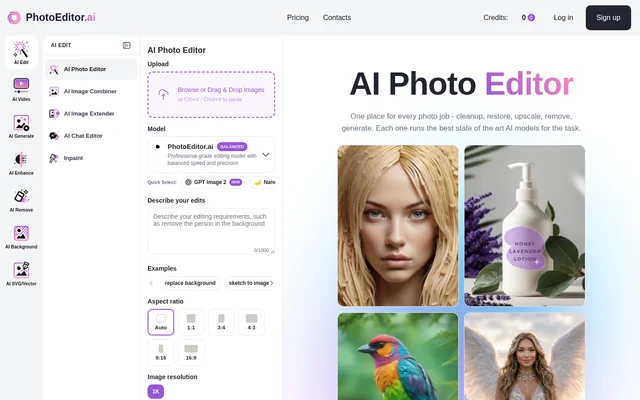
AIPhotoeditor is a browser-based collection of dedicated AI tools for editing, enhancing, and generating images. AIPhotoeditor serves personal users alongside photographers, designers, creative agencies, real estate professionals, and e-commerce teams. The service brings tasks such as cleanup, restoration, background removal, and image generation into separate workspaces rather than a single general-purpose editor.
AIPhotoeditor offers 30+ tools and selects a default AI model for each task through internal benchmarking. The website names Nano Banana, GPT Image, Gemini, SeeDream, Qwen, and in-house fine-tunes among the available models. Users can override the default model through the settings rail to compare results on the same image.
What AIPhotoeditor can do
AIPhotoeditor supports both changes to existing photographs and generation of new images. Editing can follow written instructions, a brushed selection, or a reference image. Dedicated enhancement tools address blur, low-light grain, faded scans, and JPEG damage, while background tools support transparent exports, replacement backgrounds, and background blur.
- AIPhotoeditor edits selected areas with inpainting and generative fill.
- AIPhotoeditor combines images and expands frames with generative outpainting.
- AIPhotoeditor removes unwanted objects, people, signage, and text.
- AIPhotoeditor sharpens, denoises, and restores photographs.
- AIPhotoeditor supports 4K and 8K upscaling.
- AIPhotoeditor generates portraits, logos, product shots, vectors, and illustrations.
- AIPhotoeditor converts raster images to SVG.
How AIPhotoeditor works
AIPhotoeditor accepts image uploads through browsing, drag and drop, or clipboard paste. Supported upload formats are JPG, PNG, HEIC, AVIF, and WEBP, with a 15MB size limit. Users choose a tool for the task, adjust available settings, apply the edit, and download the result or continue working with another tool.
AIPhotoeditor runs in browsers on desktop computers, iPhone, Android devices, and tablets without an app installation. Each tool has a dedicated page with examples, adjustable settings, and a model chooser. The website states that most cleanup, background removal, and enhancement edits finish in under 10 seconds, while generation and premium-model 4K upscaling can take up to a minute.
Who AIPhotoeditor is for
AIPhotoeditor addresses personal photo projects and commercial image workflows in e-commerce, marketing, photography, design, and real estate. The website explicitly allows commercial use for client deliverables, product listings, social ads, brand assets, and prints. These uses remain subject to the user's responsibility for rights to the source images.
- AIPhotoeditor restores old family photographs and scanned prints.
- AIPhotoeditor removes distractions from photography and personal images.
- AIPhotoeditor changes product-image backgrounds for e-commerce listings.
- AIPhotoeditor generates logos and visual assets for design projects.
AIPhotoeditor pricing and plans
AIPhotoeditor uses a credit-based payment model rather than stating a single cost for every operation. Credits are available through a PRO subscription or a one-time credit pack. Each edit displays its credit requirement on the button before execution. Background removal and object cleanup cost 1 credit, while premium models require more credits.
AIPhotoeditor strengths and limitations
AIPhotoeditor combines task-specific workspaces, selectable models, and browser access across devices. The website states that uploads are encrypted in transit, processed in isolated workers, and deleted within 1 hour. Uploaded images are not used for AI model training and are not sold or shared with third parties.
- AIPhotoeditor requires credits for AI edits, and premium models consume more credits.
- AIPhotoeditor accepts uploads only up to 15MB.
- AIPhotoeditor users remain responsible for source-image rights.
AIPhotoeditor FAQ
What is AIPhotoeditor?
AIPhotoeditor is a browser-based suite of 30+ dedicated AI image tools for editing, enhancement, generation, background changes, and SVG conversion. AIPhotoeditor provides task-specific workspaces with adjustable settings and a model chooser rather than placing every function inside a single general-purpose editor.
How much does AIPhotoeditor cost?
AIPhotoeditor charges credits for AI edits, with credits available through a PRO subscription or a one-time credit pack. Background removal and object cleanup cost 1 credit, while premium models cost more. The required credit amount appears on the button before an edit runs.
Can AIPhotoeditor remove objects and backgrounds?
AIPhotoeditor removes unwanted objects, people, text, and backgrounds using dedicated tools. Users can brush over unwanted content for removal or remove a background and export a transparent PNG. AIPhotoeditor also supports background replacement and background blur.
Does AIPhotoeditor work on mobile devices?
AIPhotoeditor works in browsers on iPhone, Android devices, tablets, and desktop computers without an app installation. Users upload an image, select a dedicated tool, apply edits, and download the result or continue editing with another tool.
Can AIPhotoeditor images be used commercially?
AIPhotoeditor allows commercial use of AI edits and generated outputs for product listings, client deliverables, social ads, brand assets, and prints. Users remain responsible for holding the necessary rights to source images used in those workflows.
Does AIPhotoeditor use uploaded photos for AI training?
AIPhotoeditor states that uploaded images are never used for AI model training. Uploads are encrypted in transit, processed in isolated workers, and deleted within 1 hour. AIPhotoeditor also states that uploads are never sold or shared with third parties.
From the community
No reviews yet
Be the first to review this tool. What you write helps the next person choose.