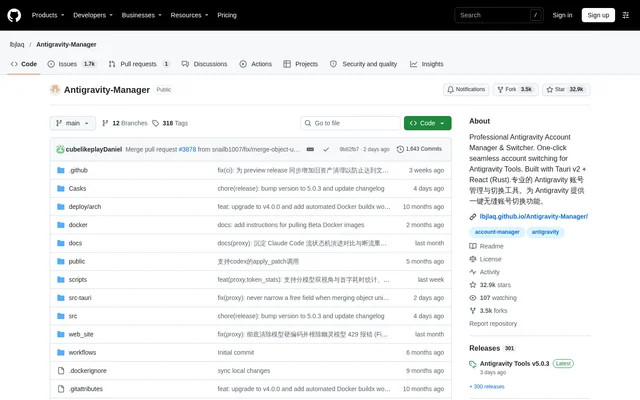
What is Antigravity-Manager?
Antigravity-Manager is an open-source account management and protocol proxy project for developers and AI enthusiasts. Antigravity-Manager combines a desktop interface with a local relay that connects AI applications to upstream services. The repository describes support for turning Google and Anthropic web sessions into standardized API interfaces, alongside tools for managing multiple accounts and scheduling requests.
Antigravity-Manager uses Tauri, React, and Rust. The account dashboard displays account health, remaining quotas for supported model families, and the active account’s last synchronization time. Account recommendations use remaining quota information, while account switching is available directly from the interface.
What Antigravity-Manager can do
Antigravity-Manager brings account administration and API request handling into the same application. The account tools cover authorization, imports, monitoring, and switching, while the proxy handles protocol adaptation and routing. Image-related controls support generation parameters and larger request payloads. These capabilities let developers configure client-facing interfaces separately from upstream model selection.
- Antigravity-Manager monitors remaining Gemini Pro, Gemini Flash, Claude, and image-generation quotas.
- Antigravity-Manager imports accounts through OAuth, individual tokens, or JSON batches.
- Antigravity-Manager exposes OpenAI-compatible, Anthropic-compatible, and Gemini interfaces.
- Antigravity-Manager retries requests and rotates accounts after rate-limit or expired-credential responses.
- Antigravity-Manager maps models using series groups and custom regular expressions.
- Antigravity-Manager redirects background tasks to Flash models to preserve premium quota.
- Antigravity-Manager supports image size controls and configurable payload limits.
How Antigravity-Manager works
Antigravity-Manager supports account authorization through a copyable browser URL, then saves the account after the authorization callback. Existing credentials can also be entered individually or imported in batches. External clients send requests to the local gateway, where middleware, model routing, account dispatch, and request mapping connect the client protocol to the upstream service.
Antigravity-Manager provides installation scripts that detect the operating system, architecture, and package manager. GitHub Releases offer desktop downloads, and Homebrew is another installation route. For servers and NAS devices, the Docker image hosts the frontend for browser-based management. Docker authentication uses an API key, with a separate administrative web password available.
Who Antigravity-Manager is for
Antigravity-Manager targets developers and AI enthusiasts who need to manage several accounts or connect AI clients through a protocol relay. The repository includes usage examples involving Claude Code, Cherry Studio, Kilo Code, and image generation. Server and NAS users can choose the headless Docker deployment rather than managing accounts through a desktop installation.
- Developers can connect compatible AI applications to a local API relay.
- Multi-account users can monitor quotas and switch active accounts.
- Claude Code users can access the native Anthropic-format interface.
- Server administrators can manage a Docker deployment through a browser.
Antigravity-Manager access and installation
Antigravity-Manager is distributed through a public GitHub repository, with source files, release downloads, installation scripts, and Docker deployment instructions. The supplied page does not list a product subscription price or paid feature tiers. Sponsor offers describe separate relay services and should not be treated as Antigravity-Manager pricing.
Antigravity-Manager strengths and limitations
Antigravity-Manager combines account visibility, protocol conversion, and routing controls with desktop and container deployment options. Automatic account rotation and permission-error detection address common request failures, but these mechanisms do not remove upstream account restrictions. Deployment also requires account credentials, and Docker users must configure authentication before using the relay.
- Account access requires authorization or imported credentials.
- Docker deployment requires an API key for request authentication.
- Accounts with permission anomalies are marked and skipped.
- Routing decisions depend on account quotas, tiers, and reset frequencies.
Antigravity-Manager FAQ
What is Antigravity-Manager?
Antigravity-Manager is an open-source desktop account manager and protocol proxy for AI services. Antigravity-Manager combines multi-account monitoring, account switching, protocol conversion, and request scheduling for developers and AI enthusiasts.
Which operating systems does Antigravity-Manager support?
Antigravity-Manager supports macOS, Windows, and Linux through installation scripts and downloadable packages. Antigravity-Manager also offers Homebrew installation and a Docker image with browser-based management for server and NAS deployments.
Does Antigravity-Manager support OpenAI and Anthropic APIs?
Antigravity-Manager provides an OpenAI-format chat completions endpoint and a native Anthropic-format messages interface. Antigravity-Manager also supports direct calls from official Google AI SDKs and describes compatibility with Claude Code CLI features.
How do you add accounts to Antigravity-Manager?
Antigravity-Manager supports browser-based OAuth authorization, individual token entry, and JSON batch imports. Antigravity-Manager generates a copyable authorization URL and saves the account after the callback, with an additional continuation option if needed.
Can Antigravity-Manager run in Docker?
Antigravity-Manager provides a native Docker image with a headless architecture and browser-based management. Antigravity-Manager requires an API key for AI requests and supports a separate web password for administrative access.
How does Antigravity-Manager handle rate limits?
Antigravity-Manager automatically retries requests and rotates accounts when requests encounter rate-limit or expired-credential responses. Antigravity-Manager also supports routing based on account tiers and reset frequencies, while marking and skipping accounts with permission anomalies.
From the community
No reviews yet
Be the first to review this tool. What you write helps the next person choose.