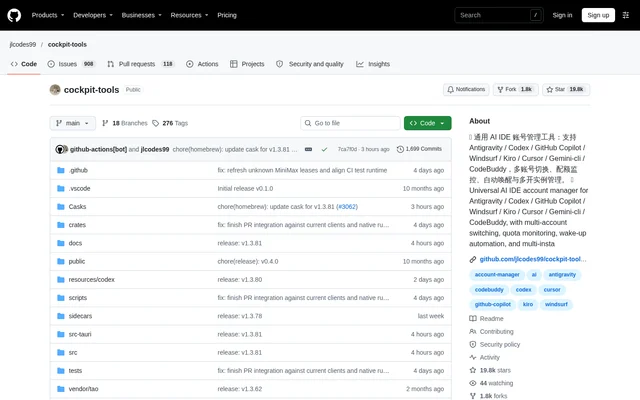
What is cockpit-tools?
cockpit-tools is an open-source desktop account manager for AI coding applications. cockpit-tools helps users manage multiple accounts, inspect remaining quotas, switch client logins and run supported applications in parallel. Official desktop support covers macOS, Windows and Linux, making the project relevant to developers working across different desktop environments.
cockpit-tools supports applications including Antigravity IDE, Codex, GitHub Copilot, Windsurf, Kiro, Cursor, Grok CLI, CodeBuddy, CodeBuddy CN, Qoder, the Trae suite, Zed and ZCode. Support is application-specific: available import methods, quota fields and instance controls differ between clients rather than following an identical workflow everywhere.
What cockpit-tools can do
cockpit-tools combines account status and usage information in a visual dashboard. Quota displays include remaining allowances and reset times, while application-specific views expose details such as Codex usage periods, GitHub Copilot suggestions and chat usage, or Cursor usage categories. Account management also includes tags and bulk operations for supported clients.
- cockpit-tools switches accounts for supported AI coding applications.
- cockpit-tools displays quota consumption with visual progress indicators.
- cockpit-tools imports accounts through application-specific authorization and file options.
- cockpit-tools schedules AI model wake-up tasks.
- cockpit-tools manages supported application instances with start, stop and window controls.
- cockpit-tools provides a Rust API service with Responses, Chat Completions, Claude, Gemini and Ollama protocol compatibility.
How cockpit-tools works
cockpit-tools uses different account connection methods according to the target application. Antigravity IDE supports OAuth, refresh tokens and plugin synchronization. GitHub Copilot supports OAuth and token or JSON imports. Qoder supports local and JSON imports, while Zed can import the current local login state or use official OAuth authorization.
cockpit-tools applies account changes using the relevant client's local authentication format and can launch supported clients after switching. Managed instances can have separate directories and startup parameters. Account records, shared configuration, logs, backups and instance settings are primarily stored locally, and the desktop tool does not depend on a project-operated cloud service to store account lists.
Who cockpit-tools is for
cockpit-tools is intended for users managing multiple AI IDE accounts and developers handling parallel coding projects. The combination of account switching, quota visibility and instance controls supports workflows that involve moving between clients or keeping projects open separately. Application-specific subscription displays also help users inspect the plan and usage information exposed by supported services.
- cockpit-tools helps developers inspect account quotas before changing clients or accounts.
- cockpit-tools supports separate Codex instances bound to different accounts and projects.
- cockpit-tools manages VS Code-based GitHub Copilot instances with independent user directories.
- cockpit-tools supports scheduled wake-up workflows for AI models.
cockpit-tools strengths and limitations
cockpit-tools combines broad client coverage with local account storage and application lifecycle controls. The same interface can cover account imports, quota checks and parallel instances, but account separation is not universal. Available behavior depends on client authentication rules, upstream capabilities and the particular feature being used.
- cockpit-tools cannot provide independent Antigravity account isolation through instance directories when the IDE uses shared login credentials.
- cockpit-tools omits access and refresh tokens from Grok CLI account exports, so those exports cannot restore login sessions.
- cockpit-tools cannot guarantee upstream acceptance of OAuth transcription requests.
- cockpit-tools does not make unsupported upstream capabilities available through Claude protocol adaptation.
Getting started with cockpit-tools
cockpit-tools is available through the public GitHub repository. A supported desktop environment and the relevant client account are the starting points for account management. Users can connect accounts using the import or authorization methods documented for each application, then review account status and quota information in the dashboard.
cockpit-tools provides settings for themes, language and automatic refresh intervals, alongside platform configuration and quota warnings. Users planning parallel workflows can configure supported managed instances and bind accounts where available. Antigravity users should check their IDE version before expecting independent account logins, because newer versions share authentication between related clients.
cockpit-tools FAQ
What is cockpit-tools?
cockpit-tools is a local desktop account manager for AI coding applications, including Codex, GitHub Copilot, Cursor and Windsurf. cockpit-tools supports account switching, quota monitoring, scheduled model wake-up tasks and application-specific parallel instance management.
Which operating systems does cockpit-tools support?
cockpit-tools officially supports macOS, Windows and Linux. cockpit-tools provides a desktop interface for account management, dashboard quota checks and supported application instance controls, with account data and configuration primarily stored on the user's computer.
Does cockpit-tools require a separate account?
cockpit-tools does not require a separate platform registration. cockpit-tools is a local desktop tool that does not rely on a project-operated cloud service to store account lists; accounts, configuration, logs, backups and instance settings are primarily saved locally.
Can cockpit-tools run multiple AI coding accounts at once?
cockpit-tools supports parallel accounts and instances for supported applications, including Codex instances bound to different accounts. cockpit-tools has application-specific limits: Antigravity IDE 2.6 and later share login credentials, so separate instance directories isolate projects and local settings rather than independent account logins.
Does cockpit-tools include an API gateway?
cockpit-tools includes a local API service running through a Rust engine, with Responses HTTP/SSE/WebSocket support and compatibility for Chat Completions, Claude, Gemini and Ollama protocols. cockpit-tools also provides Codex provider configuration, while upstream capabilities and client permissions still determine which operations are available.
How does cockpit-tools import accounts?
cockpit-tools imports accounts using methods that vary by application, including OAuth authorization, token or JSON files, plugin synchronization and existing local credentials. cockpit-tools supports local and JSON imports for Qoder, while GitHub Copilot supports OAuth and token or JSON imports.
From the community
No reviews yet
Be the first to review this tool. What you write helps the next person choose.