What is Anyvids?
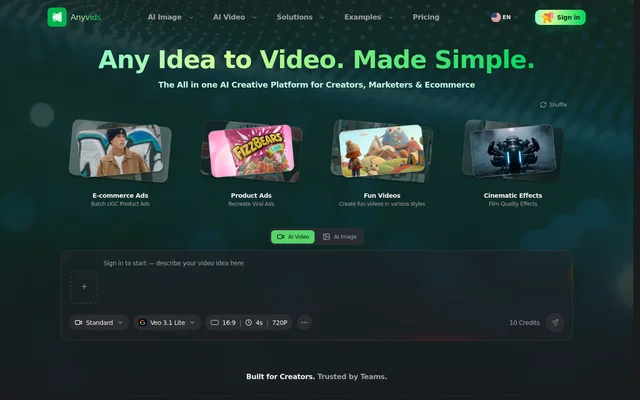
Anyvids is a web-based AI video and image creation platform for creators, designers, marketing teams, and ecommerce sellers. Anyvids brings generation and editing into the same workspace, so users can start with a written idea or an existing image and refine the result without switching tools. Its studios organize tools for creative work, commerce, marketing, and ads.
What Anyvids can do
Anyvids pairs image and video generation with tools for refining the result. Image workflows can start with a text prompt or an existing image, while video workflows can use text, photos, frames, or references. The model lineup includes Seedance, Kling, Veo, and GPT Image across video and image workflows.
- Anyvids generates video from text, images, frames, or references.
- Anyvids creates images from text prompts or existing images.
- Anyvids edits images and videos and applies video effects.
- Anyvids offers motion controls and video upscaling.
- Anyvids creates AI avatars and characters.
- Anyvids generates product images and virtual try-on videos.
How Anyvids works
Anyvids runs in a web browser, requires no software installation, and saves projects in the cloud. After signing up, users choose a tool and provide a prompt or an image, depending on the workflow. Anyvids accepts prompts in several languages and shows the credit cost before starting a generation.
Anyvids says video generation typically takes 3 to 5 minutes, depending on the prompt and selected features. More complex animations may take longer. Leaving the page does not stop a generation job, and users can check the result in Create or Assets. If a generation fails, Anyvids says credits are returned within 24 hours.
Who Anyvids is for
Anyvids is designed for solo creators, designers, marketing teams, agencies, and ecommerce sellers. Creators can turn a written concept or an existing image into a clip, while marketers can make and test ad variants before launch. Ecommerce sellers can use dedicated tools for product photography, product showcases, and virtual try-on.
- Animate still photographs for a portfolio.
- Create product photos for ecommerce listings.
- Make product showcase videos and virtual try-on clips.
- Generate ad variants before a campaign launch.
- Produce avatar-led marketing videos.
Anyvids strengths and limitations
Anyvids brings multiple model families, editing tools, and commerce workflows into a single browser workspace. That setup lets a user generate a product image, animate it, and refine the resulting video without changing tools. Showing credit costs up front also helps users compare generation settings before committing credits.
- Free generations carry watermarks.
- Lite includes only a limited selection of models and tools.
- Higher-fidelity outputs use more credits.
- More complex animations may take longer to render.
Getting started with Anyvids
Anyvids offers a free signup without a credit card. A first test can start with either a text prompt for an image or a photo to animate into a video. The signup offer covers either the listed GPT Image 2.5 image generations or the listed Veo 3.1 Lite video generation, so users can choose which workflow to try first.
Anyvids FAQ
What is Anyvids?
Anyvids is a browser-based AI video and image creation platform for creators, designers, marketing teams, and ecommerce sellers. Anyvids generates visuals from text prompts and images, and includes tools for editing, motion control, video upscaling, and avatar creation.
Is Anyvids free?
Anyvids offers a free plan with 10 signup credits, enough for 1 Veo 3.1 Lite video or 2 GPT Image 2.5 images under the signup offer. Free outputs carry watermarks, and paid plans start at $15 per month.
Can Anyvids turn a photo into a video?
Anyvids can turn an existing photo into a video using its image-to-video generator. Anyvids also offers frames-to-video and reference-to-video workflows, motion control, and video editing tools for refining the result.
Can I use Anyvids videos commercially?
Anyvids grants paid subscribers a commercial license to use their generated content, including videos. The site also says that paid subscriptions provide watermark-free outputs, while videos and images generated for free carry watermarks.
How does Anyvids charge credits for video generation?
Anyvids calculates the credit cost of each generation based on the selected model, resolution, and duration, and shows that cost before generation starts. Anyvids charges credits only for successful generations and says credits for failed jobs are returned within 24 hours.
Does Anyvids need to be installed?
Anyvids runs entirely in a web browser and does not need to be installed or configured. Anyvids saves projects in the cloud, so users can access them from other devices.
From the community
No reviews yet
Be the first to review this tool. What you write helps the next person choose.